


Participant
July 5, 2016
Question

computer crashes after pop up message appears. Adobe flash player has stopped a potentially unsafe operation

  • July 5, 2016
  • 2 replies
  • 562 views

Operating system. Mac OSX 10.10.5

Web Browser: Safari 9.1.1 (10601.6.17)

Flash Player Version. 22.0.0.192

My macbook pro crashes when I visit various sites (like the New York Times) where the site plays a video (sometimes an ad). I have taken a screenshot of the issue. I get multiple popup windows that say, Adobe Flash Player has stopped a potentially unsafe operation. I get maybe 10 popup windows so fast I cannot click on the settings button before my computer crashes. How can I fix this issue? Many thanks. ~JR
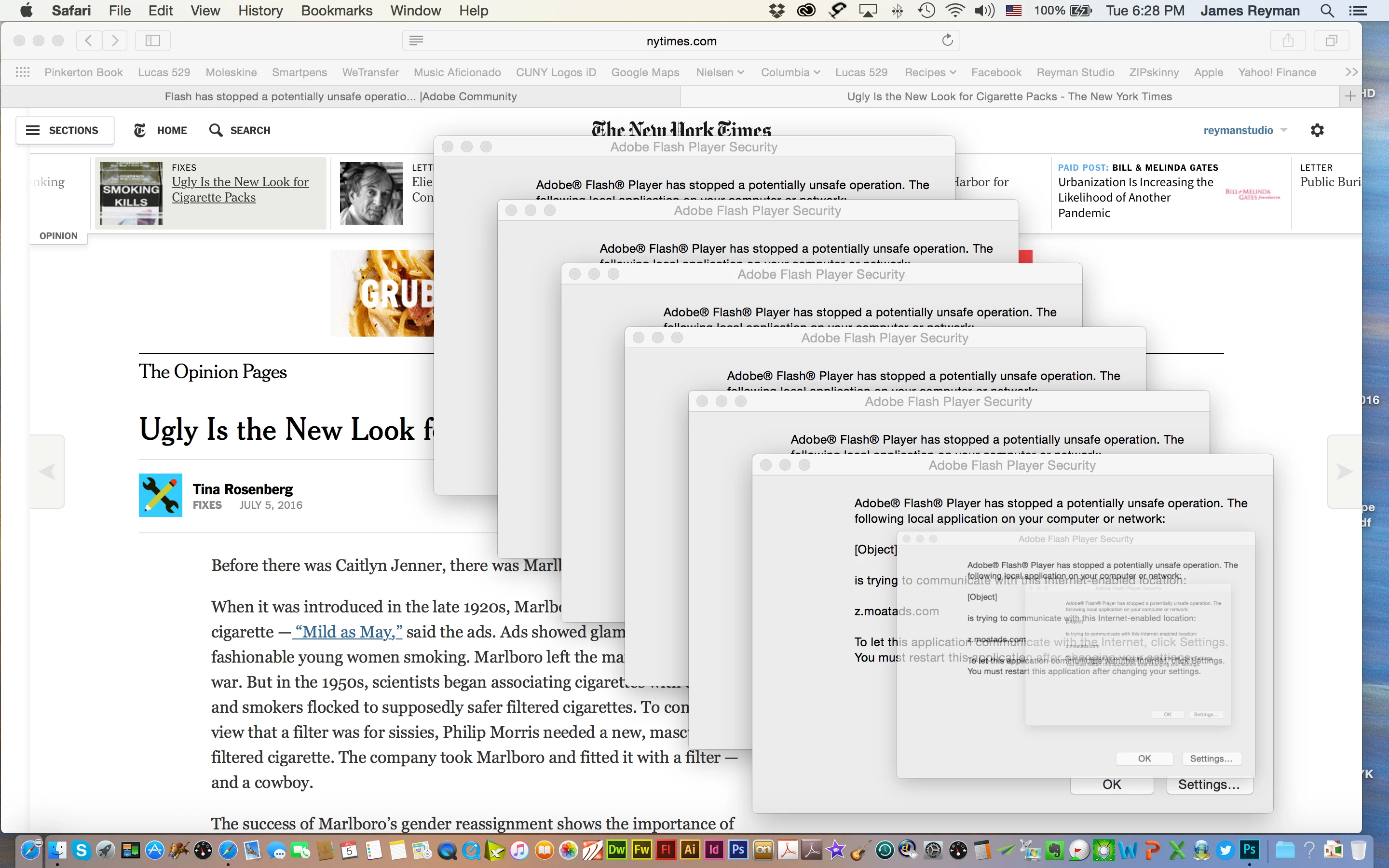
    This topic has been closed for replies.

    2 replies

    July 28, 2016

    reinstall the flash or update it?

    jeromiec83223024
    Inspiring
    July 27, 2016

    What's happening here, is that Safari doesn't tell us what the origin of the page is, so we think that it's actually a file playing on your local computer.  When Flash content is playing on the local computer, if it can read files, it's not allowed to talk to the Internet, and there's a switch that the developer is supposed to set at compile-time that basically says "Hey, I want to exclusively talk to the Internet", or "I want to exclusively read files".

    Now normally, the browser would tell us that this movie came from nytimes.com, and we'd just be like "we're loading a movie from the internet", and we'd never consider whether or not it should have local-with-anything permissions -- we'd just force it to Internet-only mode.   Because we basically just get NULL from the browser, we don't have a way to differentiate between local and remote content in this instance.

    Normally this wouldn't be a big deal.  All things told, it's a pretty benign browser bug, and we do the sane thing and default to the more strict controls.  You'd never notice under normal circumstances, but there's the double-whammy that Safari is doing it's normal buggy thing, *and* the ad network guys compiled this thing for local-with-filesystem behavior, probably because it was easier to troubleshoot on the developer's local computer or something.  As an aside, this might be fixed in 10.11/Safari 9 -- I haven't seen this in ages and had forgotten about it until I saw the screenshot and immediately recognized the symptoms.  I can't back that assertion up with data at the moment, but the upgrade is pretty painless -- I'd have to actually roll back the OS and then re-upgrade to be completely sure.

    Anyway, *super* annoying, totally outside our sphere of control.

    You have a few options:

    • Ad Blocker
    • Absolutely any other browser
    • Maybe, but no guarantee -- upgrade to 10.11.5 and Safari 9

    You could also put nytimes.com in your local trusted store, but that's not a great idea, as it opens permissions for remote SWFs to read from the local machine and talk to the Internet, which isn't a great idea unless you wrote the content yourself.

    Participant
    July 27, 2016

    I will check my operating and safari updates, Jeromiec. Will check back here. Many thanks!