
Participant
November 20, 2016
Answered

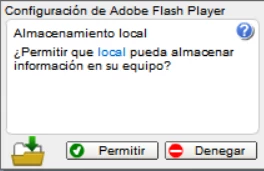
Configuration of local storage window
  • November 20, 2016
  • 2 replies
  • 425 views

Hi everyone, Ive been using Swiff Player for a long time to open .swf files but recently in one of them, this window appears, it was the normal common window but i couldnt click on the options, ive try waiting, searching for help, uninstalling and re-istalling it and nothing happens. Any idea of how can i close the window? Or how to prevent it from appearing? Or even another program to open .swf files?

Thanks ^^

This topic has been closed for replies.
Correct answer jeromiec83223024

You would need to contact Swiff Player for support on their product.  There *is* a Projector version of Flash Player available from Adobe that might serve your needs.

https://www.adobe.com/support/flashplayer/debug_downloads.html

2 replies

jeromiec83223024
jeromiec83223024Correct answer
Inspiring
November 21, 2016

You would need to contact Swiff Player for support on their product.  There *is* a Projector version of Flash Player available from Adobe that might serve your needs.

https://www.adobe.com/support/flashplayer/debug_downloads.html

Amrita Gangwani
Adobe Employee
Adobe Employee
November 21, 2016

Hi,

Please reply with following information:

  • Operating system version
  • Web browser and version
  • Flash Player version
  • Explain your problem in step-by-step detail if possible
  • A direct link to a web page that demonstrates the problem
  • If you get error messages, please quote them exactly, or provide a screenshot

If you are using Firefox browser, please try with the 64 bit version of the browser.

Thanks!