
Participant
May 25, 2017
Question

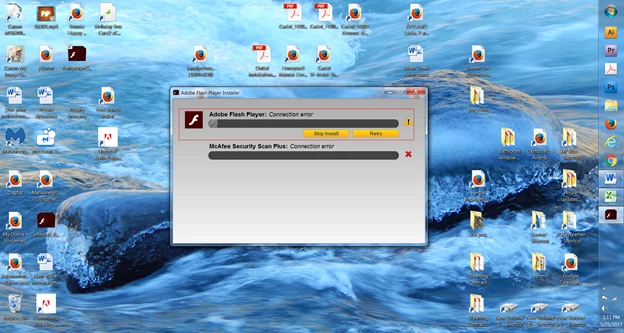
"Connection Error" attempting to install Flash Player
  • May 25, 2017
  • 1 reply
  • 1108 views

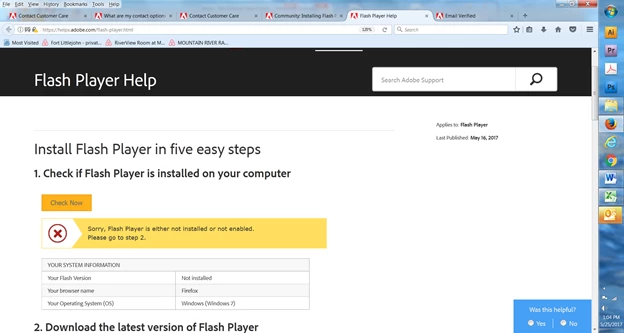
Downloaded Flash and ran install (after closing all browsers and potential flash usage).  I get a connections error.  After having checked all browser enabling as recommended on your Flash Player Help page and also having gone through all other suggested steps on the page and its links, including running uninstall, the Player still will not install with the same error message.
[moderator: updated title to more accurately reflect issue]

This topic has been closed for replies.

1 reply

_maria_
Legend
May 25, 2017

Hi,

I'll need to review the online installer log file to troubleshoot the error.  Please review the FAQ Where do I find the Flash Player installation log on Windows? and provide the Adobe_ADM.log, Adobe_GDE.log and FlashInstall.log files listed. Upload the files to cloud.acrobat.com/send using the instructions at How to share a document and post the link to the uploaded files in your reply.

Thank you.

--

Maria

Participant
May 25, 2017
_maria_
Legend
May 26, 2017

Hi,

Please upload the Adobe_ADM.log file, saved at C:\Users\<YourUserID>\AppData\Local\Temp\Adobe_ADMLogs, and provide the link to the uploaded file.

Thank you.

--

Maria