Participant
October 17, 2018
Answered

Constant update requests.

  • October 17, 2018
  • 1 reply
  • 2898 views

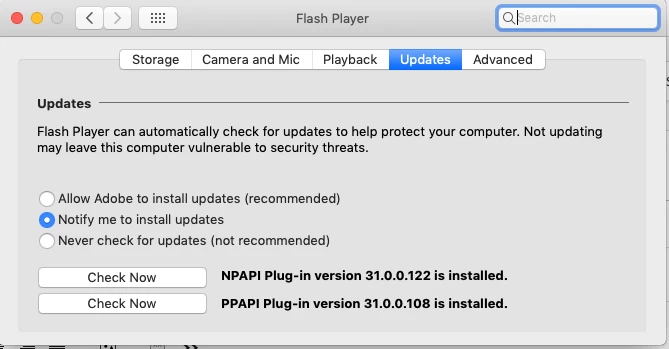
So I have installed the most current version of Flash Player on my operating system.  I'm running on Mac Mojave and using Safari, but I am constantly getting pop ups from Adobe requesting that I download and install the latest version of Flash Player on the hour despite the fact that I have already installed the program.  I will upload a picture of my system preferences to see if anybody can help me with this issue.

This topic has been closed for replies.
Correct answer _maria_

Thanks for posting the screenshot, very helpful.

According to the screenshot, you have version 31.0.0.122 installed for Firefox/Safari.  This is the most recent version, released on October 9.

You also have version 31.0.0.108 for Chromium-based browsers (e.g. Chrome, Opera).  This is not the most recent version, and thus the reason the update notification displays, as it is prompting you to update this version of Flash Player.  Once you update this version, the notification updates will stop.

Note that notification updates only update one version at a time, therefore, user's who have both NPAPI and PPAPI installed will receive multiple notifications. Notification updates can also take up to 7 days to notify a user that an update is available.

Background Updates (the 'Allow Adobe to install updates (recommended)' option), updates ALL Flash Player types (NPAPI, PPAPI, and ActiveX if on Windows 7 or below) within 24 hours of the new version being available.  This is why this option is marked as the recommended option.

1 reply

_maria_
_maria_Correct answer
Legend
October 17, 2018

Thanks for posting the screenshot, very helpful.

According to the screenshot, you have version 31.0.0.122 installed for Firefox/Safari.  This is the most recent version, released on October 9.

You also have version 31.0.0.108 for Chromium-based browsers (e.g. Chrome, Opera).  This is not the most recent version, and thus the reason the update notification displays, as it is prompting you to update this version of Flash Player.  Once you update this version, the notification updates will stop.

Note that notification updates only update one version at a time, therefore, user's who have both NPAPI and PPAPI installed will receive multiple notifications. Notification updates can also take up to 7 days to notify a user that an update is available.

Background Updates (the 'Allow Adobe to install updates (recommended)' option), updates ALL Flash Player types (NPAPI, PPAPI, and ActiveX if on Windows 7 or below) within 24 hours of the new version being available.  This is why this option is marked as the recommended option.

semlixAuthor
Participant
October 17, 2018

Thank you for getting back to me so quickly.  So I looked closer on my system preferences and clicked the option to check for the piece that you mentioned was out of date.  It told me there was a system update available, so I downloaded that and got it installed, but according to my system preferences, the old system is still in place and system preferences still asks me if I want to update it.  Do I need to pull this update from a specific browser or do I need to uninstall the older version?

_maria_
Legend
October 17, 2018

Sorry, I'm confused by your usage of 'system update' and 'old system', as 'system update' refers to a Mac update and Flash Player is completely separate from Mac System Updates.

The Flash Player installation page performs os/browser detection to offer the correct plugin for that os/browser combination.  To update the PPAPI plugin, you need to go to https://get.adobe.com/flashplayer using a Chromium-based browser (e.g. Chrome or Opera).