
Participant
February 9, 2015
Answered

Error 2047 on player.ooyala.com

  • February 9, 2015
  • 1 reply
  • 1870 views

Dear all,

I m frustrating last few weeks, adobe flash doesn't work normally.

Version OS: Windows 7 Pro SP1

Firefox: 34.0.5

Adobe Flash: 16.0.0.305 debug version

In my company we have problem with video sites, people calls all days, very very big problem..my colleagues doesn't have times for work other things..

Example: http://www.businessinsider.com.au/drugs-life-violence-new-york-city-nyc-1981-2015-2

Error:

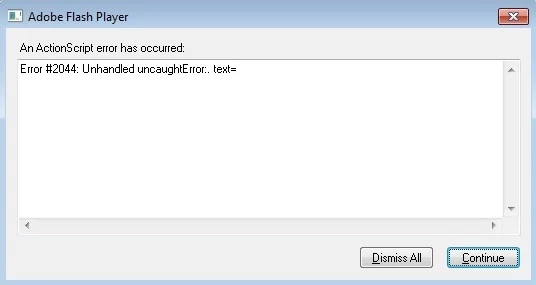
SecurityError: Error #2047: Security sandbox violation: parent: https://opf.ooyala.com/3rdparty/DiscoveryEndScreenModule_v36.swf cannot access https://player.ooyala.com/static/cacheable/947272d312bbb31971ab9ee0b28b5a1f/player_v2.swf?player=6e12e8b3387a44daacfb73afba25a76e/[[DYNAMIC]]/5.

    at flash.display::DisplayObject/get parent()

    at fl.managers::FocusManager/addFocusables()

    at fl.managers::FocusManager/addedHandler()

    at flash.display::DisplayObjectContainer/addChild()

    at com.ooyala.player.ui::EnhancedTextBlock/createLines()

    at com.ooyala.player.ui::EnhancedTextBlock/draw()

    at com.ooyala.player.ui::EnhancedTextBlock/setStyle()

    at com.ooyala.player.controls::InfoPanel/syncToPlayerStyle()

    at flash.events::EventDispatcher/dispatchEventFunction()

    at flash.events::EventDispatcher/dispatchEvent()

    at com.ooyala.player.open.wrapper.source::PlayerStyleWrapper/dispatchEvent()

    at DiscoveryEndScreenModule/hideModule()

    at DiscoveryEndScreenModule/onSeek()

    at flash.events::EventDispatcher/dispatchEventFunction()

    at flash.events::EventDispatcher/dispatchEvent()

    at MethodInfo-392()
    This topic has been closed for replies.
    Correct answer jeromiec83223024

    The Flash Player debug version should only be used for developing and debugging Flash content.  It is not suitable for general browsing.  Hopefully you're just troubleshooting with that version, and it's not the one that your regular users have.  Also, based on your description, this does not sound like a crash.  I've updated the subject accordingly.

    The security sandbox violation that you're citing appears to be the result of a misconfiguration by the website or video streaming network.

    SecurityError: Error #2047: Security sandbox violation: parent: https://opf.ooyala.com/3rdparty/DiscoveryEndScreenModule_v36.swf cannot accesshttps://player.ooyala.com/static/cacheable/947272d312bbb31971ab9ee0b28b5a1f/player_v2.swf? player=6e12e8b3387a44daacfb73afba25a76e/[[DYNAMIC]]/5.


    Each domain on the Internet can control what content is allowed to access it by providing a crossdomain.xml file. 

    More information here: White paper: Adobe Flash Player 10 security | Adobe Developer Connection


    It's possible that a temporary misconfiguration on the content provider's side caused a bad crossdomain.xml file to be cached by your client machines.  Having users clear their cache may fix this, in the event that ooyala.com has resolved the issue on their side.  (In looking at their crossdomain.xml file, I don't see an obvious problem).

    1 reply

    jeromiec83223024
    jeromiec83223024Correct answer
    Inspiring
    February 10, 2015

    The Flash Player debug version should only be used for developing and debugging Flash content.  It is not suitable for general browsing.  Hopefully you're just troubleshooting with that version, and it's not the one that your regular users have.  Also, based on your description, this does not sound like a crash.  I've updated the subject accordingly.

    The security sandbox violation that you're citing appears to be the result of a misconfiguration by the website or video streaming network.

    SecurityError: Error #2047: Security sandbox violation: parent: https://opf.ooyala.com/3rdparty/DiscoveryEndScreenModule_v36.swf cannot accesshttps://player.ooyala.com/static/cacheable/947272d312bbb31971ab9ee0b28b5a1f/player_v2.swf? player=6e12e8b3387a44daacfb73afba25a76e/[[DYNAMIC]]/5.


    Each domain on the Internet can control what content is allowed to access it by providing a crossdomain.xml file. 

    More information here: White paper: Adobe Flash Player 10 security | Adobe Developer Connection


    It's possible that a temporary misconfiguration on the content provider's side caused a bad crossdomain.xml file to be cached by your client machines.  Having users clear their cache may fix this, in the event that ooyala.com has resolved the issue on their side.  (In looking at their crossdomain.xml file, I don't see an obvious problem).

    Participant
    February 10, 2015

    hi,

    Thank you for your reply and help..

    We were installed this debug version this time, but we also installed adobe flash debug version earlier and we didn't have problem..

    Where i can download full new version adobe flash player for mozilla firefox..i need only full version because we install flash remotely...

    in this page Adobe Flash Player - Downloads i didn't see no debug version for firefox..plaase help?

    Best regards

    jeromiec83223024
    Inspiring
    February 10, 2015

    If you're an enterprise administrator distributing Flash Player across your organization, we actually provide a number of packaging options to make this easy.

    You'll need to apply for a free redistribution license, and we'll grant you access to the page with the distributable packages.

    Adobe Flash Player Distribution | Adobe

    More information can be found in the system administration guide, here:

    Adobe Flash Player Administration Guide for Flash Player | Adobe Developer Connection