


fredl18243203
Participant
September 7, 2016
Answered

Error: "couldn't load plugin"

  • September 7, 2016
  • 2 replies
  • 5243 views

My email program stopped working as is now generating the message "couldn't load plugin".

The support group at Cox Cable, the providers of my email service, were not able to resolve the problem

and suggested I contact Adobe support and here I am.  I have reinstalled the Adobe Flash Player several

times and it appears to be installed properly but it did not resolve my problem.  I am currently using Google

Chrome running on a PC with Windows X/P Pro.  Problem started yesterday out of the blue.  No new software

had been loaded or any updates other than the normal security updates.  I currently use Symantec Endpoint

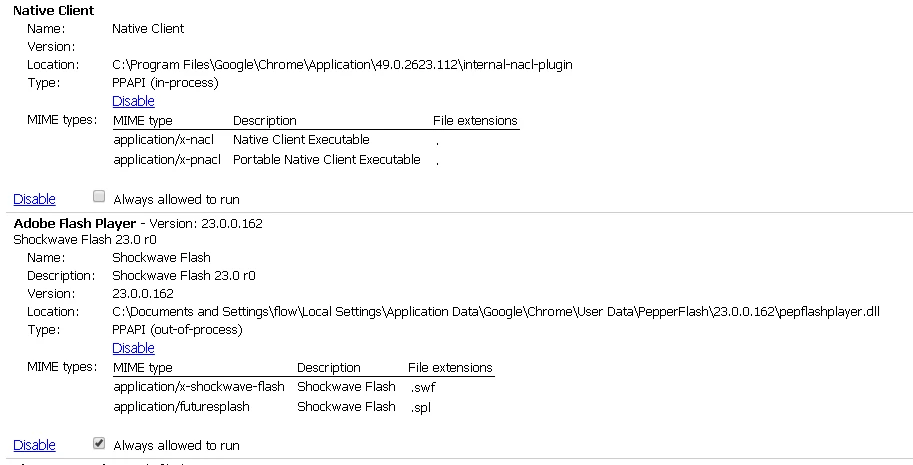
Protection software and have been for the last eight (8) years.  I have attached a snapshot of the Plugins screen.

Any suggestions or solutions would be greatly appreciated.
This topic has been closed for replies.
Correct answer _maria_

Please try the following:

  • Close Chrome (if it's open) and ensure no Chrome processes are running
    • Launch Task Manager, select to view all processes and ensure there aren't any chrome.exe processs, if so, terminate them.
  • Delete the folder C:/Documents and Settings\flow\Local Settings\Application Data\Google\Chrome\User Data\PepperFlash.
  • Launch Chrome and navigate to https://www.adobe.com/software/flash/about - does Flash content (the version information widget) display?  If so, what version does it say is installed.

2 replies

fredl18243203
Participant
September 8, 2016

Now, what do I do to get to get my email software to load the plugin ?

_maria_
_maria_Correct answer
Legend
September 9, 2016

Please try the following:

  • Close Chrome (if it's open) and ensure no Chrome processes are running
    • Launch Task Manager, select to view all processes and ensure there aren't any chrome.exe processs, if so, terminate them.
  • Delete the folder C:/Documents and Settings\flow\Local Settings\Application Data\Google\Chrome\User Data\PepperFlash.
  • Launch Chrome and navigate to https://www.adobe.com/software/flash/about - does Flash content (the version information widget) display?  If so, what version does it say is installed.
fredl18243203
Participant
September 9, 2016

Version 21,0,0,213 is installed.   Now, when I execute my email software, it works correctly.

Thank you for your help and support.

_maria_
Legend
September 7, 2016

We are investigating this issue.


Can you please launch Windows Explorer and navigate to C:\Documents and Settings\flow\Local Settings\Application Data\Google\Chrome\User Data\PepperFlash\23.0.0.162.  What is the full file name for the pepflashplayer file name?  Please be sure your system is configured to display file extensions.  If file extensions do not display, see How to Force Windows Explorer to Always Show You the File Extensions (howtohaven.com)

fredl18243203
Participant
September 7, 2016

Full name for the pepflashplayer is: pepflashplayer.dll