KaRaKuRt
Participating Frequently
October 6, 2016
Answered

Error update Flash Player with Intranet Server Update

  • October 6, 2016
  • 2 replies
  • 1294 views

Hello,

We've been using an internal update server and a deployed mms.cfg to point internal client machines to a local web-server hosting Flash Player updates extracted from the background update .cab file, as detailed in the Administration Guide.

This has been working well for Windows clients (OS Windows 7).

My FlashInstall.log shows the following:

<code>

=O====== M/22.0.0.210 2016-10-06+10-33-05.232 ========

0000 00000010 "C:\Windows\TEMP\InstallAX_22_0_0_210.exe" -install -msi -prev 0

0001 00001036 Software\Macromedia\FlashPlayerActiveX/PlayerPath 2

0002 00001036 Software\Macromedia\FlashPlayer\SafeVersions/22.0 2

0003 00000011 1

0004 00000020 C:\Windows\SysWOW64\FlashPlayerCPLApp.cpl

0005 00001037 SOFTWARE\Microsoft\Windows\CurrentVersion\Uninstall\Adobe Flash Player ActiveX/ 2

0006 00000013

0007 00000015 C:\Windows\SysWOW64\Macromed\Flash\FlashUtil32_22_0_0_210_ActiveX.exe

0008 00000016 C:\Windows\SysWOW64\Macromed\Flash\FlashUtil32_22_0_0_210_ActiveX.dll

0009 00000023 C:\Windows\SysWOW64\Macromed\Flash\activex.vch

0010 00000019 C:\Windows\SysWOW64\FlashPlayerCPLApp.cpl

0011 00000021 C:\Windows\SysWOW64\Macromed\Flash\FlashPlayerUpdateService.exe

0012 00000012

=X====== M/22.0.0.210 2016-10-06+10-33-12.424 ========

2016-10-6+10-33-16.511 [error] 1226 1062

=O====== M/22.0.0.209 2016-10-06+10-33-13.984 ========

0000 00000010 "C:\Windows\TEMP\InstallPlugin_22_0_0_209.exe" -install -msi -prev 0

0001 00001036 Software\Macromedia\FlashPlayerPlugin/PlayerPath 2

0002 00001036 Software\Macromedia\FlashPlayerPlugin/Version 2

0003 00000011 1

0004 00000020 C:\Windows\SysWOW64\FlashPlayerCPLApp.cpl

0005 00001037 SOFTWARE\MozillaPlugins\@adobe.com/FlashPlayer/ 2

0006 00001037 SOFTWARE\Microsoft\Windows\CurrentVersion\Uninstall\Adobe Flash Player NPAPI/ 2

0007 00001037 SOFTWARE\Microsoft\Windows\CurrentVersion\Uninstall\Adobe Flash Player Plugin/ 2

0008 00001036 Software\Mozilla\Firefox\extensions/Plugins 2

0009 00001036 Software\Opera Software/Last CommandLine 2

0010 00001036 Software\Opera Software/Last CommandLine 2

0011 00001036 Software\Opera Software/Plugin Path 2

0012 00001036 Software\Opera Software/Plugin Path 2

0013 00000014

0014 00000015 C:\Windows\SysWOW64\Macromed\Flash\FlashUtil32_22_0_0_209_Plugin.exe

0015 00000016 C:\Windows\SysWOW64\Macromed\Flash\FlashUtil32_22_0_0_209_Plugin.dll

0016 00000024 C:\Windows\SysWOW64\Macromed\Flash\plugin.vch

0017 00000017 C:\Windows\SysWOW64\Macromed\Flash

0018 00000022 C:\Windows\SysWOW64\Macromed\Flash\FlashPlayerPlugin_22_0_0_209.exe

0019 00000019 C:\Windows\SysWOW64\FlashPlayerCPLApp.cpl

0020 00001024 C:\Windows\SysWOW64\FlashPlayerCPLApp.cpl 183

0021 00001024 C:\Windows\SysWOW64\FlashPlayerApp.exe 183

0022 00000021 C:\Windows\SysWOW64\Macromed\Flash\FlashPlayerUpdateService.exe

0023 00001106

0024 00001106

0025 00001024 C:\Windows\SysWOW64\Macromed\Flash\FlashPlayerUpdateService.exe 183

0026 00000012

=X====== M/22.0.0.209 2016-10-06+10-33-17.728 ========

2016-10-6+10-34-57.210 [info] 1628 myserver.domain

2016-10-6+10-34-57.210 [info] 1629 myserver.domain

2016-10-6+10-34-57.210 [info] 1614

2016-10-6+10-34-57.210 [info] 1615

2016-10-6+10-34-57.210 [info] 1618

2016-10-6+10-34-57.210 [info] 1608

2016-10-6+10-34-57.210 [info] 1631 /pub/flashplayer/update/current/sau/currentmajor.xml

2016-10-6+10-34-57.272 [info] 1630 /pub/flashplayer/update/current/sau/22/xml/version.xml

2016-10-6+10-34-57.272 [info] 1632

2016-10-6+10-34-57.272 [info] 1632

2016-10-6+10-34-57.272 [info] 1630 /pub/flashplayer/update/current/sau/22/xml/patch.xml

2016-10-6+10-34-57.662 [info] 1632

2016-10-6+10-34-58.52 [info] 1632

2016-10-6+10-34-58.52 [info] 1600

2016-10-6+10-34-58.692 [error] 1215 32

2016-10-6+10-34-58.692 [warning] 1416 6

2016-10-6+10-34-58.692 [error] 1234 183

2016-10-6+10-34-58.692 [info] 1612

2016-10-6+10-34-58.692 [info] 1620

2016-10-6+10-39-0.231 [info] 1628 myserver.domain

2016-10-6+10-39-0.231 [info] 1629 myserver.domain

2016-10-6+10-39-0.231 [info] 1614

2016-10-6+10-39-0.231 [info] 1615

2016-10-6+10-39-0.231 [info] 1618

2016-10-6+10-39-0.231 [info] 1619 1063

2016-10-6+10-39-0.262 [info] 1628 myserver.domain

2016-10-6+10-39-0.262 [info] 1629 myserver.domain

2016-10-6+10-39-0.262 [info] 1614

2016-10-6+10-39-0.262 [info] 1615

2016-10-6+10-39-0.262 [info] 1618

2016-10-6+10-39-0.262 [info] 1604

2016-10-6+10-39-0.262 [info] 1608

2016-10-6+10-39-0.262 [info] 1612

2016-10-6+10-39-0.262 [info] 1620

</code>

My mms.cfg:

AutoUpdateDisable=0

SilentAutoUpdateEnable=1

SilentAutoUpdateServerDomain=myserver.domain

SilentAutoUpdateVerboseLogging=1

1) What's triggering the error codes - the hack-ish way I've forced the update, or something else?

2) What is the problem? Before moving to version 23, it worked.

--

Kirill

This topic has been closed for replies.
Correct answer _maria_

Hi,

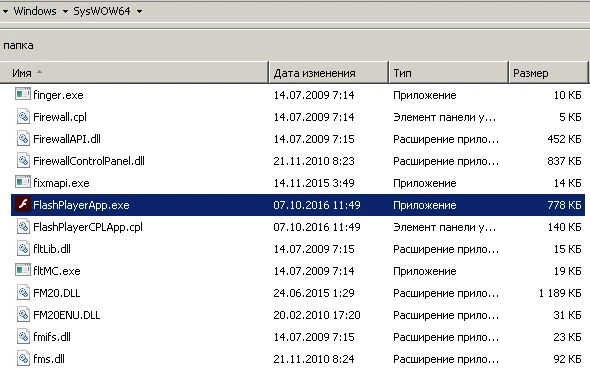
I didn't find the file FlashPlayerInstaller.exe in the C:\Windows\SysWOW64 directory.

1) Yes, i have a current license distribution agreement.

2) Log from ISA server:

2016-09-16 00:25:01 myserver.domain GET /pub/flashplayer/update/current/sau/22/xml/patch.xml - 443 - testclient.domain Get+Flash+Player+version+xml/1.0 - 200 0 0 124

2016-09-16 00:25:01 myserver.domain GET /pub/flashplayer/update/current/sau/22/install/patch/22.0.0.210/23.0.0.162/patch_all_win_ax_sgn.z - 80 - testclient.domain Download+Flash+Player+Installer/1.0 - 200 0 0 733

3) I'm getting file from fpdownload2.macromedia.com


Thank you.  A few more questions:

Does the installation fail on ALL systems, or just some?  If it works on some but not otheres, are there differences between the ones that succeed and the ones that fail?

In your first post you state "hosting Flash Player updates extracted from the background update .cab file"  In your most recent post you state you're getting the files from fpdownload2.macromedia.com, which contradicts your first post.  Your server set up, as evidenced by your screen-shot contains many more files than are included in the background update resources cab file (fp_background_update.cab).  What you have currently in your server (.e.g /beta, /patch directories), as shown in your screen-shot, is NOT supported for internal background update work-flow.  Please configure your local server using ONLY the files in the background update resources CAB file (fp_background_update.cab).  Essentially delete everything you have in /pub/flashplayer/ and deploy only what is included in the background update resources cab file

Please try the following: on an impacted system system, reboot the system and force a background update.  Does it succeed?

2 replies

_maria_
Legend
October 6, 2016

Hi,

A few more questions:

  • How many systems is this happening on?
    • Are they 32- or 64-bit systems?
  • Is the FlashPlayerInstaller.exe file in memory, if so, what is the associated User Name?
  • In Windows Explorer, go to C:\Windows\System32 (ir 32-bit OS) or C:\Windows\SysWOW64 (if 64-bit OS) and look for FlashPlayerInstaller.exe file.  If the file is there, what is the version number (right click > Properties > Details)?  If the file is there, please do not delete it.

Thank you.

--

Maria

KaRaKuRt
KaRaKuRtAuthor
Participating Frequently
October 7, 2016

Hi,

Files deployed on Server:

Client:

_maria_
Legend
October 7, 2016

Hi,


Thank you for all the screenshots.  I don't see the requested information on the FlashPlayerInstaller.exe file. Where you able to see if that was in memory or not, or if it was in the C:\Windows\SysWOW64 directory?  This is just C:\Windows\SysWOW64, not C:\Windows\SysWOW64\Macromed\Flash.

Also, the screenshots of your server directory structure contain a bunch of files that are not included in the Background Update resources package we provide to customers (under distribution license agreement).  Where are you getting these files from?  And do you have a current license distribution agreement (free for most use cases)?

--

Maria

_maria_
Legend
October 6, 2016

Hi,


I'm actually not too familiar with errors 1215 and 1234.  I'll need to forward this to the installer engineer.

What is the hack-ish way you are forcing the update?

How do you have the files deployed on your server?  Please post a screenshot, or outline, the directory structure containing the install files.

--

Maria