July 22, 2013
Question

EXE published Captivate File in window 7 throws error message

  • July 22, 2013
  • 2 replies
  • 1367 views

Hi Guys,

I have been struggle with this problem for a couple of days.

My setup:

Window 7 Professional with two account set up.  One is as Adminstrator, and the other one is the standard user account

UAC is turned off so it does not ask me to run the app with adminstrator rights.

My company will not allow flash.  Thats why we have to use the EXE file...

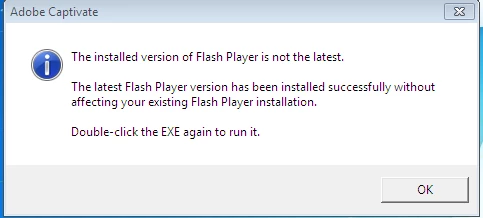
The exe file runs fine under adminstrator account.  But when I try to open it under the standard user account, it gives the following error message.  This message will keep appearing when I click on the exe file.  I am pretty sure the exe is probably trying to access some folder for read/write access and the standard user account is not allowing it to do so.  Any help would be very grateful!
This topic has been closed for replies.

2 replies

Participant
September 22, 2013

Which version of Captivate are you using? Is it Captivate 4..?

Participant
September 22, 2013

It is Captivate 6, and I figured out that it was a registry problem.  Exe file need access to software class in the registry in order to work properly.

Participant
September 22, 2013

Just another question, was that .exe file able to work on other computers..? Captivate 6 has some glitches.

July 22, 2013

no one else has this issue?

pwillener
Legend
July 23, 2013

I have never used a Flash exe file, so I don't know anything about it.

You mentioned that it could be a file permission problem; you could try to check it by using Process Monitor.

July 24, 2013

I used a tool similar to process Monitor, turns out Adobe needed write access to certain folder in the registry.  Once I've granted access to the registry, everything worked fine again.  Thanks for the reply.