


Participant
March 29, 2016
Question

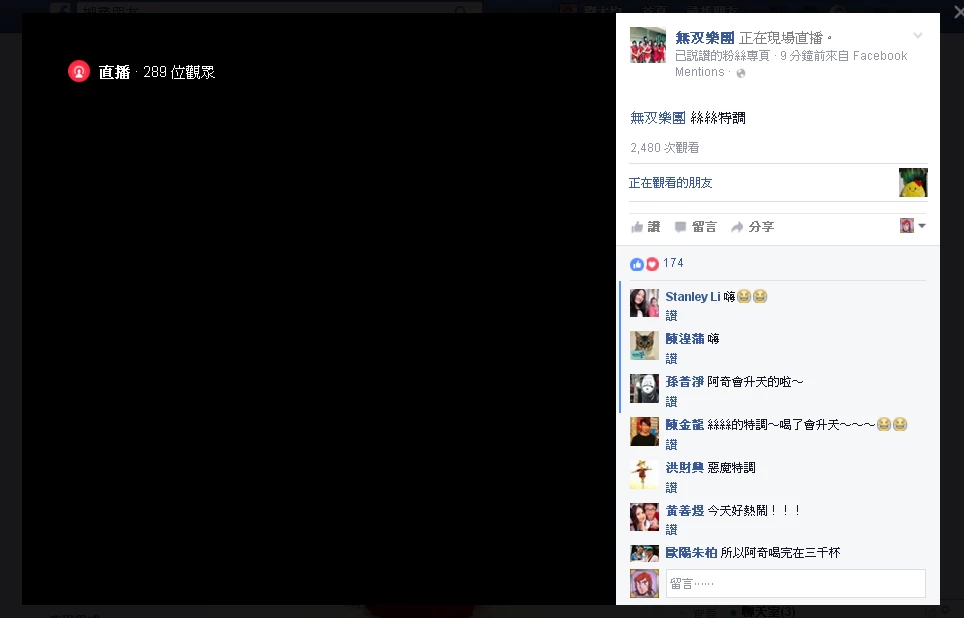
Facebook Mentions live stream video with black screen
  • March 29, 2016
  • 9 replies
  • 13237 views

I have trouble with Facebook live stream video, it always display black screen with sound... I checked help on Facebook : My video loads but just looks like a black screen with sound.  Why? | Facebook Help Community | Facebook

But those solution is not helpful for me and I only have trouble when I play with Facebook's live stream, other website are all working fine.

However, I am able the view the live stream video after the live stream end and encoded to normal video, it's so weird that I am not able to view it when it "LIVE" ...

This topic has been closed for replies.

9 replies

Participating Frequently
June 24, 2016

Hi!  I just wanted to say I'm having the same problem too and have tried all of the solutions listed above.  I'm on Windows 10 with an Intel 520 card.  Facebook live streaming works on every other browser except Firefox.  I even just tried a fresh install of Firefox without previous settings, and it still does not work.  I tried disabling Adguard for facebook.com, and that didn't work either.  I'm getting the black screen with no audio.

Participating Frequently
April 27, 2016

Some examples:

Firefox 64 bit and Chrome playing the same identical Facebook mention at the same time. Firefox shows a blank square, Chrome is showing it.

Proof Firefox is using Flash. Some rare Mentions play without Flash and they do work, their right clock menu is similar to the Chrome's menu shown in the last picture below.

Proof Chrome is not using Flash.

Participating Frequently
April 26, 2016

jeromiec83223024

Even now, I am recording and watching all sorts of videos all days long, most of them with Flash. Only Facebook mentions is giving me this trouble.

Of course, like many others, I have reported and asked on Facebook "help" chats about this issue and of course they never replied, that's why some of us ended up here.

Participating Frequently
April 26, 2016

I get this response:

Your Flash Version

21.0.0.213

Your browser name

Firefox (NPAPI)

Your Operating System (OS)

Windows (Window 10)

Participating Frequently
April 25, 2016

I have installed Firefox 64 bit as suggested. However it worsened the situation! No I cannot see NOR hear Facebook mentions at all!

jeromiec83223024
Community Manager
Community Manager
April 25, 2016

Hmm.  Is Flash actually working in the new Firefox installation?

https://helpx.adobe.com/flash-player.html

If not, you may need to uninstall and reinstall Flash Player:

Uninstall Flash Player - Windows:

https://helpx.adobe.com/flash-player/kb/uninstall-flash-player-windows.html

Flash Player Download:

http://get.adobe.com/flashplayer/

Participating Frequently
April 21, 2016

Disabling hardware Acceleration in the Flash settings? No, it changed nothing.

About Firefox 64 bit, it looks like a good idea. But how's the plugins support? I use several and need them (I am a software developer), I'd hate to be unable to do anything because they only work on the 32 bit version.

jeromiec83223024
Community Manager
Community Manager
April 21, 2016

You'll have to play around with it.  The plugin developers do have to target 64-bit systems. 

The native NPAPI sandbox in 64-bit Firefox eliminates a number of intermediary Flash processes (we had to bolt a sandbox on to the wrong side of the NPAPI interface in 32-bit Firefox), and cuts down the overall amount of IPC messaging.  This solved a lot of the pervasive intermittent hangs.  The spare address space in 64-bit also makes it much more difficult to predictably align memory in ways that allow malware to compromise the system.

You *can* install multiple Firefox versions in parallel.  I'd highly recommend the 64-bit version for general browsing for both performance and security reasons.  The sandboxes are basically the same, except 64-bit is implemented the right way from an architectural perspective.  The sparse address space is a huge win in terms of defense.

jeromiec83223024
Community Manager
Community Manager
April 21, 2016

For the folks that sent over dxdiags, thanks.  That was very helpful.  Here's what I'm seeing.

If it was purely a thing where Flash consistently falls back to software (we publish clear guidelines on how to stream video effectively to Flash) and the software codec doesn't like their encoding scheme, it would be easily reproducible in our labs.  The folks working on Flash content at Facebook are savvy, and I don't believe that this scenario is what's going on.

Here are the data points that I'm seeing at the moment:

  • we can't reproduce it across several machines and testers across two disparate geographies in our labs
  • reporters get audio but not video, so they're getting a stream -- it's not a firewall problem or something
  • hardware acceleration isn't the problem (old/buggy drivers are the source of 99% of this kind of video decoding pain)
  • the software codec that's used when hardware is disabled has been around for ~10 years, is *very* forgiving, and is easy for content providers to test
  • facebook eningeering isn't escalating the problem to us

Tech companies tend to end up near each other, and we're located in geographic regions near Facebook's campuses.  It may be that things work better towards the core of the network, and less so as video is distributed to nodes farther away in their content delivery network.  Delivering live video to huge populations of users is really, really hard.

I've been doing this a long time, and it really feels like a problem on the server side.  Until we can reproduce it under a C++ debugger, we're just guessing though.  I was hoping that it was just that we weren't testing on the right GPU, but since it's independent of hardware, something else is in play.

We'll continue to play with it and try to establish a reproducible case, but I'm not sure that the assumption that this is a Flash problem is necessarily accurate.  Given that this isn't a straightforward problem, the most expedient path to a resolution would be for Facebook engineers to investigate the video playback failures, identify a root-cause, and escalate the low-level issue to us, should they identify a behavior in Flash that's problematic.  Like you, we're only able to see the public-facing edges of their video service.  They have end-to-end visibility.  Naturally, we're more than happy to provide whatever technical assistance would be useful to Facebook engineers, and they're more than welcome to reach out through the established business channels, or contact me directly (just click my username) if that's easier, and I'll get a formal dialog going with our engineering team.

Participating Frequently
April 19, 2016

I have the same issue. Used to work, but since some weeks:

- Flash videos play just fine, on every website. Same for playing back Facebook Mentions videos that already have been recorded and saved (that is, NOT live).

- LIVE Facebook mentions videos only play sounds but they show a black picture. Once LIVE broadcasting ends and they get saved, they play just fine.

jeromiec83223024
Community Manager
Community Manager
April 19, 2016

Yeah, the live video stream is served up with different protocols and methodologies, so it's not surprising that the live stream differs from the pre-recorded stream.  The problem that's making it hard to track down is that it only appears to be broken for a small subset of people, and we haven't been able to reproduce it.

It would be helpful for me to collect the dxdiag output (see my post above about the video troubleshooting guide) from a few people to see if I can spot a pattern, or at least find a comparable machine.  It would also be interesting to know if the problem goes away when you disable hardware acceleration.

Participating Frequently
April 19, 2016

I already reported that disabling hardware acceleration didn't fix it

Participating Frequently
April 9, 2016

I have the same issue, did all listed and no help

jeromiec83223024
Community Manager
Community Manager
April 7, 2016

We've seen a couple people report this through the Mozilla bugbase, but we haven't been able to reproduce it on comparable systems.

Please work through the video troubleshooting guide.

https://helpx.adobe.com/flash-player/kb/video-playback-issues.html

I'm really curious to know if disabling hardware acceleration resolves this for you.

Let me know how that works out, and we'll try and get the underlying driver problems resolved, or try something else to narrow down why this is happening.

Participant
April 8, 2016

I have tried " disabling hardware acceleration" , however, it not working for me.

I checked out the video troubleshooting guide already, before I am asking this question, I am able to view all the video samples, and all working fine, and also other website live streaming are all working fine.

I am able the view Facebook Mentions live stream video before the flash player updated, but I am not sure when did it happened and not allow my system to play it back live, but I can play it after the live video finished encoding become a video.

jeromiec83223024
Community Manager
Community Manager
April 8, 2016

If it's not a video issue, then I'm leaning towards either firewall configuration (they're using a port that isn't allowed on your network/machine), or maybe you're running something like an ad-blocker/anti-tracking/privacy plug-in that's problematic.  We've tested this scenario on a few of our machines already and it works fine, so now it's an exercise in finding the common denominator.