


Known Participant
January 4, 2017
Answered

Failed to register Version 24..0.186

  • January 4, 2017
  • 4 replies
  • 7365 views

I have tried to load onto Windows Internet Explorer the above version of Flash Player. I keep the following:

Failed to Register
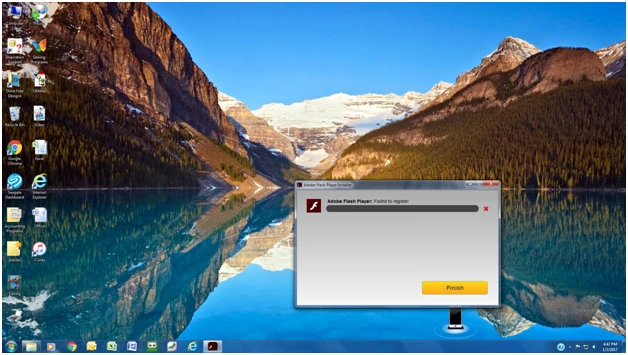
I reviewed all of the ideas on what to do. Shock wave isn't even showing on my computer to enable nor can I down load it.

I can't get to my games because they what me to update my flash player. I cleaned cache, reboot computer, and tried everything that I know.

Any help would be appreciated.

This topic has been closed for replies.
Correct answer _maria_

Shockwave could refer to Shockwave Player of Flash Player (Flash Player is labeled as Shockwave Flash in IE).

Permissions can become corrupt due to various reasons, such as software installations.  It's really difficult to pin down why.

Can you please provide the updated files?  I have something else for you to try, that hopefully will give us more information, but I'd like to see the new FlashInstall.log files first.

4 replies

LynneGoldAuthor
Known Participant
March 25, 2017

Guess what same issue occurred with new update.

LynneGoldAuthor
Known Participant
March 25, 2017

I had to uninstall, run subincacl, and ftbat to get it to work again. Please elevate so it does not happen next time.

LynneGoldAuthor
Known Participant
March 25, 2017

I'm back. According to computer, I have the new version of 25. installed. However, when I go to check it, it states that is not there. I can see if on the add on options as being enabled. It is working in chrome but not in internet explorer. What can I do. I know that I am not the only person having this issue. I followed everything above, and did a complete install. Any help would be appreciated.

LynneGoldAuthor
Known Participant
January 6, 2017

Also, I'm the only person one my computer so how can I have admin issues?

LynneGoldAuthor
Known Participant
January 6, 2017

I just read on someone else's experience about a program named shock wave, please advise. Also when I did sublet, was I supposed to do the uninstall first?

_maria_
_maria_Correct answer
Legend
January 6, 2017

Shockwave could refer to Shockwave Player of Flash Player (Flash Player is labeled as Shockwave Flash in IE).

Permissions can become corrupt due to various reasons, such as software installations.  It's really difficult to pin down why.

Can you please provide the updated files?  I have something else for you to try, that hopefully will give us more information, but I'd like to see the new FlashInstall.log files first.

LynneGoldAuthor
Known Participant
January 6, 2017

So I went back to square 1. I uninstalled program, and carefully read all of the steps. Then I loaded the SubinACL installer and rrset_fp.zip file, and I got the program to finally install. So my error was not going back and uninstalling before using SubinACL. Thanks your patience and help.

_maria_
Legend
January 4, 2017

Hi,

'Failed to register' errors usually indicate a permissions issue with the registry or file system where Flash Player writes to/saves files to.  To confirm this, I'll need to get the FlashInstall.log file from your system.  The file is saved at C:\Windows\System32\Macromed\Flash.  If this is a 64-bit OS, there is another FlashInstall.log file saved at C:\Windows\SysWOW64\Macromed\Flash.  Both files are required from a 64-bit OS.  Upload the file(s) to cloud.acrobat.com/send using the instructions at How to share a document  and post the link to the uploaded file(s) in your reply.

Thank you.

--

Maria

LynneGoldAuthor
Known Participant
January 4, 2017

Here is the upload.

https://files.acrobat.com/a/preview/593bb469-1cec-44ce-8863-41cf0d2c001c

Thank you for your help in advance.

_maria_
Legend
January 4, 2017

Hi LynneGold

Both files provided were from the C:\Windows\SysWOW64\Macromed\Flash directory.  Please upload the FlashIntall.log file from the C:\Windows\System32\Macromed\Flash directory.

Thank you.

--

Maria