


JG_79
Participant
July 16, 2018
Question

Failing security audit due to old flash.ocx version

  • July 16, 2018
  • 3 replies
  • 3108 views

Hi

Hope someone can help.

I've been asked to gain a security accrediation for my company and during the initial vulnerability scans (Nessus), we have a number of 8.1 PCs (which we will have until early next year so can't just get shot of them) that are failing because of an outdated and unsupported version of Adobe Flash Player, specifically:

The following unsupported Flash player controls were detected :

  Product : ActiveX control (for Internet Explorer)

  Path : C:\Windows\System32\Macromed\Flash\Flash.ocx

  Installed version : 11.8.800.175

  Supported versions : 19.x / 18.x

We have installed:

The latest Windows Security Updates for Adobe Flash Player - July 2018 (KB4338832)

The latest Adobe Flash Players (all three types) all at version 30.0.0.134
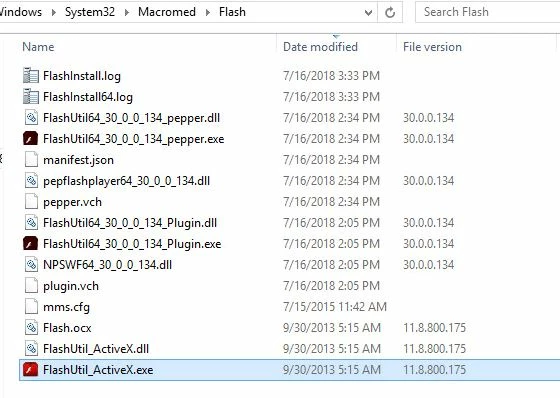
I need to get flash.ocx, FlashUtil_ActiveX.dll and FlashUtil_ActiveX.exe version 11.8.800.175 updated to at least version 19 but I cannot find any installer or way to do this. I have also tried taking ownership of these files and have on some machines had success at removing them manually, but for some reason its not allowing me to do it on all of the affected PCs.

Could anyone help me figure out a way to update these to the latest version as its going to fail me my security accrediation.

I have seen this:  how do i uninstall flash player from window 8.1 and reinstall the newer version so I am not sure if I am just going to have to argue the point with the security assessor. I believe it may be a remnant that only works with IE10 and obviously we have IE11 which in my mind would be a mitigation for the vulnerability?

Any advice appreciated.

Kind regards,

Jonathan

This topic has been closed for replies.

3 replies

Legend
July 16, 2018

Or... is it possible this is a separate ActiveX install outside IE?

_maria_
Legend
July 16, 2018

No, it's not.  The embedded Flash Player ActiveX does not display a version number in the */Macromed/Flash directory.  The old-style red Flash icon, instead of the new maroon Flash icon (updated in 2015) also indicates that it is a very old version of Flash Player.

<edit>

The official Flash Player ActiveX installer will not run on Windows 8 and above.

JG_79
JG_79Author
Participant
July 16, 2018

Hi

I have tried every flash player update I can find from Microsoft, every single one of them comes back as not applicable and doesn't install.

I'm not sure if its because we have installed IE11 during our build and its IE10 that shipped with 8.1 and potentially therefore any updates for this version of flash player aren't detected by the windows update engine?

I can raise a call with Microsoft but running out of time to resolve this before we are re-assessed

_maria_
Legend
July 16, 2018

Hi jg_79 ,

As of Windows 8, all Flash Player ActiveX updates for IE (and Edge on Windows 10) are released by Microsoft, not Adobe. Since these computers have Flash Player ActiveX 11.8.800.175 (released 9/24/2013) suggests that Windows Updates, or a subset thereof, are not being applied to these machines.  Since these are not being applied, you would need to contact Microsoft for assistance in troubleshooting why Microsoft Updates are not being installed on these systems.

--

Maria

Legend
July 16, 2018

Not clear whether you've tried just insalling the latest Flash ActiveX.