Inspiring
May 16, 2015
Answered

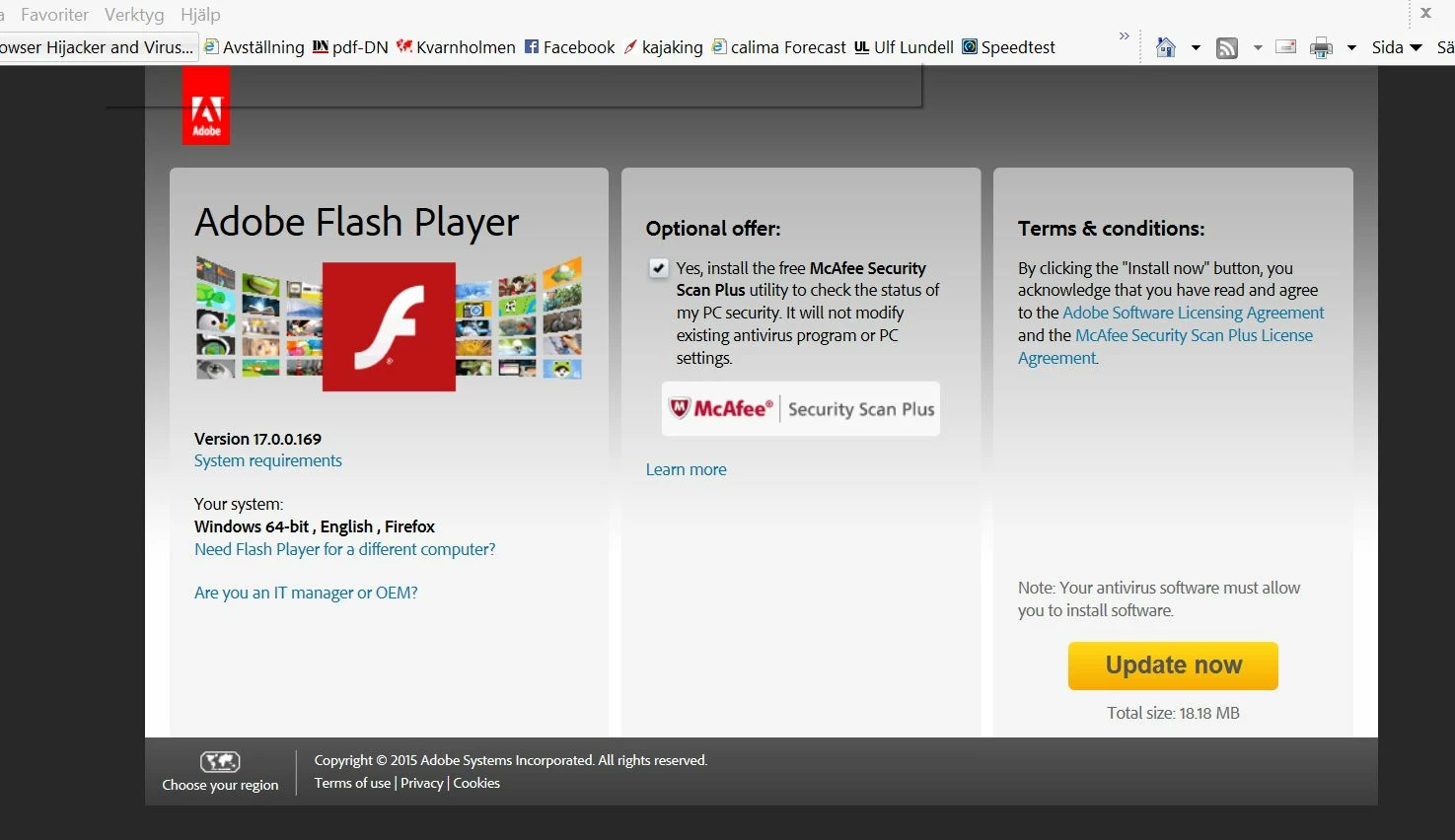
Falsk Adobe Flash player "uppdate now"

  • May 16, 2015
  • 2 replies
  • 2474 views

Den här sidan kommer upp ofta vid sökningar via Google. 194.6.232.151/39/en/video.php

Inte bara på en dator i det trådlösa nätverket Asus rt-n56u

Uppdatera länken och den önskade sidan kommer upp den falska Adobe annonseringen försvinner.

Ett klick på "Update now" laddar ner massor av malvare saker!!! Men ngn Flash Player!

Någon som vet hur man kan bli av med detta??
Försöker rensa men lyckas inte helt. Måste jag formatera om håddisken och installera om allt??

Sänd gärna frågan vidare, please
This topic has been closed for replies.
Correct answer leifs79125112

Hi leifs79125112,

There are many user forum support sites that provide assistance and performing a Google search for "malware removal assistance forum" or similar terms will return many sites,  You'll need to read through the results and decide for yourself if you want to obtain assistance from one, or more, of them.  Alternatively you could take your computer to a reputable company/individual who does this sort of thing for a living.

--

Maria


Helo again Maria

I found som tips in a forum about hacking the router and change DNS.

I just find out that my ASUS Router was hacked and the DNS value changed to 185.29.8.202!!!

I have now changed it to the correct IP-number. And a stronger admin PW.

I have also bocked the IP 194.6.232.151 in the router firewal.

ASUS has sent me a new firmware, so i am going to upgrade the router

The problem is still that i dont know how they did it when they hacked my router... my old PW was also "verystrong"

Take care

//Leif S

2 replies

_maria_
Legend
May 17, 2015

Hi leifs79125112,


What is the URL for the page in your screenshot?

--

Maria

Inspiring
May 17, 2015

194.6.232.151/39/en/video.php

Participant
May 16, 2015

I've had this repeatedly over the last few days, seemingly at random appears when visiting different websites. I have run scans using Malwarebytes, Spybot and Windows Defender with nothing major appearing. I have also reset my router (Asus RT-N66U) to factory settings and uninstalled and reinstalled Chrome but with no luck. It also appears when using IE and also when browsing my library in Steam.

This post and another on a polish website is all I have seen about this, all within the last few days. Nothing new has been installed on my laptop.

Anybody have any suggestions?

Inspiring
May 17, 2015

I am sure that this problem does not come from my computer. All of my three computers that run through my ASUS RT-n56u router has the same problem!

Thus, a problem that ASUS should have a solution for! I had planned a factory reset. But I wait a bit because it has not helped others.

Right now I am connected through my VPN tunnel rt-n56u router. It seems that it gereffekt. And I will return.

Inspiring
May 17, 2015

This page comes up often in searches through Google. The adress where it comes from is 194.6.232.151/39/en/video.php

it happens at all the computers on my wireless network ASUS RT-n56u

Update pagelink and the desired page comes up the fake Adobe advertising disappears.

A click on the "Udate Now" downloading lots of malvare things!!!
But No Adobe Flash Player!

Anyone knows how to get rid of this ??
Tried to uninstall and "clean" my harddisk but fails completely.
I must reformat the hard drive and reinstall everything ??

Please send this matter further to someone that knews how to solve it, please.

Any one that knows how the fake haml-page works. Is my Router hacked?
Or is the problem linked to the browser cals??

It seams that a factory reset of the ASUS router does not help!!!