
Inspiring
October 8, 2014
Answered

Firefox ESR 24.8.1- Flash Video only shows 1/4 of the image with Mid-2014 Mac, Retina Display

  • October 8, 2014
  • 1 reply
  • 1509 views

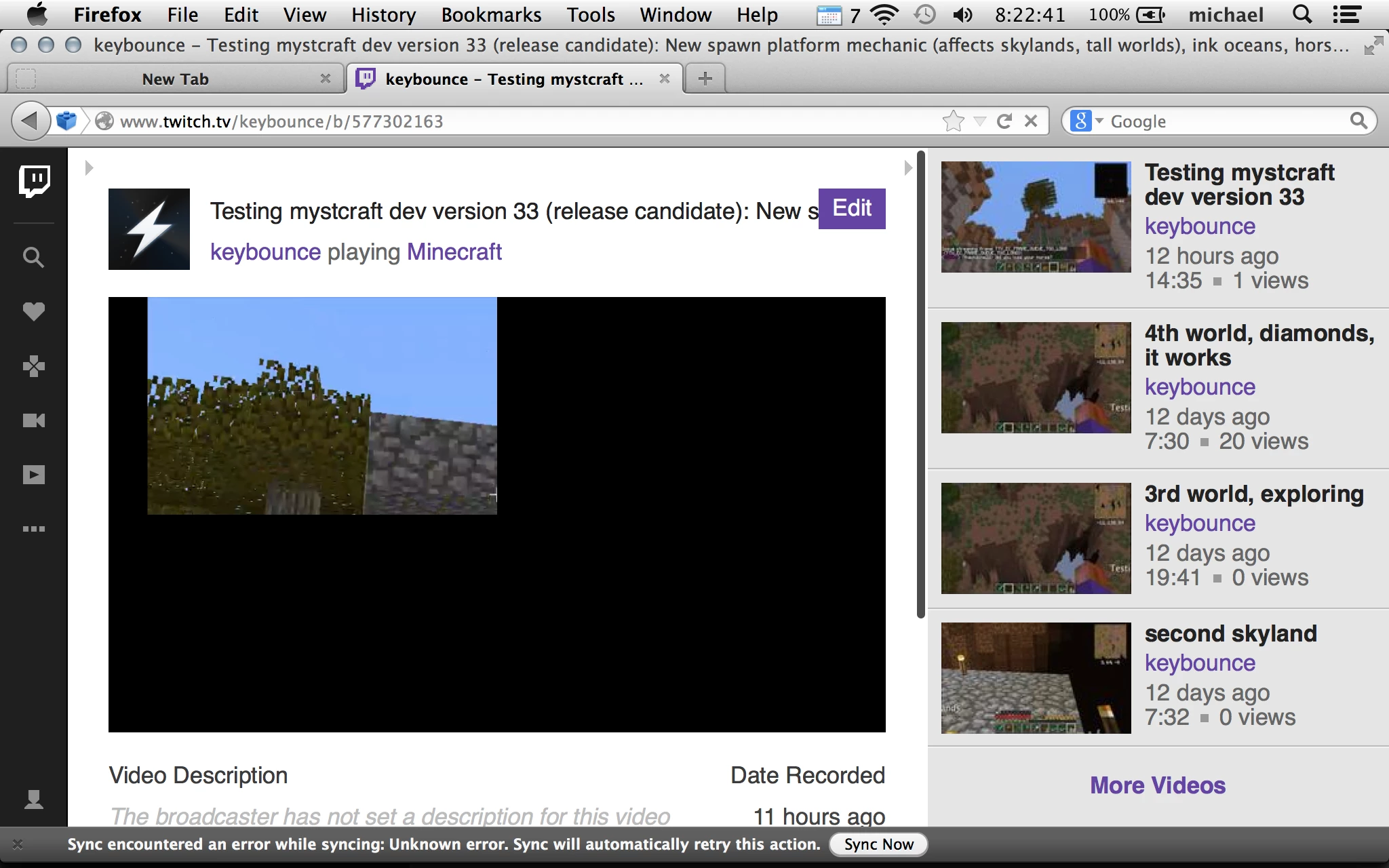
Issue: Flash movies -- YouTube, Dish Anywhere, Nickelodeon (only three tested) all show only the top left 1/4 of the display.

Perceived issue: Since retina has double the number of pixels, only the "actual" pixel count is used, which is half -- so the top half, and left half, is only the upper left corner.

Flash version 15.0.0.152

Mac OS 10.9.5

Hardware issue: Retina Display.

Browser: Firefox ESR 24.8.1 (up to date)

Additional notes: Changing YouTube's playback from Flash player to HTML makes the playback work.

Moving the window to an external monitor (not retina) makes the flash playback work.

This is only happening for flash playback on the retina monitor; not for non-flash on retina, not for flash on non-retina.

My question: How do I make this work on my retina monitor? The only browser choices possible for me are firefox and safari, and I really want to avoid safari for other reasons.
This topic has been closed for replies.
Correct answer Keybounce

Yes, it still happens

EDIT: Interesting, you are on 31.1, and I'm on 24.8; it's two days before I get ESR 31. Hmm ...

(Where's the save button when you edit?)


Well ...

Turns out that switching from Firefox Esr 24.8 with the non-beta plugin to Firefox ESR 31.1 with the beta plugin solves it.

Confirmed -- it's working correctly on two sites tested so far that were giving me trouble.

Now I just have a new GUI on firefox to get used to ... (at least that's only once a year now.)

1 reply

jeromiec83223024
Inspiring
October 8, 2014

Retina display support has been around in Flash Player for a long time at this point, and this issue is not reproducing for me on my retina macbook pro with either the generally available or ESR version of Firefox.  This really sounds like an issue with GPU drivers, and it's probably specific to the particular model that you're using.

You can verify this by temporarily disabling hardware acceleration.  It's described in the troubleshooting guide, here: Video playback issues

If disabling hardware acceleration fixes it temporarily, please follow the directions in the troubleshooting guide about copying and posting the relevant system info. I'll try and hunt down an equivalent machine and get someone to triage it.  It will probably mean that we just end up filing a bug with Apple on the issue and/or blacklisting that particular driver/card combo until a patch is available, but we're happy to do that.

Also, not all YouTube videos are encoded the same way.  A direct link to a video that demonstrates the problem (and any specifics, like quality settings or full-screen vs. embedded) would be helpful.  I'm definitely not seeing this on the handful of videos I sampled, and this machine is my daily driver...

Out of curiosity, does it reproduce both when the machine is plugged in and on battery?  Some of the machines have two graphics chipsets, and switch to the lower powered ones when on battery.

KeybounceAuthor
Inspiring
October 10, 2014

Hmm. Model is Retina, 15-inch, Mid 2014, Graphics  NVIDIA GeForce GT 750M 2048 MB

Model Identifier:    MacBookPro11,3

I see this happen both with the built-in Intel Iris Pro, and the NVidia.

Software is 10.9.5.

I am using ESR firefox.

Some YouTube videos:

https://www.youtube.com/watch?v=PUcPnIJKXXM

Mystcraft intro (1.6.4/1.7.2/1.7.10), part 3: Writing ages and review - YouTube

It does NOT happen in full-screen mode on YouTube, only in the normal 360p or 480p display window.

For Dish Anywhere, it happen on any of my DVR recordings.

For Nickelodeon:

The Legend of Korra Full Episodes, The Stakeout: Season 2, Episode 209

(So why did your system auto-fetch the titles of 2 out of the three links I used?)