

Mary Lyn
Participant
July 10, 2018
Question

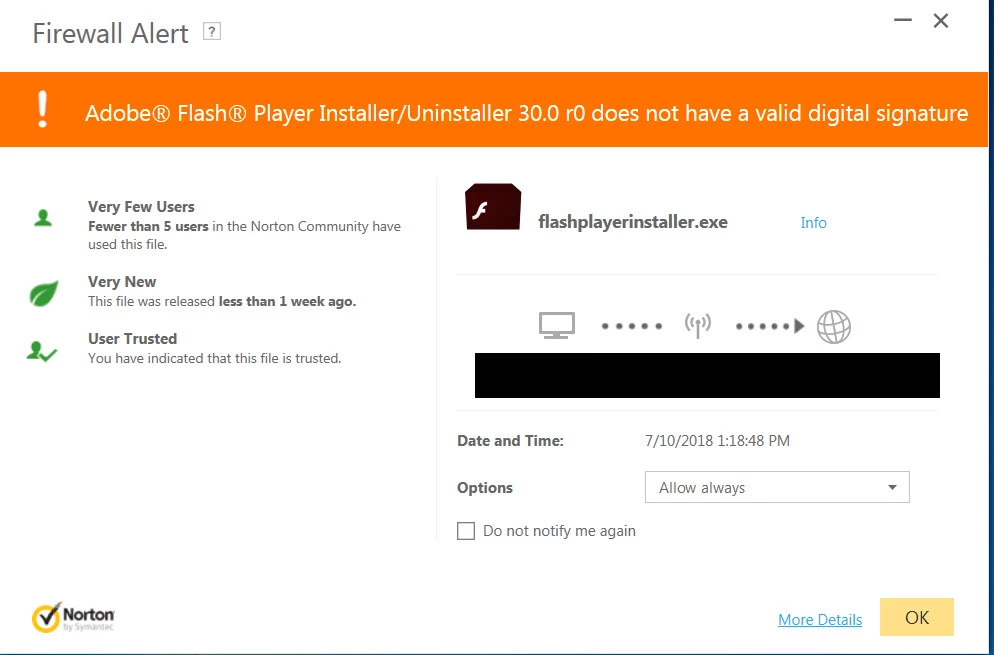
Firewall alert: Flash player 30.0 r0 does not have a valid digital signature
  • July 10, 2018
  • 6 replies
  • 1721 views

Why would this release not have a valid signature? I allowed it but should I not have done so?

This topic has been closed for replies.

6 replies

Participant
August 14, 2018

I encountered this problem too. It appears to be a Norton bug.

The message is generated by Norton Security.
Norton AUTO-allows access if you don't reply within 60 seconds.
Shortly after seeing this message I saw another one for a Dropbox auto updater.

Searching online, I found many other app generating this error with Norton Security.

For example, this solution with Dropbox updates:
Solved:  Dropbox conflicting with Anti virus (Norton/Sophos... - Dropbox Community - 276269

https://www.dropboxforum.com/t5/Installation-and-desktop-app/Dropbox-conflicting-with-Anti-virus-Norton-Sophos/td-p/276269

Bottom line: I'm forcing an update of Norton, have removed those firewall entries from Norton to make sure it alerts me again.

I expect the problem to resolve when Norton is updated.

Will run system scans with different tools to be sure.

jeromiec83223024
Inspiring
July 12, 2018

Yeah, that isn't one of our installer filenames, and our releases would be signed.


The only place you *might* encounter a signing error is on an ancient operating system that doesn't support the current generation of digital signatures (e.g. WinXP SP2 and below), in which case, it's probably time to detach those machines from the Internet and either retire them, or treat them like air-gapped kiosks.

Legend
July 11, 2018

If you allowed that, you could be infected and should probably completely wipe the computer and reinstall.

Kajal_Singh
Adobe Employee
Adobe Employee
July 11, 2018

Hi Mary,

All Flash Player installers and files(created after installation) have a valid digital signature.  Flash Player doesn't create any file with the name "flashplayerinstaller.exe" after installation.

Please use the official site Adobe Flash Player Install for all versions to download the Flash Player.

Thanks!

divya010193
Adobe Employee
Adobe Employee
July 11, 2018

Hi,

What source are you downloading the installer from?

Thanks!

kglad
Community Expert
Community Expert
July 10, 2018