


Participant
November 11, 2017
Answered

Flalshplayer downloads but won't install

  • November 11, 2017
  • 1 reply
  • 583 views

I am using an older laptop that runs Vista. Yes, I know it is no longer supported by Microsoft, but had no trouble downloading and installing anything until I had to run a clean install because of a virus. Everything is running fine again, but now I can't install Flashplayer. I have not had an issue installing other things since I did the clean install.

This topic has been closed for replies.
Correct answer divya010193

Hi,

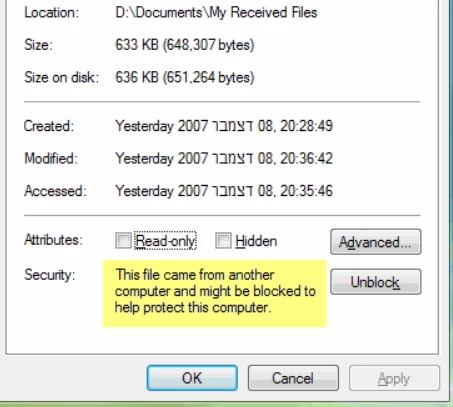
Right click on the Flash Player installer that you have downloaded. Click on properties.

In General tab, Click on Unblock -> Apply -> OK

Then try installing the Flash Player installer.

If you want to disable this feature entirely, you can do it using Group Policy by going to User Configuration \ Administrative Templates \ Windows Components \ Attachment Manager and enabling the policy named "Do not preserve zone information in file attachments".

You may also refer to https://www.petri.com/unblock-files-windows-vista

Thanks!

1 reply

divya010193
Adobe Employee
Adobe Employee
November 11, 2017

Hi,

You may try the offline installer. Follow these steps

1)Download the uninstaller from: Uninstall Flash Player for Windows

2) Open the page: Installation problems | Flash Player | Windows 7 and earlier

Under the heading "Still having problems" click on the specific link to NPAPI/PPAPI/ActiveX plugin.

3) Ensure all the browsers are closed. Run the uninstaller and then the offline installer.

If the problem persists, please write back to us.

Thanks!

IceonfireAuthor
Participant
November 12, 2017

No, none of those helped. It downloads just fine, but when I click on the

.exe to install nothing happens. I have tried going to the download folder

and trying it that way also. I am not getting any permission messages and

have tried to install as Admin... just nothing happens at all. I am an

older handicapped lady and play games a lot. Even in my Gamehouse, I cant

install any of those games. None of the installs have worked except for

Firefox and Netgear and Chrome. You can see in the attachment just how many

times I have tried. Thanks for any additional help you can provide.

On Sat, Nov 11, 2017 at 10:08 AM, divya_1993 <forums_noreply@adobe.com>

divya010193
Adobe Employee
divya010193Correct answer
Adobe Employee
November 13, 2017

Hi,

Right click on the Flash Player installer that you have downloaded. Click on properties.

In General tab, Click on Unblock -> Apply -> OK

Then try installing the Flash Player installer.

If you want to disable this feature entirely, you can do it using Group Policy by going to User Configuration \ Administrative Templates \ Windows Components \ Attachment Manager and enabling the policy named "Do not preserve zone information in file attachments".

You may also refer to https://www.petri.com/unblock-files-windows-vista

Thanks!