


September 28, 2016
Answered

Flash 23 Installation Error

  • September 28, 2016
  • 1 reply
  • 482 views

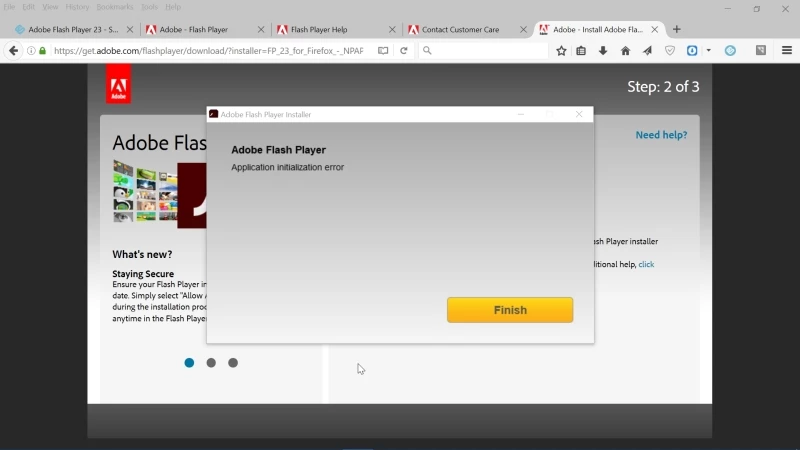
Using windows 10, firefox, says I need to update to 23 from 22 but when I try to do this I get an error message that says "Application Initialization Error" and it won't install.

I've tried it with and without the mcfee offer, right after a reboot before anything else is started, with and without avast enabled.

I've tried the help pages which just send me in circles.

What to do?
This topic has been closed for replies.
Correct answer _maria_

Hi,

I'll need to get some log files from you to troubleshoot the 'application initialization error'.  Please review the FAQ Where do I find the Flash Player installation log on Windows? and provide all files listed: FlashInstall.log, Adobe_ADM.log and Adobe_GDE.log, so that we can troubleshoot the issue.


As an alternative, you can try using the offline installer posted at the bottom of the Installation problems | Flash Player | Windows 7 and earlier page in the 'Still having problems' section, however, without the installation log files we can't troubleshoot why the initialization error is occurring.

Thank you.

--

Maria

1 reply

_maria_
Community Manager
_maria_Community ManagerCorrect answer
Community Manager
September 28, 2016

Hi,

I'll need to get some log files from you to troubleshoot the 'application initialization error'.  Please review the FAQ Where do I find the Flash Player installation log on Windows? and provide all files listed: FlashInstall.log, Adobe_ADM.log and Adobe_GDE.log, so that we can troubleshoot the issue.


As an alternative, you can try using the offline installer posted at the bottom of the Installation problems | Flash Player | Windows 7 and earlier page in the 'Still having problems' section, however, without the installation log files we can't troubleshoot why the initialization error is occurring.

Thank you.

--

Maria

September 28, 2016

Hi maria,

I was not aware of the offline installer, which seems to have worked.

Thanks ;-)

Charlie

_maria_
Community Manager
Community Manager
September 28, 2016

Thanks for confirming the offline installer worked.  We'd appreciate it if you could provide the Adobe_ADM.log and Adobe_GDE.log files so that we can investigate this further.  Thank you.