


tonyk32654382
Participant
January 8, 2018
Question

Flash 28.0.0.128 MSI tries to install old version

  • January 8, 2018
  • 1 reply
  • 880 views

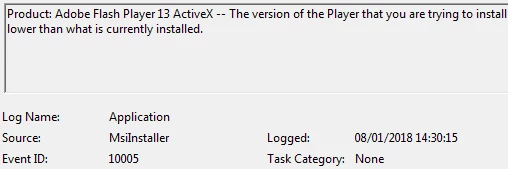
The Windows 7 Internet  Explorer-Active X MSI (install_flash_player_28_active_x.msi) on the distribution page (Adobe Flash Player Distribution | Adobe​)  is trying to install an old version of Flash. The error can be seen in the Event log.  Anyone know how to alert Adobe so they can update the MSI to the latest proper version.
    This topic has been closed for replies.

    1 reply

    _maria_
    Legend
    January 8, 2018

    You may be experiencing a known issue that was resolved quite some time ago. There are several possibilities for this, and we'll need to obtain various installation log files to troubleshoot.


    Please provide the following log files, all of them for the same installation attempt:

    • FlashInstall log file(s) saved at:
      • 32-bit OS: C:\Windows\System32\Macromed\Flash\FlashInstall32.log
      • 64-bit OS: C:\Windows\System32\Macromed\Flash\FlashInstall64.log AND C:\Windows\SysWOW64\Macromed\Flash\FlashInstall32.log - both files are required from a 64-bit OS
    • verbose MSI installation log file with options v+x enabled (verbose + additional debugging logging)

    How do you perform the installation?  Have you recently deleted the MSI file cache on the deployment server and/or local machine?

    tonyk32654382
    Participant
    January 10, 2018

    1. I installed the MSI via GPO on a newly re-imaged machine and it worked fine. 

    2. I then uninstalled Flash on the problem machine and a clean install of the MSI worked. Looks like a problem with updating previous versions on a specific machine.

    Not going to pursue this further as we only have a few users needing Flash and we are moving towards migrating all systems to Windows 10 in the near future.

    _maria_
    Legend
    January 10, 2018

    Thanks for the update.