
Flash acting strange in Firefox. How to Fix?
Flash content has been acting strange in Firefox for the past few months for me. It works normally in other browsers, so I'm pretty sure it has to do with firefox. I've tried to uninstall Flash and reinstall, tried to install older versions, and made sure all my plugins and players were up to date but it hasn't fixed my issue.
The issue is that the content seems to blend together or not totally load correctly when the flash content changes.
For example if I'm playing a flash game and something changes, the whole picture won't change unless I click in the flash content area.
If I scroll, not all of the content will scroll correctly, but when I click in the content area it'll update to how it should look.
It's almost as if only a part of the content works correctly until I click in the content area to fix it.
I'm using Firefox 52.0.2,
Flash 25.0.0.127, and Windows 10
I've also tried to disable all adblockers and still nothing.
You can see in this image how the content doesn't scroll correctly if I try to use the scroll bar. It's like only a piece of the content scrolls like it's supposed to, but then if I click in the box, it shows it how it should.
Does anyone know how to fix this?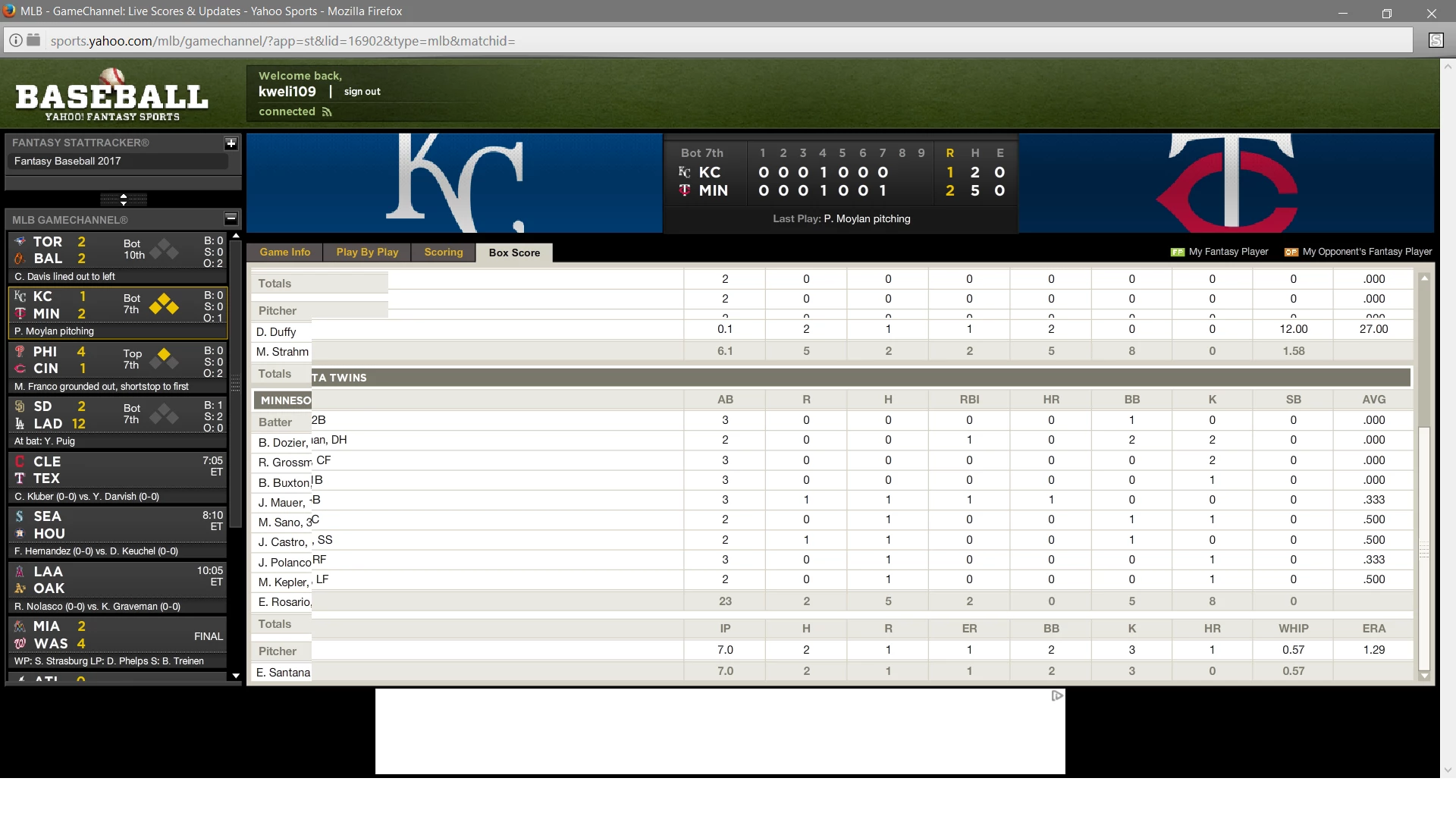


 AdChoices