


Participant
July 11, 2017
Question

Flash ActiveX SCUP catalog installable/installed rules

  • July 11, 2017
  • 1 reply
  • 700 views

Hi,

I'm having issues with the SCUP loaded Flash ActiveX installs and think the issue covered in a thread from a few years ago is still being published for all the new updates. Re: Flash 12.0.0.38 SCUP problem en-US described an issue with the rules where it was using a registry entry that doesn't exist. HKLM\Software\Macromedia\FlashPlayer\SafeVersions is not a valid registry path on any of our systems. We import the updates in to SCCM and the install seems to be happening, but it does not think it has been installed afterwards. I have checked the last few releases from 26.0.0.137 down and they all seem to be defined the same way.
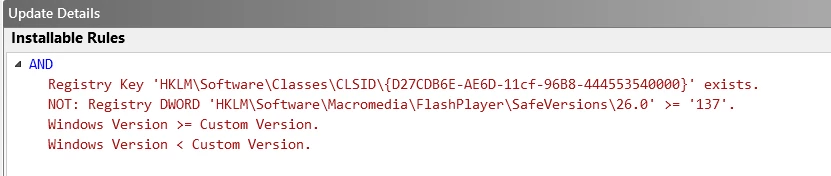

Is there any way to update the catalog so it no longer uses the 'SafeVersions' registry path?

Thanks.

    This topic has been closed for replies.

    1 reply

    _maria_
    Legend
    July 11, 2017

    All Flash Player ActiveX Control installers create the SafeVersions registry entry.  However, it is removed when uninstalling Flash Player using the standalone uninstaller.  Are you running the uninstaller as part of your deployment workflow?  If so, this can explain why it doesn't exist on your system.

    Also, what version of Windows is this on?

    Participant
    July 11, 2017

    Sure, this is primarily Windows 7 Enterprise x64 SP2 installs and we're deploying Flash using the SCUP catalog, importing it in to SCCM and deploying it as a patch to the existing Flash ActiveX install (version 24.0.0.194 in this case).

    Thanks.

    _maria_
    Legend
    July 11, 2017

    To clarify, what does "but it does not think it has been installed afterwards." mean?  does "it" refer to SCCM?

    If the installation was successful, the SafeVersions registry entry will exist.  Since you're on 64-bit systems there will be 2 SafeVersions registry entries, one for the 32-bit version of Flash Player and another for the 64-bit version of Flash:

    • HKEY_LOCAL_MACHINE\SOFTWARE\Macromedia\FlashPlayer\SafeVersions
    • HKEY_LOCAL_MACHINE\SOFTWARE\Wow6432Node\Macromedia\FlashPlayer\SafeVersions

    Have you checked for any sccm installation log files relating to the Flash Player?  If so, does the file indicate there were issues with the installation?

    I'd like to review the FlashInstall log files from an impacted system.  Since this is a 64-bit OS, there will be 2 FlashInstall log files saved at C:\Windows\System32\Macromed\Flash AND C:\Windows\SysWOW64\Macromed\Flash.  Please upload both files to cloud.acrobat.com/send using the instructions at How to share a document  Post the link to the uploaded log files.