


Flash Background Updates from internal server not working
We are setting up to receive flash background updates from an internal server for our 5000+ enterprise pcs running windows 7 64bit and Windows 10
Current mms.cfg
AutoUpdateDisable=0
SilentAutoUpdateEnable=1
SilentAutoUpdateServerDomain=SVRTSTR2
SilentAutoUpdateVerboseLogging=1
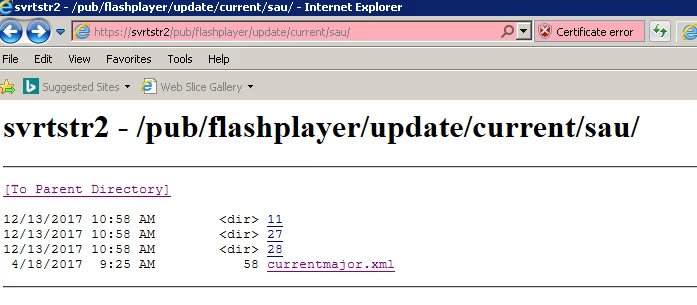
Note- the server is running server 2016, with IIS, and the website is set up with an SSL certificate and the cab files were extracted to the site with the correct folder structure
Here is the log:
2018-1-3+3-4-0.217 [info] 1629 SVRTSTR2
2018-1-3+3-4-0.220 [info] 1614
2018-1-3+3-4-0.222 [info] 1615
2018-1-3+3-4-0.224 [info] 1618
2018-1-3+3-4-0.226 [info] 1604
2018-1-3+3-4-0.226 [info] 1608
2018-1-3+3-4-0.227 [info] 1612
2018-1-3+3-4-0.232 [info] 1620
2018-1-3+4-4-0.198 [info] 1629 SVRTSTR2
2018-1-3+4-4-0.199 [info] 1614
2018-1-3+4-4-0.201 [info] 1615
2018-1-3+4-4-0.204 [info] 1618
2018-1-3+4-4-0.207 [info] 1619 1063
2018-1-3+4-4-0.228 [info] 1629 SVRTSTR2
2018-1-3+4-4-0.232 [info] 1614
2018-1-3+4-4-0.234 [info] 1615
2018-1-3+4-4-0.236 [info] 1618
2018-1-3+4-4-0.238 [info] 1604
2018-1-3+4-4-0.238 [info] 1608
2018-1-3+4-4-0.238 [info] 1612
2018-1-3+4-4-0.239 [info] 1620
2018-1-3+5-4-0.181 [info] 1629 SVRTSTR2
2018-1-3+5-4-0.181 [info] 1614
2018-1-3+5-4-0.184 [info] 1615
2018-1-3+5-4-0.186 [info] 1618
2018-1-3+5-4-0.190 [info] 1619 1063
2018-1-3+5-4-0.212 [info] 1629 SVRTSTR2
2018-1-3+5-4-0.215 [info] 1614
2018-1-3+5-4-0.217 [info] 1615
2018-1-3+5-4-0.219 [info] 1618
2018-1-3+5-4-0.220 [info] 1604
2018-1-3+5-4-0.220 [info] 1608
2018-1-3+5-4-0.228 [info] 1631 /pub/flashplayer/update/current/sau/currentmajor.xml
2018-1-3+5-4-0.320 [warning] 1470 12175
2018-1-3+5-4-0.321 [warning] 1474 183
2018-1-3+5-4-0.321 [warning] 1475
2018-1-3+5-4-0.322 [info] 1432
2018-1-3+5-4-0.322 [info] 1612
2018-1-3+5-4-0.323 [info] 1620
2018-1-3+6-4-0.259 [info] 1629 SVRTSTR2
2018-1-3+6-4-0.260 [info] 1614
2018-1-3+6-4-0.263 [info] 1615
2018-1-3+6-4-0.265 [info] 1618
2018-1-3+6-4-0.268 [info] 1619 1063
2018-1-3+6-4-0.295 [info] 1629 SVRTSTR2
2018-1-3+6-4-0.297 [info] 1614
2018-1-3+6-4-0.299 [info] 1615
2018-1-3+6-4-0.301 [info] 1618
2018-1-3+6-4-0.303 [info] 1608
2018-1-3+6-4-0.303 [info] 1604
2018-1-3+6-4-0.303 [info] 1612
2018-1-3+6-4-0.304 [info] 1620
2018-1-3+7-4-0.328 [info] 1629 SVRTSTR2
2018-1-3+7-4-0.328 [info] 1614
2018-1-3+7-4-0.331 [info] 1615
2018-1-3+7-4-0.333 [info] 1618
2018-1-3+7-4-0.335 [info] 1619 1063
Please assist
NOTE:
-I have already tried deleting the reg key HKEY_LOCAL_MACHINE\SOFTWARE\Wow6432Node\Macromedia\FlashPlayerSAU\LastUpdateCheck
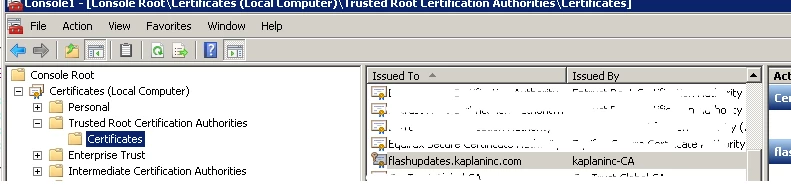
-I have imported the Cert to the Trusted Root Certification Authorities store (local computer) on the workstation
I can view the files on a browser(firefox/chrome/IE11) from the workstation by entering https://svrtstr2/ --I get the IIS landing page, and can navigate the folder strucure all the way through without error
 AdChoices