


Flash Blocking Microphone
Hello everyone,
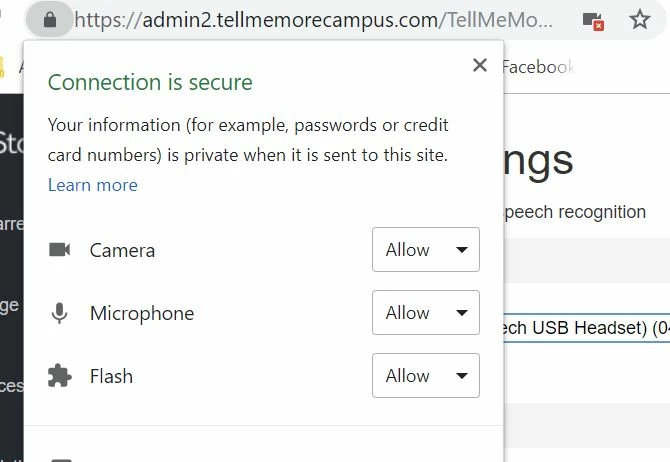
I've tried quite a few things for the past few hours and nothing seems to be working. I'm trying to log into Rosetta Stone for my online Chinese course. Much of the course requires speech recognition, however, my microphone started getting blocked whereas before it was working fine. I'm at a point where even though I have allowed flash, mic, and camera, I am still getting an icon in the search bar showing that the camera and mic are blocked (See screenshot below).
So far I have:
- Gone into my chrome settings and selected to Allow flash, microphone access, etc
- Uninstalled and reinstalled flash
- Reset my browser settings
- Uninstalled and reinstalled Chrome
- Tried to use a different browser with the same results.
Details on my setup are below.
- Windows 10 Version 1803 (OS Build 17134.472) [that may have been more info than needed]
- Chrome Version 71.0.3578.98 (Official Build) (64-bit)
- Flash Version 32.0.0.114
- Screenshot
Edit: It is working in Microsoft Edge but I really, really don't like that browser and would prefer to use chrome
Thanks in advance for any and all help
 AdChoices