


sound56finder
Participant
April 28, 2017
Answered

FLash code: 2032

  • April 28, 2017
  • 3 replies
  • 6369 views

I have been getting the following error message when playing certain games on Facebook. Error Info: "FlashCode: 2032, HTTPStatus: 0, FileName: sp.json"  and I keep reloading and reloading and keep getting the same error. Have contacted Mozilla about the issue, but they are saying to contact you. I am stuck in the I sent middle here....I sent Mozilla the following info.....

I run Windows 10 Pro 32 Bit. I have been having issues with Flash player on Firefox for a long time now. Last I saw was that Firefox will no longer support or run Flash. Yet most of the web still uses it. I only have issues with the Flash when using Firefox. Everything works great when using Edge and most of th etime when using Internet Explorer. Now I am getting the following message. "Error Info: "FlashCode: 2032, HTTPStatus: 0, FileName: sp.json". And "most" of the time it is on Facebook games and video's.
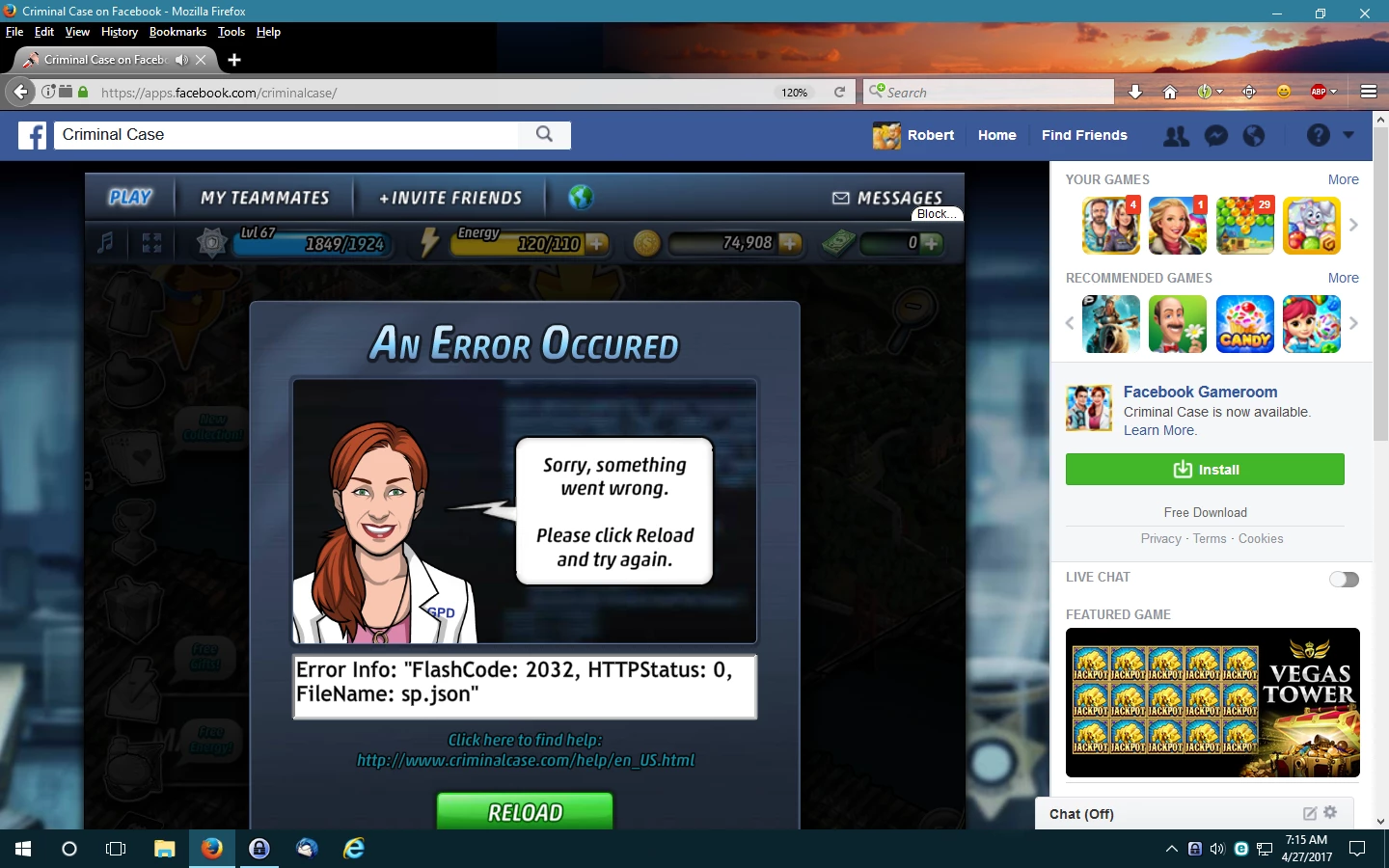
Any help on this issue will be greatly appreciated. If there is any information needed that is not here, please let me know and I will see what I can do.

This topic has been closed for replies.
Correct answer sound56finder

cool dude


Thank You sincerely for your time and assistance with this issue. But I

have decided to just switch to Chrome Browser. Everything just works

allot better there. gain Thank You

3 replies

May 3, 2017

You have problem playing it only in firefox right. other browser support this game isn't it?

(If so it should be a problem with in the Firefox)

Or try this link :https://support.recright.com/hc/en-us/articles/115000611905-Error-2032

(I have contacted the criminal case help center for this problem i'll get back to you when they get back to me)

_maria_
Community Manager
Community Manager
May 3, 2017

@FloretMedia BNGLR

What are you talking about "criminal case help center"?

May 4, 2017

he contacted Firefox no help so I  tried contacting "Criminal Case" might be they get this kind of questions I guess, but they can't help either.

_maria_
Community Manager
Community Manager
May 2, 2017

"Last I saw was that Firefox will no longer support or run Flash."

This is not true.  Most browsers are moving to a click-to-play model where they disable Flash by default and users have to enable it per site, or for all sites.

Error 2032 indicates an issue with the content or a network issue.  It's trying to load a file that it can't find (see CurtisMorley.com » ActionScript Error #2032​, https://forum.starling-framework.org/topic/error-2032-stream-error-in-as3 )  You would need to contact the content developer to notify them of the issue.

Also, are you running the stable version of Flash Player (downloaded from get.adobe.com/flashplayer) or the content debugger?  Launch Firefox and navigate to https://helpx.adobe.com/flash-player.html.  Click the 'Check Now' button.  Copy and paste the resulting System Information.

sound56finder
Participant
May 2, 2017

. Check if Flash Player is installed on your computer

YOUR SYSTEM INFORMATION

Your Flash Version

25.0.0.148

Your browser name

Firefox (NPAPI)

Your Operating System (OS)

Windows (Window 10)

Here is the system information. And I don't understand a word of the

information you said to check out Curtismorley .com or

starling-framework.

_maria_
Community Manager
Community Manager
May 2, 2017

Thank you for providing the information.  If you had been using the Content Debugger it would have indicated in the System Information output.


The links I posted confirm the error is a content/network issue, not Flash Player.

--

Maria

April 29, 2017

Here are some solution that you can try

1.some time Flash player for Firefox doesn't work for some users.because some flash player related files   won't remove when it is re installed.first you need to uninstall using the uninstaller :You can download it from Here:http://helpx.adobe.com/flash-player/kb/uninstall-flash-player-windows.html.

Then Download the latest plug in version from :https://www.adobe.com/products/flashplayer/distribution3.html

  • a.Run the Uninstaller
  • b.Reboot the system
  • c.Install flash

2.If you're not so adamant about Firefox you can try latest chrome version it have a built in flash player.

3.2032 error usually cause because of the browser cookies and caches so

  • a.clear the browser cache
  • b.check the box override automatic cookie handling in browser settings

  Hope it helps

sound56finder
Participant
April 29, 2017

Thank You for your reply. I did uninstall Adobe flash and reinstalled it as described. Cleared the cache and selected the "override automatic cookie handling" and selected 450mb. But alas, it did not fix the issue.  I have contacted Facebook, Mozilla, and now Adobe. I am at a loss. Was thinking maybe its just that my computer is not powerful enough for some of these new games etc. I don't do games like World of Warcraft etc....too involved for me. Here are the properties of my computer...

Again, Thank You for your help.