Participant
July 22, 2018
Answered

Flash not installed properly.. cant figure out whats wrong.

  • July 22, 2018
  • 1 reply
  • 486 views

Noticed a game that requires Flash was not working properly today. I went over to adobe's flash test page at Adobe - Flash Player which also tells you your flash version number.. Whenever I load that page the same thing happens, the small square where your version number is supposed to appear displays as a puzzle piece icon and disappears in a fraction of a second leaving nothing there. At the top of the screen a video appears with a play button, and that disappears in 3 seconds also leaving that area blank. Multiple refreshes had same result. I reinstalled Flash from download page and same result again.

I checked another flash test site (codegeek) and it says: "You do not have flash player installed" - In Chrome settings, Flash is set to "Ask First", which is the only option other then block. When I added codegeek's test page to the allow list it worked and now says: You have flash player 30.0.0 installed. Do I really have to do that every time I go to a site that uses Flash? And what about games? The Steam game that I was having problems with today does not show me the address of the server, I could dig around on the game's forums or site probably find out but that's a lot of trouble to go through when I want to play a new game.

Anyone have any idea what I am doing wrong and how to get flash installed properly?

Win 10- all updates installed, chrome and graphics drivers all latest version. Videos, movies and youtube all play normally.

Thx for any help

Sean G

    This topic has been closed for replies.
    Correct answer _maria_
    When I added codegeek's test page to the allow list it worked and now says: You have flash player 30.0.0 installed. Do I really have to do that every time I go to a site that uses Flash?

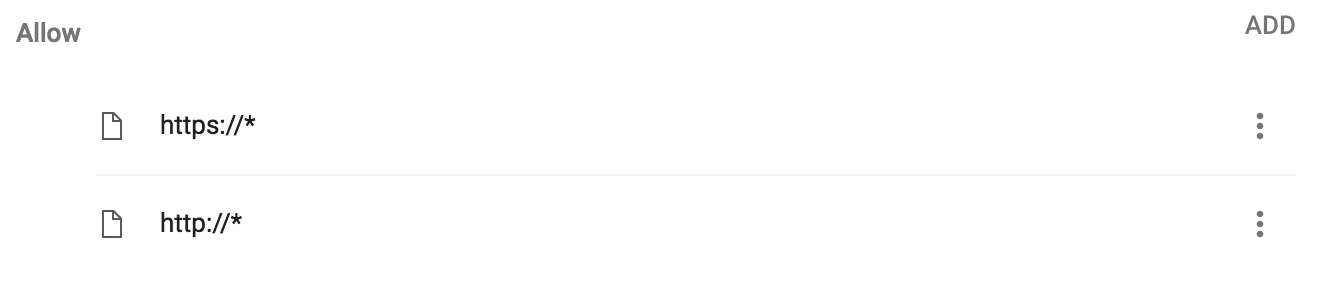
    This is a browser issue, not a Flash Player issue.  The browser controls the loading of the plugin, not the plugin.  Most browser vendors block Flash by default, forcing users to enable it, usually on a per-site basis.  You can either enable it for each site you want, or add the following to Chrome's list of exceptions, which whitelists all sites.

    1 reply

    _maria_
    _maria_Correct answer
    Legend
    July 23, 2018
    When I added codegeek's test page to the allow list it worked and now says: You have flash player 30.0.0 installed. Do I really have to do that every time I go to a site that uses Flash?

    This is a browser issue, not a Flash Player issue.  The browser controls the loading of the plugin, not the plugin.  Most browser vendors block Flash by default, forcing users to enable it, usually on a per-site basis.  You can either enable it for each site you want, or add the following to Chrome's list of exceptions, which whitelists all sites.

    bum4evrAuthor
    Participant
    July 23, 2018
    Ok I did that - then restarted browser - the adobe test page does the same thing - I tried a different flash test site (ultrasounds.com) and a puzzle piece appeared and the text said "click here for flash" so I did and then a pop-up window appeared asking for permission to run flash, after I gave permission then flash worked fine.
    Well I guess that's the best I can expect, I will click the "Correct Answer" button - thanks for your help.
    All the time I wasted learning Swishmax so I could make animated custom sigs for EverQuest boards.... Now good luck finding any forum that even allows Flash.. (sigh)
    Sean G