


Participant
July 7, 2016
Question

Flash not working for two weeks. Recommended solutions to not solve problem.

  • July 7, 2016
  • 4 replies
  • 1151 views

I find it extremely frustrating that none of the recommended solutions from Adobe solve my issue with Flash. It is even more frustrating that I am expected to troll forums or post problem to a forum in order to resolve it rather than the ability to contact support. Hello heard of digital transformation?

Here is the sequence of screen shots suggestion from Adobe to resolve in the order of display:
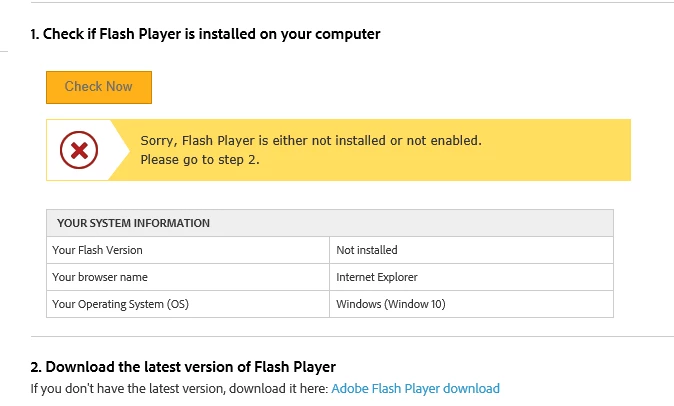
Then clicked on link and let do this:

Then click Test Flash Player:

Then walked through the below next steps and still not working!

Reached out to Customer Support on Twitter and they sent me back to trolling forums.

    This topic has been closed for replies.

    4 replies

    jeromiec83223024
    Inspiring
    July 27, 2016

    If you're still struggling with this, here's my generic advice:

    First, confirm that ActiveX Filtering is configured to allow Flash content:

    https://forums.adobe.com/thread/867968

    Internet Explorer 11 and Edge introduce a number of changes both to how the browser identifies itself to remote web servers, and to how it processes JavaScript intended to target behaviors specific to Internet Explorer. Unfortunately, this means that content on some sites will be broken until the content provider changes their site to conform to the new development approach required by modern versions of IE.

    You can try to work around these issues by using Compatibility View:

    http://windows.microsoft.com/en-us/internet-explorer/use-compatibility-view#ie=ie-11

    If that is too inconvenient, using Google Chrome may be a preferable alternative.

    Also, Edge is a moving target, and our detection page keeps getting broken. 

    If you go to a basic Flash site like the one below and see animation, Flash is working for you, and my paragraph above definitely applies. http://www.homestarrunner.com/

    Carm01
    Legend
    July 7, 2016

    Did you know that Adobe Flash Player is a FREE product? You have to understand that if you want something for FREE then you in a sense get what you pay for, so the forums are it.

    You might want to reach out to google and ask it a question like how to enable flash player on windows 10 for Internet explorer. I bet it will provide you with an answer.

    How to I update flash player on windows 10 is done via windows updates, which again is something that can be Googled.

    Google is a terrific resource to use and it works great

    You also just as easily might want to try an alternate browser such as Google Chrome as it has Flash player built in and is constantly updated.

    Best regards

    Participant
    July 7, 2016

    When I click on reply by akshay this is what I see

    Participating Frequently
    July 7, 2016

    Hi Liz,

    Please send me your Adobe ID, location and phone # over a private message.

    Click my picture and use the Message option. We will get in touch with you for investigation.

    Regards,

    Akshay