Participant
June 23, 2017
Answered

Flash not working in Safari for Google Financial Charts

  • June 23, 2017
  • 1 reply
  • 918 views

Flash works fine using Firefox for my Google Financial Charts, but the Charts won't load using Safari.

My problem has occurred 3 times. The previous times, my steps fixed it.

The website is www.goldstockdata.com. Here is an example page:

Pan American Silver Corp. / Silver Stock Profile & Analysis

Here are the steps I've used to try to get it to work:

http://isflashinstalled.com

https://www.whatismybrowser.com/detect/is-flash-installed

Both of these links say Flash is installed.

My Safari settings:

Safari -> Preferences -> Security

   Enable Java checked

   Allow Plugins checked

   Uncheck Block Popups

Click on Plugin Settings

   Adobe Flash

    -> GoldStockData -> On

    -> When Visit other Websites -> On

   Java

    -> GoldStockData -> On

    -> When Visit other Websites -> On  (this won’t save)

Reinstall Flash

Restart Computer
    This topic has been closed for replies.
    Correct answer Newager23

    Thank you for posting the screenshot. It's very helpful.

    Unfortunately, I'm not not able to reproduce.  Using OS X 10.11.6 and Safari 10.1.1

    • I installed the latest version of Flash Player (26.0.0.131)
    • I navigate to Pan American Silver Corp. / Silver Stock Profile & Analysis
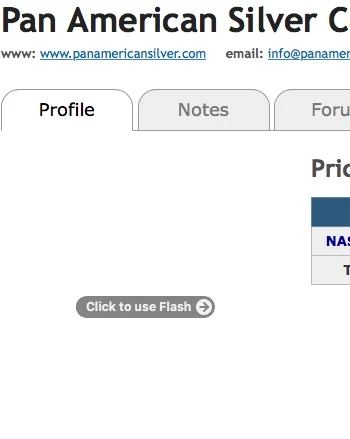
    • The browser prompts to click-to-use Flash:
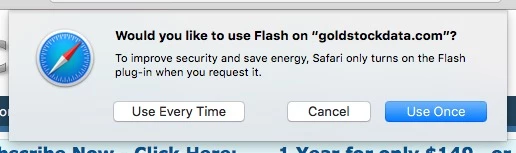
    • I click the gray message area and get the following:
    • Clicking 'Use Every Time' will create an entry in Safari > Preferences > Security > Internet Plug-Ins > Plug-in Settings > Flash to always allow Flash on this site:
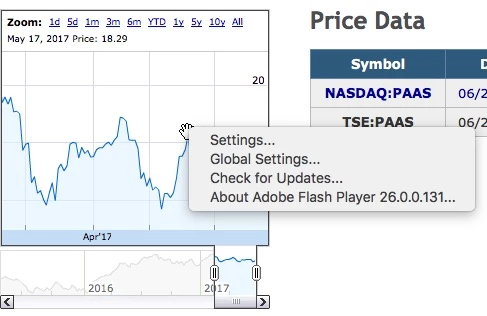
    • The graph, in Flash, displays:

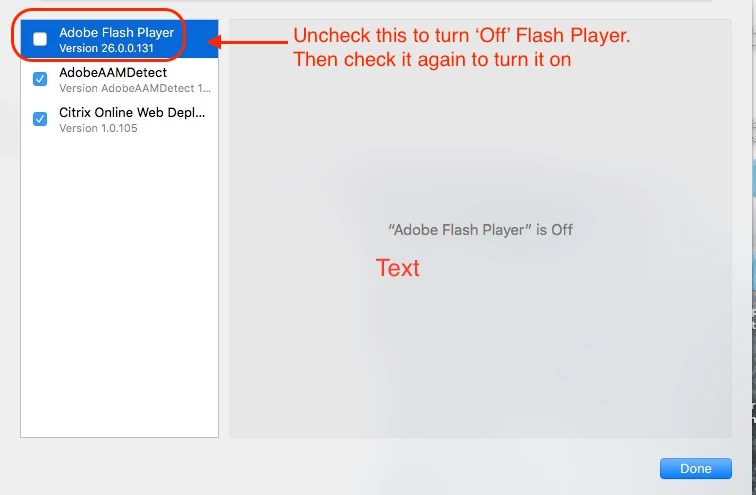
    Try disabling/enabling Flash:

    If that doesn't work, you can try resetting Safari: How to fully reset Safari on your Mac | MacIssues  Perform each option one at a time to see if this will help.


    Vargas,

    The solution was to clear the history in Safari. Which you recommended.

    Safari -> History -> Clear History -> All.

    Thanks!

    1 reply

    _maria_
    Legend
    June 23, 2017

    Where is the Flash content on the site located at?  The YouTube videos are rendering in HTML5, not Flash (YouTube long ago defaulted to HTML5 video instead of Flash video).  Charts are not showing Flash context menu when right-clicking.


    Please post EXACT steps to reproduce and EXACT link to location in site that has Flash content. Also, post a screenshot of the charts rendering in Firefox, and not rendering in Safari.

    Thank you.

    Newager23Author
    Participant
    June 24, 2017

    Thanks for the reply. It usually works fine. Something turned it off. And it works for other people with Safari. It's just my problem.

    Here is the link:

    Pan American Silver Corp. / Silver Stock Profile & Analysis

    Here is a screenshot of the link location:

    _maria_
    Legend
    June 26, 2017

    Thank you for posting the screenshot. It's very helpful.

    Unfortunately, I'm not not able to reproduce.  Using OS X 10.11.6 and Safari 10.1.1

    • I installed the latest version of Flash Player (26.0.0.131)
    • I navigate to Pan American Silver Corp. / Silver Stock Profile & Analysis
    • The browser prompts to click-to-use Flash:
    • I click the gray message area and get the following:
    • Clicking 'Use Every Time' will create an entry in Safari > Preferences > Security > Internet Plug-Ins > Plug-in Settings > Flash to always allow Flash on this site:
    • The graph, in Flash, displays:

    Try disabling/enabling Flash:

    If that doesn't work, you can try resetting Safari: How to fully reset Safari on your Mac | MacIssues  Perform each option one at a time to see if this will help.