
Participant
March 4, 2016
Question

Flash on chromebook not even showing built-in microphone or camera... HELP.

  • March 4, 2016
  • 1 reply
  • 5080 views

So here is my problem.

I just bought a new ACER Chromebook 15, and I think that it's great, but my flash player isn't working properly!

There is a built-in microphone and camera in this unit, and the ability to link with my USB microphone.

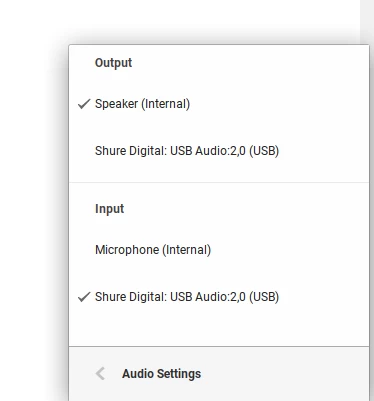
And when I go to the audio settings, both microphones show up perfectly. As such:
HOWEVER

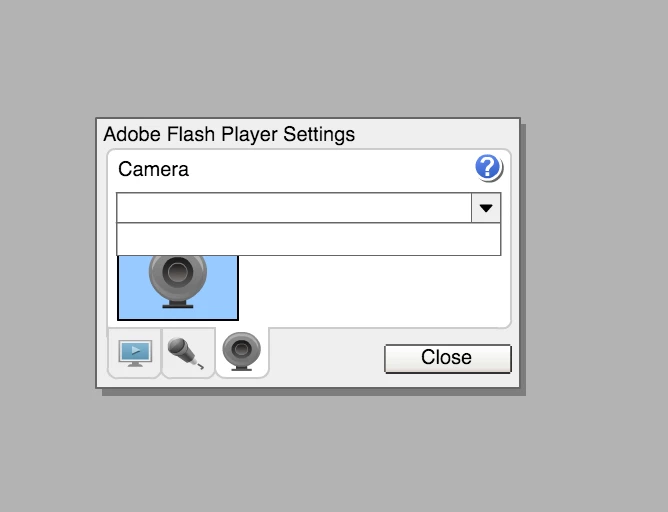
when trying to record from flash, it doesn't even show up with the built-in parts.

It looks exactly the same for the mic and camera sections.
Please help me. I really need this to work, or I need to know if I need to return this device and get a new one. It's a chomebook so I can't uninstall. I've tried restarting, disabling and enabling flash again, I've tried updating it - but I can't. And I've tried everything I can think of (or find online) in the settings!

Thank you so much for your help.

Please reply if you can.

This topic has been closed for replies.

1 reply

Community Manager
March 4, 2016

Hi,

Please go to below link and click on check now button to see the flash player version:

https://helpx.adobe.com/flash-player.html

Also please upgrade your chrome browser to latest.
Check on other browsers and see if the issue exist.

Participant
March 4, 2016

Hi there Kratika Agarwal,

Here is what shows up:

Unfortunately, on chromebook I cannot use any other browsers, or even attempt to download an update of chrome as it claims to update automatically.

I am just a little frustrated, as I used this function perfectly on the chromebook that I had before this, but it got water damage, so I bought this new one today and it isn't working. It's part of my job, so this is really setting me behind...

Thank you so much for your help, and I hope you may have another idea.

Community Manager
March 4, 2016

Hi,

Try below steps:

open chrome browser and click on customize and control google chrome tab on top right side of browser

Go to Help>About google chrome> and see if the browser is checking for updates.