Participant
May 31, 2018
Answered

Flash on Edge - Disabled - but turned on in Settings

  • May 31, 2018
  • 3 replies
  • 2489 views

This website appeared in Task View:

Adobe Flash Player issues with Windows 10 (Microsoft Edge)

I checked in Advance Settings and Use Adobe Flash Player is turned on

Yet when I Test Flash Player in the above site it still says Flash Player is currently disabled

Microsoft technicians checked my Windows 10 systems and Flash Player is working OK, they do not understand the message.

Why does it still say Flash Player is currently disabled?

    This topic has been closed for replies.
    Correct answer _maria_

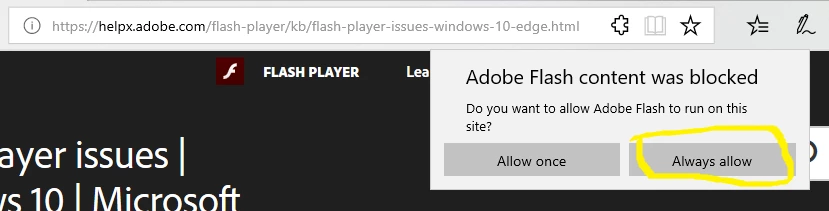
    Edge disables Flash by default, forcing users to enable it on each site.  For the page you are referring to, click the puzzle piece in the address field (to the right) and enable Flash:

    3 replies

    Participant
    January 5, 2020

    I never see always allow.   It only ever says Allow once.   

    _maria_
    Community Manager
    Community Manager
    January 6, 2020

    This post is from May 2018.  Microsoft has updated Edge browser to remove the 'Always Allow' option.  The only option available, per Microsoft, is 'Allow Once'.

    _maria_
    Community Manager
    _maria_Community ManagerCorrect answer
    Community Manager
    May 31, 2018

    Edge disables Flash by default, forcing users to enable it on each site.  For the page you are referring to, click the puzzle piece in the address field (to the right) and enable Flash:

    Participant
    May 31, 2018

    Hi Maria - that seems to have worked; brilliant, thanks very much.  But why does Edge disable Flash by default, when Flash Player is integrated with Microsoft Edge in Windows 10?  Perhaps I had tried to download Flash Player when it was already there?

    _maria_
    Community Manager
    Community Manager
    May 31, 2018

    Since Microsoft embeds Flash Player in IE and Edge there isn't a separate installer for it.  If you don't use Firefox, it's possible you downloaded it thinking it was the correct one.  However, Acrobat does use the NPAPI plugin to play Flash content embedded in PDF documents, and it's possible you downloaded it for that.

    But why does Edge disable Flash by default, when Flash Player is integrated with Microsoft Edge in Windows 10?

    Unfortunately, not a question I can answer.  This would be a question for Microsoft.

    I'm glad the recommended solution worked and you're no longer blocked.

    --

    Maria

    kglad
    Community Expert
    Community Expert
    May 31, 2018