


Inspiring
June 23, 2016
Answered

Flash Player 22 error viewing Acrobat Portfolios in browsers

  • June 23, 2016
  • 2 replies
  • 3430 views

Our school district uses Adobe Acrobat Professional's portfolio feature to create PDF portfolios of BOE Agendas and appendices for public access to Board meeting documents. Since 2009, we have published about 25 agendas each year using the Acrobat portfolio feature. For examples, please see http://boe.usd259.org under BOE Meetings: Agendas and Minutes.

On June 16, 2016, we published the BOE Agenda for the June 20th Board meeting online, and the Adobe portfolio worked in browsers without any issues.

The morning of June 20th, patrons began reporting that they were unable to see the appendices in the portfolios using Windows Internet Explorer and Firefox.

After troubleshooting, it appears that this issue may relate to the June 16th update to Adobe Flash Player 22 (22.0.0.192). When we uninstall the June 16th release of Flash Player 22 on affected PCs and install the prior release of Flash Player, the portfolios work fine again in the browsers.

Any help you could provide in resolving this issue with the June 16th release of Adobe Flash Player 22 would be appreciated.

Sincerely,

Mike Willome, Ed.D.

Clerk of the Board
Wichita Public Schools
201 N. Water
Wichita KS 67202
316-973-4553
mwillome@usd259.net
    This topic has been closed for replies.
    Correct answer Mike_Willome__Ed_D_

    Hi Mike

    I was getting the same issue and narrowed it down to being an issue with the NPAPI plugin only, not the ActiveX.

    Used the uninstall utility to remove both, then installed the v22.0.0.207 NPAPI and ActiveX Beta Builds.  This resolved the issue.

    Please try updating the NPAPI plugin to resolve.

    Richard


    Richard,

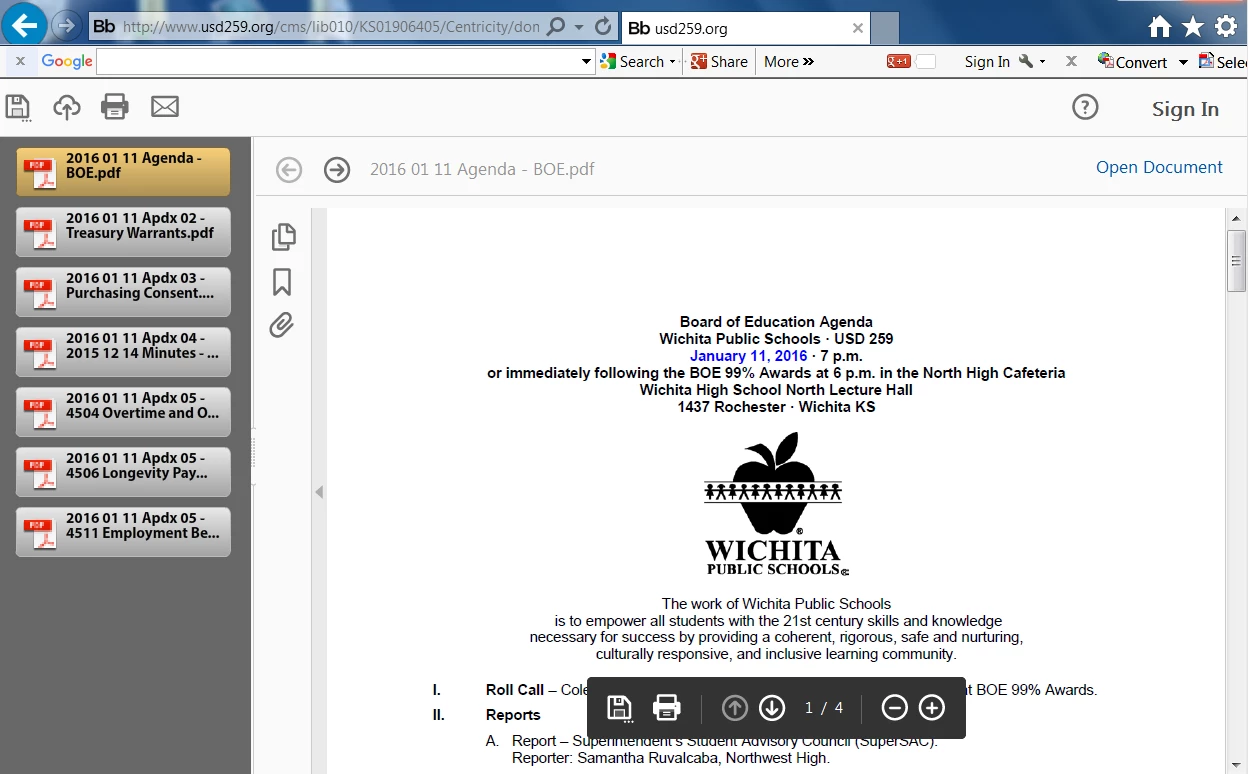
    As you suggested, I uninstalled both the ActiveX and NPAPI utilities, restarted test laptop, and then installed the V22.0.0.207 ActiveX and NPAPI beta builds. This has resolved the issue in Internet Explorer on the test laptop. As shown in the Printscreen below, the Adobe Portfolio now shows the files in the preview area at left.

    Thanks very much for your help.

    Mike

    2 replies

    Participating Frequently
    June 24, 2016

    Hi,

    Can you please check if your issue is same as reported here

    Re: Flash Player 22 - Flash content does not display since player 22 install

    Inspiring
    June 24, 2016

    Kratika,

    The link provided within Don Baker's report: Re: Flash Player 22 - Flash content does not display since player 22 install<https://forums.adobe.com/message/8831661#8831661> appears to be to content that is limited to that institution's clients. Thus, I'm not able to compare the issues. Our level of concern appears to be similar.

    Thanks,

    Mike

    Participating Frequently
    June 24, 2016

    Hi,

    Please check if your issue is fixed in our Flash player beta 22.0.0.203 , which will be live today in some hours.

    Download location:

    Adobe Labs | Previews, prereleases and beta software from Adobe

    Thanks

    Participating Frequently
    June 24, 2016

    Hi,

    Please log a bug in our bugbase with all steps to reproduce the issue and share the bug number here. we will look into it.

    Home

    Thanks

    Inspiring
    June 24, 2016

    Kratika,

    The bug number is 4167793. The attached files are: examples of issue, and Adobe Portfolio.

    Thanks,

    Mike

    Mike Willome, Ed.D.

    Clerk of the Board

    Wichita Public Schools

    201 N. Water

    Wichita KS 67202

    316-973-4553

    mwillome@usd259.net

    Bug 4167793