
infrat12922493
Participant
October 27, 2016
Question

Flash Player 23.0.0.205 not detected after .msi install

  • October 27, 2016
  • 1 reply
  • 1079 views
  • Operating system version : Windows 7 Professional
  • Web browser and version : Internet Explorer 11
  • Flash Player version : 23.0.0.205

Dear Support,

I downloaded the installation MSI from the distribution URL that we previously received from a previous distribution installation request.

Looking at the site, the 23.0.0.205 .msi version for IE 11.0.9600.18282 was available.  I downloaded it and tried installing it on a Windows 7 Pro laptop as follows:

- Previous version (23.0.0.185) was installed; I simply launched the newer msi - it seemed to install fine but in Flash control panel, there is no version installed for IE. Then of course, Flash Player isn't working from IE.  (No issue was found while using the NPAPI msi for Firefox)
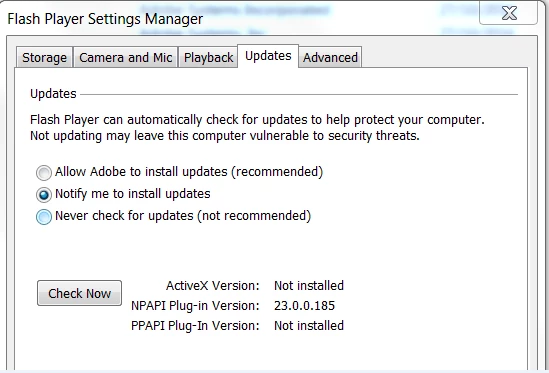
The only way to make it work is when I uninstall Flash from the computer, then using the usual .exe from Get.adobe.com Adobe Flash Player is successfully recognized.

Would you be able to help us with this .msi deployment?

Many thanks!

Kind regards,

Jean-Christophe

    This topic has been closed for replies.

    1 reply

    _maria_
    Legend
    October 27, 2016

    Hi infrat12922493

    Was 23.0.0.185 installed using the MSI or the EXE installer?

    I'll need to get some log files from you to investigate further.  Please provide the following:

    • FlashInstall.log file saved at:
      • 32-bit OS: C:\Windows\System32\Macromed\Flash
      • 64-bit OS: C:\Windows\SysWOW64\Macromed\Flash
    • Verbose with additional debugging MSI install log flle

    These log files, especially the verbose MSI log file, will be very long.  Please upload the files to cloud.acrobat.com/send using the instructions at How to share a document and post the link to the uploaded files in your reply.

    Thank you.

    --

    Maria

    infrat12922493
    Participant
    October 28, 2016

    Hello Maria,

    Going further in my testing, I managed to solve this issue altough it doesn't make a lot of sense to me.

    Weirdly enough, I had the same issue with the 23.0.0.185 .msi deployment.  If I tried to install it manually using the .msi without any version of Flash previously installed the wizard asked midway for the path to the install_flash_player_22_active_x.msi (which I changed accordingly).  I still had the error.

    So I re-tried the whole installation process by first installing the install_flash_player_22_active_x.msi - then checked the Flash control panel -> the correct version was displayed and Flash tests were fine in IE11.

    Afterward I simply launched the verbose installation of the 23.0.0.185 .msi (for which you will see the attached logs) and it went through successfully.  Finally launched the 23.0.0.205 msi install and it went through successfully.  Flash is now correctly displayed in the Flash Control panel & tests were successful in IE11.

    Maybe will you find more details on why it happened in the Log files.  I must say that we deploy all our machines with Windows 7 images so it could come from there.

    Many thanks on your support!

    Kind regards,

    Jean-Christophe

    Here is the link to the installation logs:

    Shared Files - Acrobat.com
