
fengy12353241
Known Participant
December 13, 2016
Answered

Flash player 24.0.0.186 run in Google Chrome can not connect to socket server.

  • December 13, 2016
  • 9 replies
  • 6278 views

Today(2016-12-13),a lot of users come to report that they can not login to the game when they use google chrome.

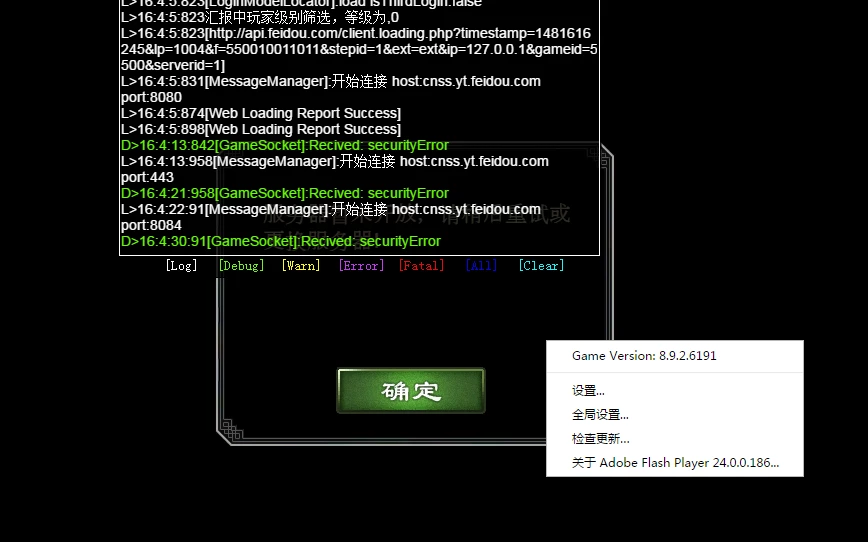
I saw that the flash player automatic update to 24.0.0.186 in the Chrome's plugins list. And when I test my game app in chrome, I can not login to the socket server.

I received the securityError. But my game run in IE is OK.

The version of flash player in my IE is   23.0.0.207.

Why chrome update to higher version?

Why it can not connect to my server?

How can I deal with the problem?
    This topic has been closed for replies.
    Correct answer Amrita Gangwani

    Hi,

    The issue is resolved with our latest release FP 24.0.0.194. Please, verify!

    9 replies

    Amrita Gangwani
    Adobe Employee
    Amrita GangwaniCorrect answer
    Adobe Employee
    January 10, 2017

    Hi,

    The issue is resolved with our latest release FP 24.0.0.194. Please, verify!

    Rohit Guglani
    Participating Frequently
    December 14, 2016

    Hi Everyone,

    We have updated our Beta channel with the fix for this problem. Kindly download the Beta from labs.adobe.com/downloads/flashplayer.html and let us know if this fixes the issue.

    Regards,
    Rohit

    fengy12353241
    Known Participant
    December 15, 2016

    Hi Rohit,

    I have updated to the beta version. The problem is fixed. I can connect to the socket server and login in to the game.

    Thank you for your help.

    And when will update automatically to users client?

    fengy12353241
    Known Participant
    December 14, 2016

    The port of my game server is 8080.

    After I add a file mms.cfg to '• Win: %USERNAME%/AppData/Local/Google/Chrome/User Data/Default/Pepper Data/Shockwave Flash/System' , the problem still there.

    _maria_
    Legend
    December 13, 2016

    Moved from Flash Player Beta Channel to Using Flash Player   24.0.0.186 is a stable release, not beta, as such, posts regarding this version should not be in the https://forums.adobe.com/community/labs/flashruntimes/flashplayer forum.

    chris.campbell
    Legend
    December 13, 2016

    Hello,

    Can you tell me what ports your application is using for communication?  If you add the following to your mms.cfg, does it "fix" the problem?

    EnableInsecureSocketPorts=1

    mms.cfg file location

    Assuming a default Windows installation, Flash Player looks for the mms.cfg file in the following system directories:

    • 32-bit Windows - %WINDIR%\System32\Macromed\Flash

    • 64-bit Windows - %WINDIR%\SysWow64\Macromed\Flash

    Note: The %WINDIR% location represents the Windows system directory, such as C:\WINDOWS.

    Macintosh /Library/Application Support/Macromedia

    Linux /etc/adobe/

    Note: Unlike Windows and Macintosh, the Linux player is in a directory named adobe, not in one named Macromed or

    Macromedia.

    Google Chrome

    Google Chrome uses its own version of the mms.cfg file, saved at:

    • Mac: /Users/<username>/Library/Application Support/Google/Chrome/Default/Pepper Data/Shockwave

    Flash/System

    • Win: %USERNAME%/AppData/Local/Google/Chrome/User Data/Default/Pepper Data/Shockwave Flash/System

    The System directory may not exist. If not, create it manually.

    Note: Directives such as those relating to updating Flash Player are not honored as Google embeds Flash Player in

    Chrome and all updates are released by Google.

    You might use third-party administration tools, such as Microsoft System Management Server, to replicate the

    configuration file to the user's computer.

    Use the standard techniques provided by your operating system to hide or otherwise prevent end users from seeing or

    modifying the mms.cfg file on their systems.

    December 14, 2016

    same problem for me,how long time to solve it?

    fengy12353241
    Known Participant
    December 13, 2016

    Hi

    Can you get the securityError?

    Amrita Gangwani
    Adobe Employee
    Adobe Employee
    December 13, 2016

    Hi,

    We were able to reproduce the issue. We are investigating it.

    You may follow up on https://tracker.adobe.com/#/view/FP-4198184

    Thanks!

    Participant
    December 13, 2016
    fengy12353241
    Known Participant
    December 13, 2016

    After I update the version down to 23.0.0.207 version, I can login to the game. But it was updated to 24.0.0.186 automatically in several minutes later. What should I do ?

    Now all of my users can not use google chrome.

    fengy12353241
    Known Participant
    December 13, 2016

    Amrita Gangwani
    Adobe Employee
    Adobe Employee
    December 13, 2016

    Hi,

    Can you please try it after clearing the cache? The issue is not reproducible at our end, once you have your cache cleared. If it is still reproducible can you mention any specific network requirements.

    This is the observation at our end:

    Thanks!

    Participant
    December 13, 2016

    ++

    Participant
    December 13, 2016

    +1