



Flash Player 30 crashes when audio input is changed
Hello,
I use Internet Explorer to watch TV on a website (SFR TV, french internet access provider).
I use a software called "Audio Router" to route the sound from Internet Explorer to my TV.
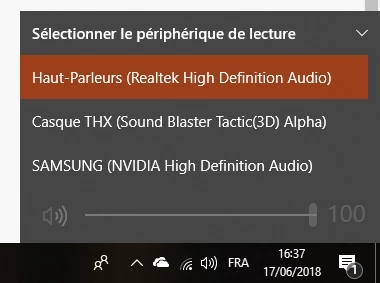
And I set my audio input in Windows to my speakers, so I can play games with sound on speakers, and have TV in the background with sound on the TV.
My issue is simple : when I change the audio input in Windows 10 settings (to switch between my speakers, my headphones or my TV), it makes Internet Explorer close and open again if it is opened on a web page with Flash content
And if I try to route the sound with the software, the issue appears too.
The issue is not present with Flash Player 29. I uninstall the update 30 almost every day to avoid this issue, but it will be annoying to do this until the next release.
I blocked the update in Adobe Flash Player general settings, but the update comes from Windows Update.
Is there a way to block this update, or to solve the issue ?
- Windows 10 Pro v1803
- Internet Explorer v11.112.17134.0
- Flash Player 30
Edit : I found an error report in Event Viewer, I don't know if it can help :
Name of the failed application: IEXPLORE.EXE, version : 11.0.17134.1, timestamp : 0x6639744d
Name of the failed module : Flash.ocx, version : 30.0.0.113, timestamp : 0x5b11dffb
Exception code : 0xc0000005
Error offset : 0x0035d2aa
ID of the failed process : 0x4f0
Start time of the failed software : 0x01d406289d3cbbdd
Path of the failed software : C:\Program Files (x86)\Internet Explorer\IEXPLORE.EXE
Path of the failed module : C:\Windows\System32\Macromed\Flash\Flash.ocx
Report ID : 0c226f08-b6ae-4878-9503-3f2a149bee57
 AdChoices