


Inspiring
October 18, 2017
Answered

Flash Player ActiveX Version 27.0.0.170 - MSI installation issue

  • October 18, 2017
  • 1 reply
  • 11095 views

Hello,

im facing a problem to install the latest Flash Player ActiveX Plugin via MSI from the distribution page.
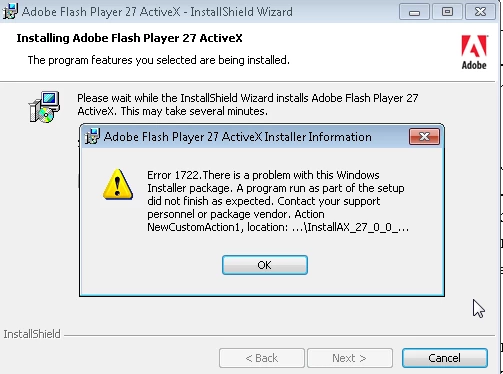
MSI-Log:

CustomAction NewCustomAction1 returned actual error code 1041 (note this may not be 100% accurate if translation happened inside sandbox)
MSI (s) (2C:94) [15:15:36:588]: Product: Adobe Flash Player 27 ActiveX -- Error 1722.There is a problem with this Windows Installer package. A program run as part of the setup did not finish as expected. Contact your support personnel or package vendor. Action NewCustomAction1, location: C:\Users\#USERNAMEDELETED#\AppData\Local\Temp\{25B9B97A-0B1F-4826-9433-17DD1AC643BF}\InstallAX_27_0_0_170.exe, command: -install -msi -prev 0

Error 1722.There is a problem with this Windows Installer package. A program run as part of the setup did not finish as expected. Contact your support personnel or package vendor. Action NewCustomAction1, location: C:\Users\#USERNAMEDELETED#\AppData\Local\Temp\{25B9B97A-0B1F-4826-9433-17DD1AC643BF}\InstallAX_27_0_0_170.exe, command: -install -msi -prev 0
Action ended 15:15:36: InstallFinalize. Return value 3.
Action ended 15:15:36: INSTALL. Return value 3.
MSI (s) (2C:94) [15:15:36:611]: Product: Adobe Flash Player 27 ActiveX -- Installation operation failed.

System: Windows 7 Enterprise

The NPAPI Plugin I could install without problems.

Thank you for Support.

Best Regards,

FK

This topic has been closed for replies.
Correct answer fk85121915

1722 is a generic Windows MSI error, unfortunately, is not very helpful by itself, although there's another error code in your excerpt that may be more telling, but I'll need the entire FlashInstall log files and corresponding verbose MSI log file (for the same installation) to investigate further.  The FlashInstall log file is saved at the following location:

32-bit OS: C:\WIndows\System32\Macromed\Flash\FlashInstall32.log

64-bit OS: C:\Windows\System32\Macromed\Flash\FlashInstall64.log AND C:\Windows\SysWOW64\Macromed\Flash\FlashInstall32.log (both files are required from a 64-bit OS)

Upload the FlashInstall log file AND corresponding MSI verbose log file (you may need to run the installation again to get both for the same installation attempt) to cloud.acrobat.com\send using the instructions at How to share a document and post the link to the uploaded files in your reply.

Thank you.


After a restart the installation was successfully. Due to a lot of work sometimes you don't think on the easiest way. Thank you for Support!

1 reply

Known Participant
October 18, 2017

try this before the install...

taskkill /f /im "flash*"

wmic product where "name like 'Adobe Flash Player%%ActiveX'" uninstall /nointeractive

msiexec /i install_flash_player_27_active_x.msi FLAGS=ALLUSERS=1 /q /norestart

Inspiring
October 18, 2017

Still same message. I assume something is wrong with the MSI provided by the distribution page.

I downloaded the MSI from the german distribution page.

_maria_
Community Manager
Community Manager
October 18, 2017

1722 is a generic Windows MSI error, unfortunately, is not very helpful by itself, although there's another error code in your excerpt that may be more telling, but I'll need the entire FlashInstall log files and corresponding verbose MSI log file (for the same installation) to investigate further.  The FlashInstall log file is saved at the following location:

32-bit OS: C:\WIndows\System32\Macromed\Flash\FlashInstall32.log

64-bit OS: C:\Windows\System32\Macromed\Flash\FlashInstall64.log AND C:\Windows\SysWOW64\Macromed\Flash\FlashInstall32.log (both files are required from a 64-bit OS)

Upload the FlashInstall log file AND corresponding MSI verbose log file (you may need to run the installation again to get both for the same installation attempt) to cloud.acrobat.com\send using the instructions at How to share a document and post the link to the uploaded files in your reply.

Thank you.