


Participant
April 10, 2019
Answered

Flash Player Catalog for Microsoft System Center Updates Publisher 4.5 (SCUP)

  • April 10, 2019
  • 1 reply
  • 1871 views

We do the Update on our Windows 7 Clients with SCUP. But this month (April 2019) it's a Problem with the XML file.

I think the refer ist to the wrong Flashplayer and Plugin version. Because if we import this XML file we get the Information no Update available.

[moderator: deleted links to licensed resources; sharing links (including on the forums) is not allowed as per the distribution license agreement]

thanks regard

Reto
This topic has been closed for replies.
Correct answer piotrł43734508

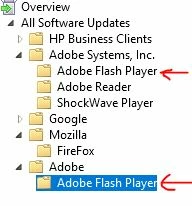
Before Adobe flash Player 32.0.0.171 all updates were at folder Adobe Systems, Inc. -> Adobe Flash Player.

After import new CAB file to System Center  Updates Publisher 2011 with 32.0.0.171  Adobe Flash Player version I found NEW folder Adobe --> Adobe Flash Player . Now I have two folders one with all olders updates and new with only 32.0.0.171 version.

1 reply

piotrł43734508Correct answer
Participant
April 10, 2019

Before Adobe flash Player 32.0.0.171 all updates were at folder Adobe Systems, Inc. -> Adobe Flash Player.

After import new CAB file to System Center  Updates Publisher 2011 with 32.0.0.171  Adobe Flash Player version I found NEW folder Adobe --> Adobe Flash Player . Now I have two folders one with all olders updates and new with only 32.0.0.171 version.

Participant
April 10, 2019

Hello - I found this as well, however I cannot find the patch after publishing it under "all software updates", even without using my saved searches .. just searching for entire patch list for "adobe" does not show me 32.0.0.171 except for the ones Microsoft released on the 9th.

I have confirmed that I published them, using "full content" and using the "sign all software" option like I have been doing for years now.

has anyone else found this, or just me?

thanks

Participant
April 10, 2019

I figured it out - found in another thread - We need to update the Software Update Point to look for the new Product, since Adobe has changed what it is called.

Thanks to Parc STM's comment:

Go in administration (in ConfigMgr console) ==> Sites ==> Manages Software Update Point ==> Products ==> Check the new Adobe / Adobe Flash Player.