


Participant
April 9, 2016
Question

Flash Player doesn't work

  • April 9, 2016
  • 3 replies
  • 1512 views

Hello!

Flash Player doesn't work in Google Chrome and other browsers based Chromium. When i start any video I see "The latest version of Flash Player is required to view videos."

But i use the version 21.0.0.216.
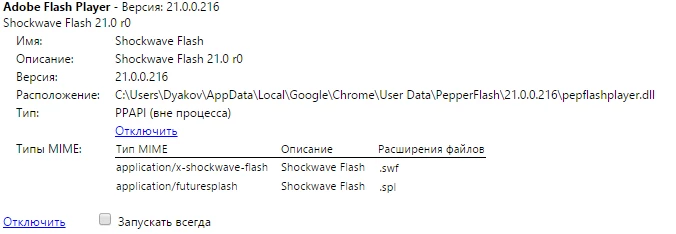
I tried to reinstall Goggle Chrome, cleared cookies & history... nothing helped. Whats the problem?

    This topic has been closed for replies.

    3 replies

    StormwolfKy
    Participant
    April 11, 2016

    You're lucky. I have the latest version of Chrome, but when I try to update to the latest version of Flash, it keeps telling me that I have the latest version - but is only on Version 21.0.0.213.

    My Chrome is Version 49.0.2623.112 m. I have uninstalled fully and clean re-installed 3 times now, but I cannot get Flash 21.0.0.216 on Chrome no matter what I do. All I get when I go to sites requiring Flash is "Couldn't load plugin".

    _maria_
    Legend
    April 11, 2016

    Hi,


    Google released version 21.0.0.216 as a component update.  If you're version hasn't updated yet, launch Chrome and navigate to chrome://components.  Locate the pepper_flash entry and click the 'Check for updates' button.

    --

    Maria

    Carm01
    Legend
    April 11, 2016

    I cannot read Russian

    Is it enabled?

    If it is try closing ALL chrome sessions and deleting the PepperFlash folder here:

    c:\users\%username%\AppData\Local\Google\Chrome\User Data\PepperFlash

    Participating Frequently
    April 9, 2016

    Hi,

    can you please share any such video URL site link?
