dan0000000
Participant
February 27, 2017
Answered

Flash player installation - Connection Failed

  • February 27, 2017
  • 1 reply
  • 4260 views

I followed the link on the Flash Player Help page and under

"Install Flash Player in five easy steps"

I used the Check Now button to confirm current version:

YOUR SYSTEM INFORMATION

Your Flash Version    24.0.0

Your browser name   Firefox (NPAPI)

Your Operating System (OS) Windows (Windows 7)

Under Still Having Problems I clicked on "Installation problems for Windows 7 and older" which took me to

"Installation problems | Flash Player | Windows 7 and earlier"

I selected the "Flash Player for Firefox- NPAPI" link and downloaded the install_flash_player.exe program.  After running it the

Check Now button still returns:

YOUR SYSTEM INFORMATION

Your Flash Version    24.0.0

Your browser name   Firefox (NPAPI)

Your Operating System (OS) Windows (Windows 7)

Please provide a link for the latest version which i believe is Version 24.0.0.221
    This topic has been closed for replies.
    Correct answer _maria_

    Hi,

    The download link posted at "Installation problems | Flash Player | Windows 7 and earlier" is the latest version.  This also download the offline/full installer (install_flash_player.exe) that doesn't return a 'connection error' when using it to install Flash Player.


    Not sure why the 'check now' widget is not displaying the entire version of Flash Player, but you can use Firefox to check what version of the plugin is installed.  Two methods to check:

    Use plugin checker:

    1. Launch Firefox and navigate to Keep your Firefox healthy with a quick checkup — Mozilla
    2. Locate the Adobe Flash Player entry
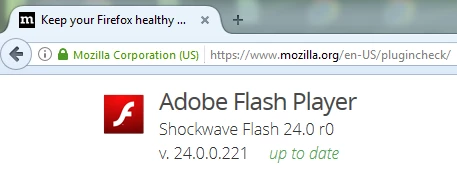
    3. What version is listed?  If you have version 24.0.0.221 it is the latest version and the entry will appear as:

    Use about:addons:

    1. Launch Firefox and navigate to about:addons
    2. In the left pane, ensure Plugins is selected
    3. In the right pane, locate Shockwave Flash and click the More link
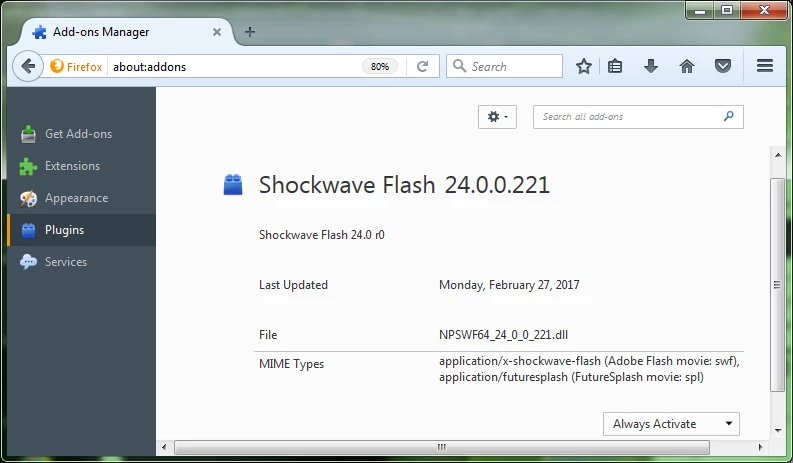
    4. What version is listed?  If it's 24.0.0.221 it's the latest version and the entry will appear as:

    --

    Maria

    1 reply

    _maria_
    Community Manager
    _maria_Community ManagerCorrect answer
    Community Manager
    February 27, 2017

    Hi,

    The download link posted at "Installation problems | Flash Player | Windows 7 and earlier" is the latest version.  This also download the offline/full installer (install_flash_player.exe) that doesn't return a 'connection error' when using it to install Flash Player.


    Not sure why the 'check now' widget is not displaying the entire version of Flash Player, but you can use Firefox to check what version of the plugin is installed.  Two methods to check:

    Use plugin checker:

    1. Launch Firefox and navigate to Keep your Firefox healthy with a quick checkup — Mozilla
    2. Locate the Adobe Flash Player entry
    3. What version is listed?  If you have version 24.0.0.221 it is the latest version and the entry will appear as:

    Use about:addons:

    1. Launch Firefox and navigate to about:addons
    2. In the left pane, ensure Plugins is selected
    3. In the right pane, locate Shockwave Flash and click the More link
    4. What version is listed?  If it's 24.0.0.221 it's the latest version and the entry will appear as:

    --

    Maria

    dan0000000
    Participant
    February 27, 2017

    Hi Maria,

    Thank you for  the prompt reply,

    Yes, it appears you are correct...

    Adobe Flash Player

    Shockwave Flash 24.0 r0

    v. 24.0.0.221 up to date

    and the 'check now' widget still shows 24.0.0

    _maria_
    Community Manager
    Community Manager
    February 27, 2017

    Hi,


    I'm not sure why the entire version is not displaying for you. I'm unable to reproduce, but will forward this to the team responsible for the widget.

    --

    Maria