


March 14, 2019
Question

Flash Player (Mac) switches itself to auto-update and won't let me switch back to notify

  • March 14, 2019
  • 1 reply
  • 517 views

I saw that Flash was trying to install itself in a system folder, even though I had it set to notify before updating. Blocked it, went into the prefs, and saw that the setting had mysteriously changed. I tried to set it back to "notify" and the UI literally switches itself back after I click.  Seriously, if y'all are going to be that horrible, just ignore the UI and run the update anyway.
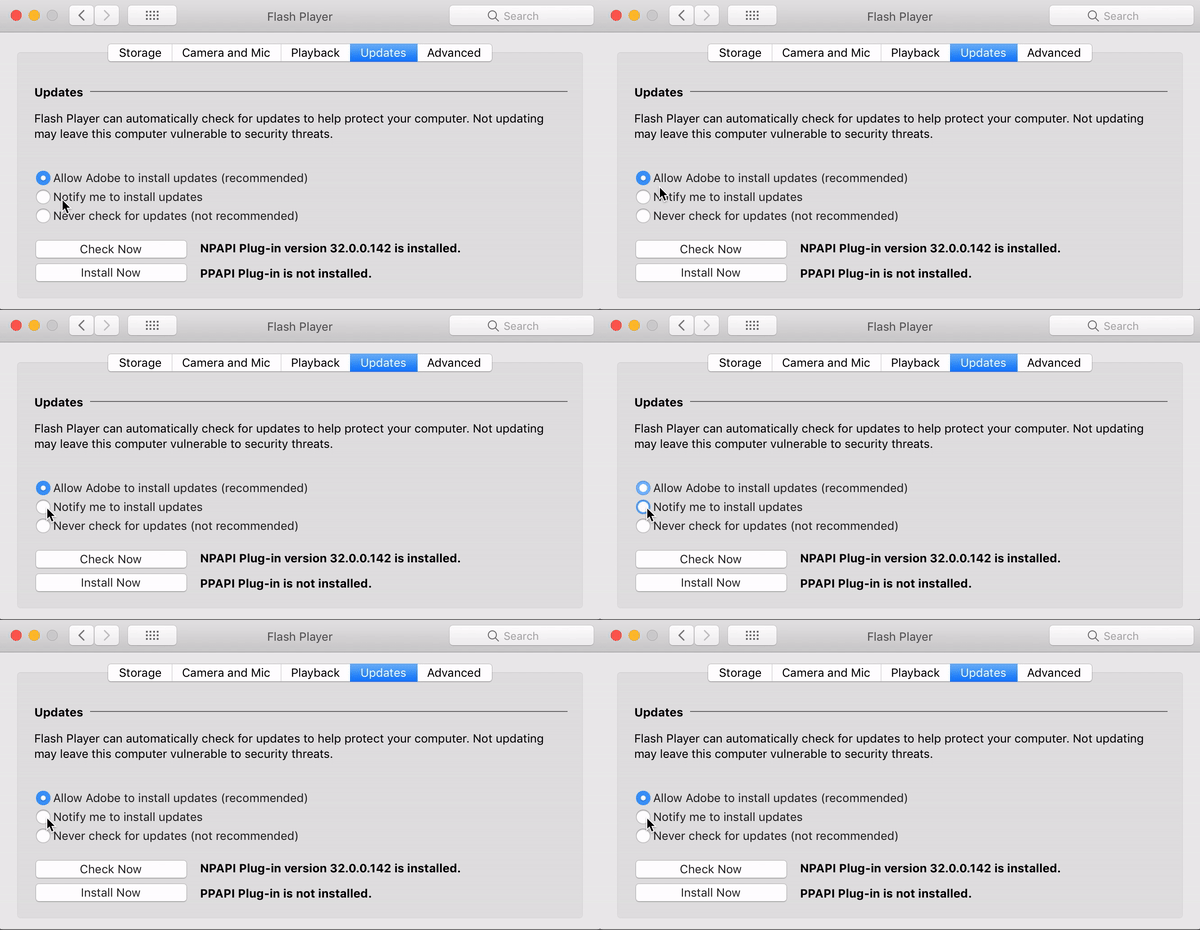
I uninstalled flash but then a few weeks later ran across the one place I still like to have it, so reinstalled it. I was happy to see I could set the preference to ask before updating. And then a week or two later--surprise!--same thing: I caught it trying to update itself without permission, and found that the preference was stuck on "allow Adobe to install updates". That's some seriously user-hostile BS, people.

This topic has been closed for replies.

1 reply

_maria_
Community Manager
Community Manager
March 14, 2019

Hi,


Thank you for reporting.  Please provide the following information and we'll investigate further:

  • Mac OS version
  • Is the Mac user account you're logged on as an Admin user, or Standard user?
  • Flash Player Install Manager log file saved at ~/Library/Logs/FlashPlayerInstallManager.log

The file will be quite large.  Please upload it to cloud.acrobat.com/send, or some other file sharing service of your choice that doesn't require user account to access.  Post the link to the uploaded file in your reply.


Thank you.

--

Maria

March 14, 2019

I'm on macOS 10.13.6. The account is an admin user. The log file is only around 6KB:

2018-02-20 21:29:01 -0800 FIN: [finalizer started]

2018-02-20 21:29:01 -0800 FIN: Compression Output Path: '/Library/Internet Plug-Ins/Flash Player.plugin'.

2018-02-20 21:29:01 -0800 FIN: Compression Input Path: '/Library/Internet Plug-Ins/Flash Player.plugin.lzma'.

2018-02-20 21:29:03 -0800 FIN: Reading previous version file

2018-02-20 21:29:05 -0800 FIN: [finalizer succeeded]

2018-11-08 21:19:23 -0800 FIN: [finalizer started]

2018-11-08 21:19:23 -0800 FIN: Compression Output Path: '/Library/Internet Plug-Ins/Flash Player.plugin'.

2018-11-08 21:19:23 -0800 FIN: Compression Input Path: '/Library/Internet Plug-Ins/Flash Player.plugin.lzma'.

2018-11-08 21:19:25 -0800 FIN: Reading previous version file

2018-11-08 21:19:29 -0800 FIN: [finalizer succeeded]

2018-11-16 09:47:37 -0800 SAU: End SAU run with exit code: 2006

2018-11-23 21:03:50 -0800 SAU: End SAU run with exit code: 2006

2018-12-03 12:00:00 -0800 FIN: [finalizer started]

2018-12-03 12:00:00 -0800 FIN: Compression Output Path: '/Library/Internet Plug-Ins/Flash Player.plugin'.

2018-12-03 12:00:00 -0800 FIN: Compression Input Path: '/Library/Internet Plug-Ins/Flash Player.plugin.lzma'.

2018-12-03 12:00:02 -0800 FIN: Reading previous version file

2018-12-03 12:00:05 -0800 FIN: [finalizer succeeded]

2018-12-05 13:59:51 -0800 SAU: verifySignatureWithData : Message Verified!

2018-12-05 14:00:02 -0800   IM: NPAPI 32.0.0.101 ---------- log start ----------

2018-12-05 14:00:02 -0800   IM: [install started]

2018-12-05 14:00:05 -0800 FIN: [finalizer started]

2018-12-05 14:00:05 -0800 FIN: Compression Output Path: '/Library/Internet Plug-Ins/Flash Player.plugin'.

2018-12-05 14:00:05 -0800 FIN: Compression Input Path: '/Library/Internet Plug-Ins/Flash Player.plugin.lzma'.

2018-12-05 14:00:06 -0800 FIN: Reading previous version file

2018-12-05 14:00:36 -0800 FIN: [finalizer succeeded]

installer: Package name is Adobe Flash Player

installer: Upgrading at base path /

installer: The upgrade was successful.

2018-12-05 14:00:38 -0800   IM: [install succeeded]

2018-12-05 14:00:38 -0800   IM: Install succeeded with exit code: 0.

2018-12-05 14:00:38 -0800   IM: NPAPI 32.0.0.101 ---------- log end ----------

2018-12-19 09:49:45 -0800 SAU: End SAU run with exit code: 2002

2018-12-19 10:49:45 -0800 SAU: End SAU run with exit code: 2002

2018-12-19 11:49:45 -0800 SAU: End SAU run with exit code: 2002

2018-12-19 12:49:45 -0800 SAU: End SAU run with exit code: 2002

2018-12-19 13:49:45 -0800 SAU: End SAU run with exit code: 2002

2018-12-19 14:49:46 -0800 SAU: End SAU run with exit code: 2002

2018-12-19 15:49:46 -0800 SAU: End SAU run with exit code: 2002

2018-12-19 16:49:46 -0800 SAU: End SAU run with exit code: 2002

2018-12-19 17:49:46 -0800 SAU: End SAU run with exit code: 2002

2018-12-19 18:49:46 -0800 SAU: End SAU run with exit code: 2002

2018-12-19 19:49:46 -0800 SAU: End SAU run with exit code: 2002

2019-01-08 14:22:36 -0800 SAU: verifySignatureWithData : Message Verified!

2019-01-08 14:22:41 -0800   IM: NPAPI 32.0.0.114 ---------- log start ----------

2019-01-08 14:22:41 -0800   IM: [install started]

2019-01-08 14:22:43 -0800 FIN: [finalizer started]

2019-01-08 14:22:43 -0800 FIN: Compression Output Path: '/Library/Internet Plug-Ins/Flash Player.plugin'.

2019-01-08 14:22:43 -0800 FIN: Compression Input Path: '/Library/Internet Plug-Ins/Flash Player.plugin.lzma'.

2019-01-08 14:22:45 -0800 FIN: Reading previous version file

2019-01-08 14:23:16 -0800 FIN: [finalizer succeeded]

installer: Package name is Adobe Flash Player

installer: Upgrading at base path /

installer: The upgrade was successful.

2019-01-08 14:23:17 -0800   IM: [install succeeded]

2019-01-08 14:23:17 -0800   IM: Install succeeded with exit code: 0.

2019-01-08 14:23:17 -0800   IM: NPAPI 32.0.0.114 ---------- log end ----------

2019-01-08 14:38:04 -0800 FIN: [finalizer started]

2019-01-08 14:38:04 -0800 FIN: Compression Output Path: '/Library/Internet Plug-Ins/Flash Player.plugin'.

2019-01-08 14:38:04 -0800 FIN: Compression Input Path: '/Library/Internet Plug-Ins/Flash Player.plugin.lzma'.

2019-01-08 14:38:05 -0800 FIN: Reading previous version file

2019-01-08 14:38:08 -0800 FIN: [finalizer succeeded]

2019-02-11 18:00:28 +0800 SAU: End SAU run with exit code: 2002

2019-02-13 09:38:02 +0800 SAU: verifySignatureWithData : Message Verified!

2019-02-13 09:38:07 +0800   IM: NPAPI 32.0.0.142 ---------- log start ----------

2019-02-13 09:38:08 +0800   IM: [install started]

2019-02-13 09:38:10 +0800 FIN: [finalizer started]

2019-02-13 09:38:10 +0800 FIN: Compression Output Path: '/Library/Internet Plug-Ins/Flash Player.plugin'.

2019-02-13 09:38:10 +0800 FIN: Compression Input Path: '/Library/Internet Plug-Ins/Flash Player.plugin.lzma'.

2019-02-13 09:38:12 +0800 FIN: Reading previous version file

2019-02-13 09:38:16 +0800 FIN: [finalizer succeeded]

installer: Package name is Adobe Flash Player

installer: Upgrading at base path /

installer: The upgrade was successful.

2019-02-13 09:38:18 +0800   IM: [install succeeded]

2019-02-13 09:38:18 +0800   IM: Install succeeded with exit code: 0.

2019-02-13 09:38:18 +0800   IM: NPAPI 32.0.0.142 ---------- log end ----------

2019-02-16 15:45:54 +0800 FIN: [finalizer started]

2019-02-16 15:45:54 +0800 FIN: Compression Output Path: '/Library/Internet Plug-Ins/Flash Player.plugin'.

2019-02-16 15:45:54 +0800 FIN: Compression Input Path: '/Library/Internet Plug-Ins/Flash Player.plugin.lzma'.

2019-02-16 15:45:57 +0800 FIN: [finalizer succeeded]

2019-03-12 11:20:00 -0700 SAU: verifySignatureWithData : Message Verified!

2019-03-12 11:20:05 -0700   IM: NPAPI 32.0.0.156 ---------- log start ----------

2019-03-12 11:20:05 -0700   IM: [install started]

2019-03-12 11:20:08 -0700 FIN: [finalizer started]

2019-03-12 11:20:08 -0700 FIN: Compression Output Path: '/Library/Internet Plug-Ins/Flash Player.plugin'.

2019-03-12 11:20:08 -0700 FIN: Compression Input Path: '/Library/Internet Plug-Ins/Flash Player.plugin.lzma'.

2019-03-12 11:20:09 -0700 FIN: Reading previous version file

2019-03-12 11:20:15 -0700 FIN: [finalizer succeeded]

installer: Package name is Adobe Flash Player

installer: Upgrading at base path /

installer: The upgrade was successful.

2019-03-12 11:20:16 -0700   IM: [install succeeded]

2019-03-12 11:20:16 -0700   IM: Install succeeded with exit code: 0.

2019-03-12 11:20:16 -0700   IM: NPAPI 32.0.0.156 ---------- log end ----------

_maria_
Community Manager
Community Manager
March 14, 2019
I saw that Flash was trying to install itself in a system folder

What system folder was it trying to install to?

Thank you for providing the information.  This is definitely not expected behaviour.  Your selection should stick.

Upon further investigation, I was able to reproduce the behaviour after deleting the file /Library/Application Support/Adobe/Flash Player Install Manager/fpsuad.  Does this file exist on your system, or was it deleted?  If it was deleted, please re-install Flash Player to re-create this file.