Participant
June 28, 2018
Answered

Flash player MSI will not install

  • June 28, 2018
  • 2 replies
  • 1731 views
  • Operating system version

Windows 7 x64 SP1

  • Web browser and version

IE 11

ActiveX NPapi and PPapi 30

  • Explain your problem in step-by-step detail if possible

For most of our users, the deployment of the Flash 30 MSI's has gone smoothly.  However, for some it just sticks on 'Installing...' for 30 mins and then times out.  I have tried to run the MSI directly from the desktop of an affected computer and it comes up with the install page, click next, 30 minute delay where nothing happens - then an error that says "You must be an administrator to install this program".  I am logged in as administrator and I can install any other program, just not flash.

  • A direct link to a web page that demonstrates the problem

N/A

This topic has been closed for replies.
Correct answer _maria_

Thank you for providing the log files.  The log files show the NPAPI and PPAPI installed without error.  Are you able to view Flash content in Firefox and a Chromium-based browser (Chrome, Opera)?

For the ActiveX installation, for which the MSI log file was provided, there is no record of this installation attempt in the FlashInstall log files, so the failure is happening prior to the  the Flash Player installer itself being launched by the MSI.  We'd like to get additional information to troubleshoot further:

  • Post a screenshot of the Control Panel > All Control Panel Items > Flash Player > Updates tab
    • If you do not see the Flash Player in in the Control Panel, change the view by setting to 'Small icons'
  • Do you use a MSI Transform file?  If so, please compress the file and upload it to cloud.acrobat.com/send
  • Is the user on the system that is failing a local Administrator or a Network Administrator?
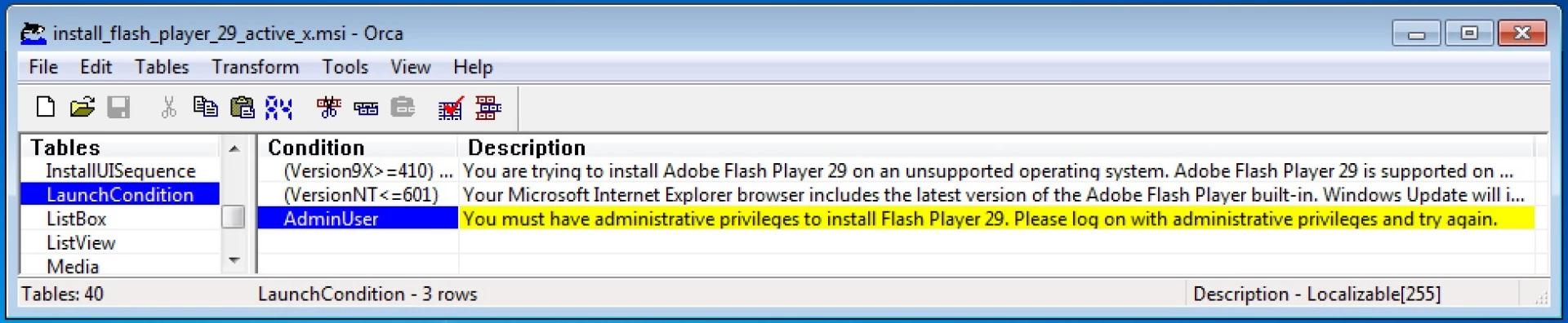
  • The MSI installer has a setting that configures the MSI to require Admin privileges.  You can try disabling this setting and running the installer again.  To disable the setting:
    • Open the MSI installer using Orca, or similar MSI editing utility.
    • Delete the LaunchCondition > Admin User entry
    • Save and Run the MSI

Thank you.

--

Maria

2 replies

_maria_
Community Manager
Community Manager
June 28, 2018

Hi AW_CAT

We'll need to review the installation log files, including verbose MSI log files, to troubleshoot.  Please provide the following from an impacted system:

  • FlashInstall32.log saved at C:\Windows\SysWOW64\Macromed\Flash
  • FlashInstall64.log saved at C:\Windows\System32\Macromed\Flash
  • a MSI log file with the options v+x to obtain verbose + extra debugging information

The log files must be for the same installation attempt.  Upload the files to cloud.acrobat.com/send using the instructions at How to share a file using Adobe Document Cloud and post the link to the uploaded files in our reply.

Please note: Adobe North American offices will be closed all of next week (week of July 2nd).  Replies will most likely be delayed until the following week (week of July 10).

--

Maria

AW_CATAuthor
Participant
June 28, 2018

Hi,

Please see link below for the log files you have requested.

Shared Files - Acrobat.com

I have noted from the log file that the source is set as \\LapfordCPS.

Thats a low bandwidth server, so I copied installer to desktop and switched ethernet/wireless off.

I still get the failure during install that I don't have administrative permissions.

I definitely do have them!!

Any help/suggestions are gratefully received.

Thanks

_maria_
Community Manager
_maria_Community ManagerCorrect answer
Community Manager
June 28, 2018

Thank you for providing the log files.  The log files show the NPAPI and PPAPI installed without error.  Are you able to view Flash content in Firefox and a Chromium-based browser (Chrome, Opera)?

For the ActiveX installation, for which the MSI log file was provided, there is no record of this installation attempt in the FlashInstall log files, so the failure is happening prior to the  the Flash Player installer itself being launched by the MSI.  We'd like to get additional information to troubleshoot further:

  • Post a screenshot of the Control Panel > All Control Panel Items > Flash Player > Updates tab
    • If you do not see the Flash Player in in the Control Panel, change the view by setting to 'Small icons'
  • Do you use a MSI Transform file?  If so, please compress the file and upload it to cloud.acrobat.com/send
  • Is the user on the system that is failing a local Administrator or a Network Administrator?
  • The MSI installer has a setting that configures the MSI to require Admin privileges.  You can try disabling this setting and running the installer again.  To disable the setting:
    • Open the MSI installer using Orca, or similar MSI editing utility.
    • Delete the LaunchCondition > Admin User entry
    • Save and Run the MSI

Thank you.

--

Maria

John T Smith
Community Expert
Community Expert
June 28, 2018

As far as I know, Microsoft does not allow external installs into Edge or Internet Explorer

If you want the latest Flash Player, you will have to use a non-Microsoft browser

Search http://www.microsoft.com/en-us/default.aspx for help with their browser