
Flash Player Not Working
Flash Player is installed. Some video content plays, while other content does not.
For example, I can watch the (subscription only) live baseball games on MLB.com, but the video clips and highlights on the main site will not play (both players are Flash, but they are different). Similarly, I can watch the subscription only video on TheBlaze.com (the player is the same, or very similar, to that used by MLB subscription service), but the video clips in the free news feed will not play. I can also view most video on YouTube, it seems. I cannot, however, view video on sites like HuffingtonPost and FOXNews, among others.
Since I started encountering this problem, I have also replaced my hard drive and reinstalled Windows 7. The problem still persists.
I first thought that the problem could have something to do with my browser settings, so I have reset Internet Options to default via the Advanced Tab. I reset the Java settings to their default security settings.
I usually trace all of my installations with Revo Uninstaller. Just in case this could have created a problem, I uninstalled Flash, Shockwave, AIR, and Reader and reinstalled them without the trace running. I also wondered that it may have something to do with the order in which I installed the Adobe products, so I made sure that I installed them in the order in which they appear on your downloads page.
The only thing that I can think of to try is to make sure I am in a 64-bit tab before visiting the download page. That, and clean my registry before installing the next attempt. And download the full installation pack so that I can disable the virus scanner during installation.
The problem still is not resolved. I cannot think of anything else I may have done which would affect the Flash Player installation.
=====================================================================
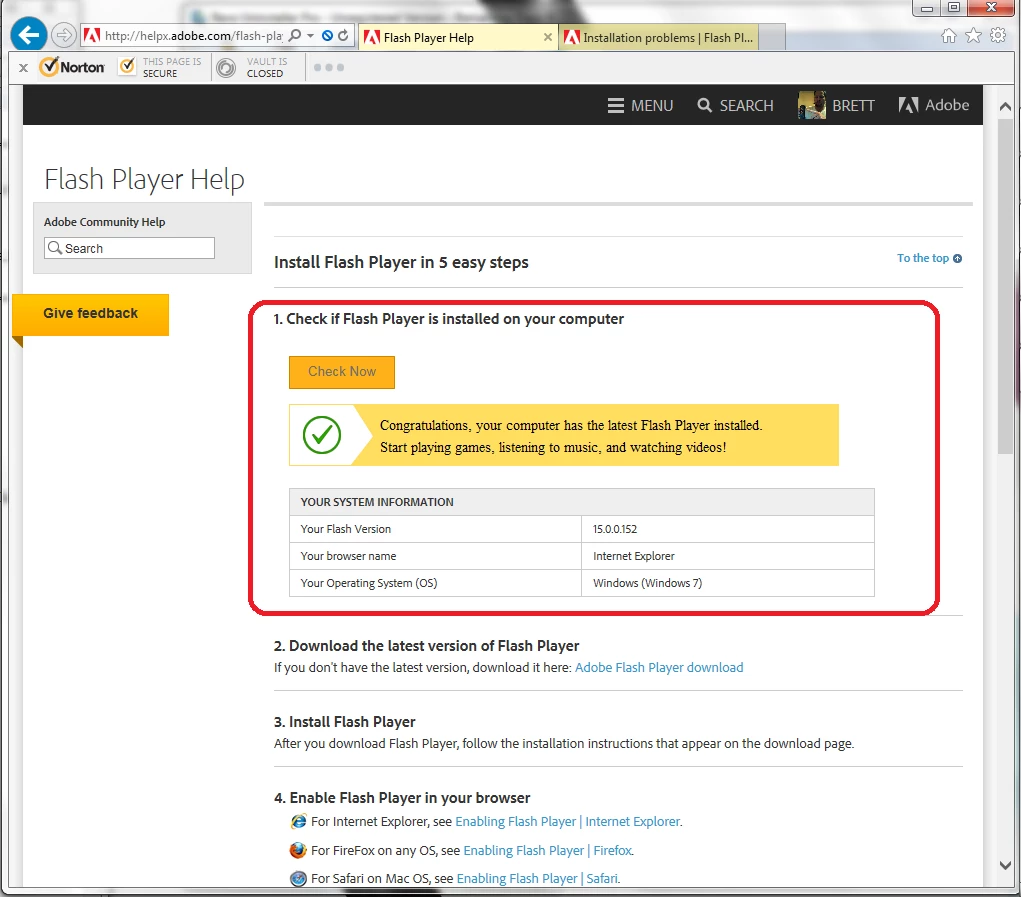
Using the resources provided on your site, I navigated from the Home page to Learn & Support>Download and Install>Check if Flash Installed (http://helpx.adobe.com/flash-player.html). Step one result is normal: "Congratulations, your computer has the latest Flash..." [Attachment #1]/servlet/JiveServlet/downloadImage/2-6730251-671621/1.+Installation+Check.png
On the same page, step 4: Enable Flash Player (http://helpx.adobe.com/flash-player/kb/install-flash-player-windows.html)... The non-HTML5 video at the top of the page does not play. The GUI doesn't even generate. [Attachment #2]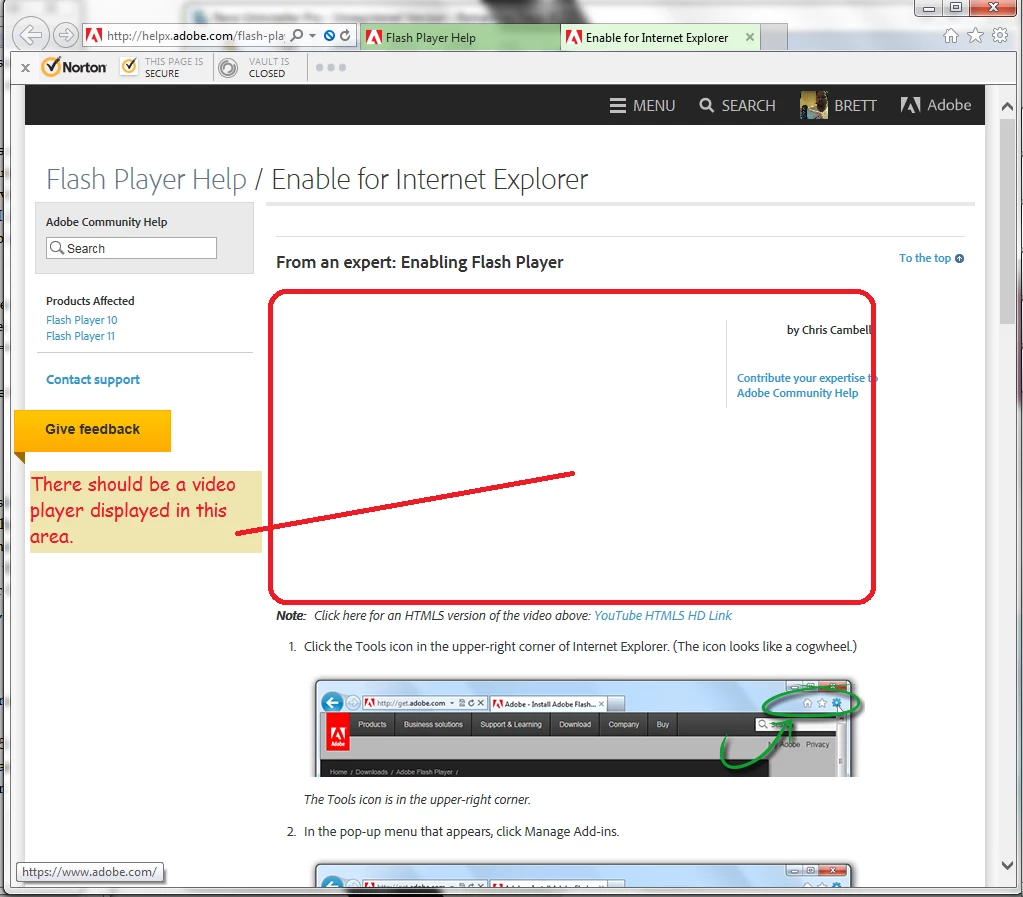 /servlet/JiveServlet/downloadImage/2-6730251-671623/2.+No+Video+Player.png
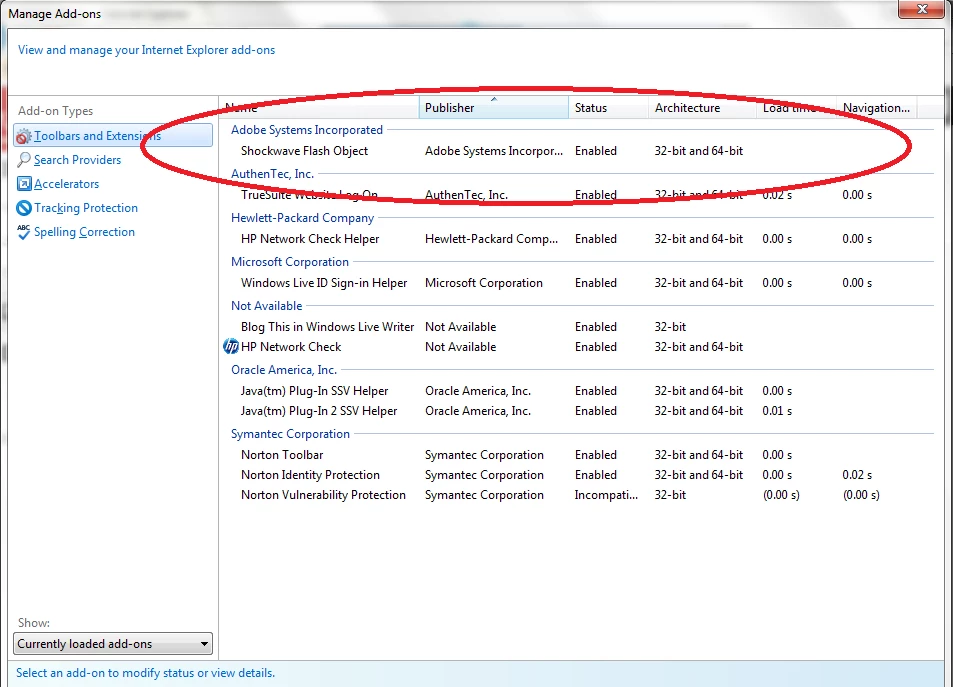
Anyway, when I click the link for the HTML5 version, the YouTube page opens and builds the player GUI, but only audio come out, no video. Some other videos on YouTube do play, though. Following the instructions on the page, I double-check to make sure that Flash Player is enabled. [Attachment #3]/servlet/JiveServlet/downloadImage/2-6730251-671624/3.+Manage+Add-Ons.png
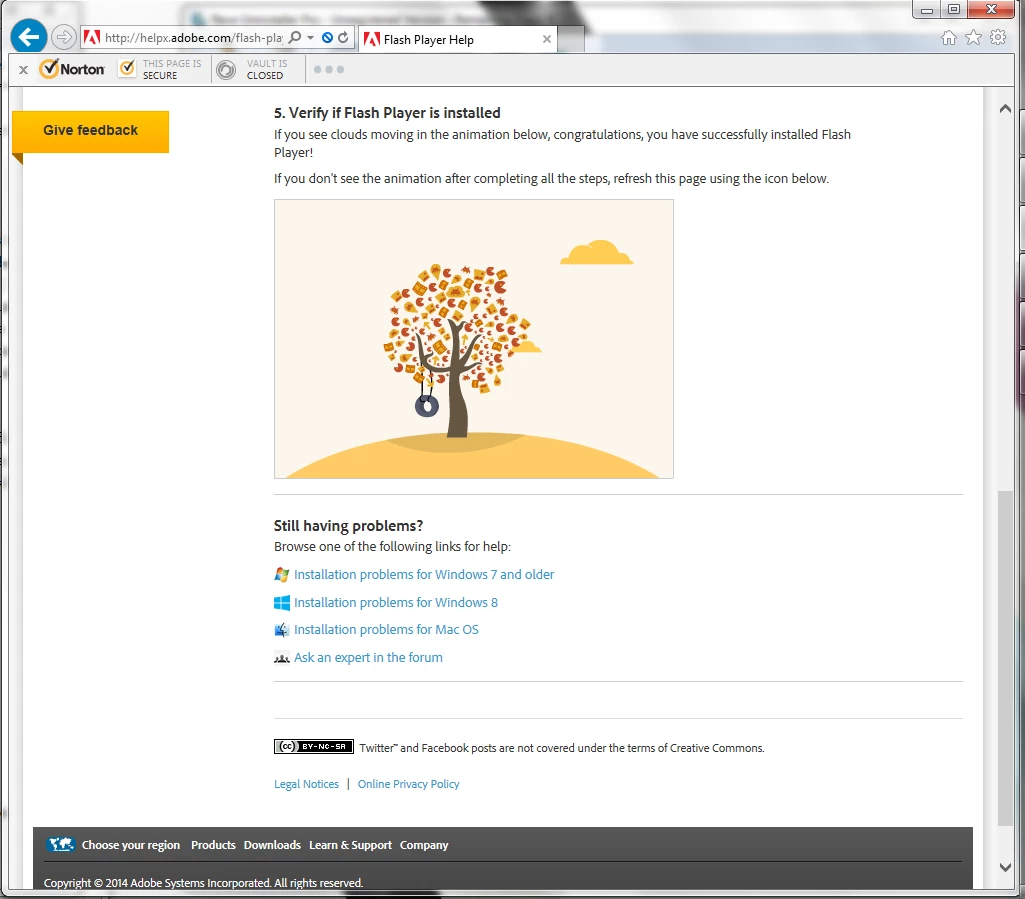
Back to the page (http://helpx.adobe.com/flash-player.html), step number 5: "Verify if Flash Player is installed." This graphic is running. The tire swings and the clouds do their thing. [Attachment #4]/servlet/JiveServlet/downloadImage/2-6730251-671625/4.+Verify+Installation.png
At the bottom of the page, I click through the link for "Installation problems for Windows 7 and older."
Step 1: "Have you checked if Flash Player..."
"Congratulation, your computer has the latest Flash Player installed." This is an identical test to that shown in [Attachment #1].
Step 2: "Are you being asked to close the Browser?"
No.
Step 3. "Have you checked if Flash... is enabled...?"
Yes, and it is.
Step 4. "Are you getting errors containing ActiveX issues?"
No, but I verify that Filtering is not selected, anyway.
Step 5. The installer ran just fine. Flash Player is installed, or I would not be able to watch the video that does work (see above).
Step 6. I am not getting permissions issues.
In fact, even the web pages that will not play video THINK that they are... I usually get the audio stream, and my bandwidth usage meter indicates that the site is streaming more than just the audio feed. In addition, none of these pages prompt me to download or install anything, indicating that they have detected that Flash Player is installed.
Step 7. I click the link for "frequently occurring issues;" (http://helpx.adobe.com/flash-player/kb/common-problems-flash-player.html).
-----------------------------------------------------
New Page: http://helpx.adobe.com/flash-player/kb/common-problems-flash-player.html
Step 1. "Check if you have the latest Flash..."
This page does not show the graphics panel that is supposed to tell me what version of Flash is installed [Attachment #5]./servlet/JiveServlet/downloadImage/2-6730251-671626/5.+Flash+Player+Fail.png
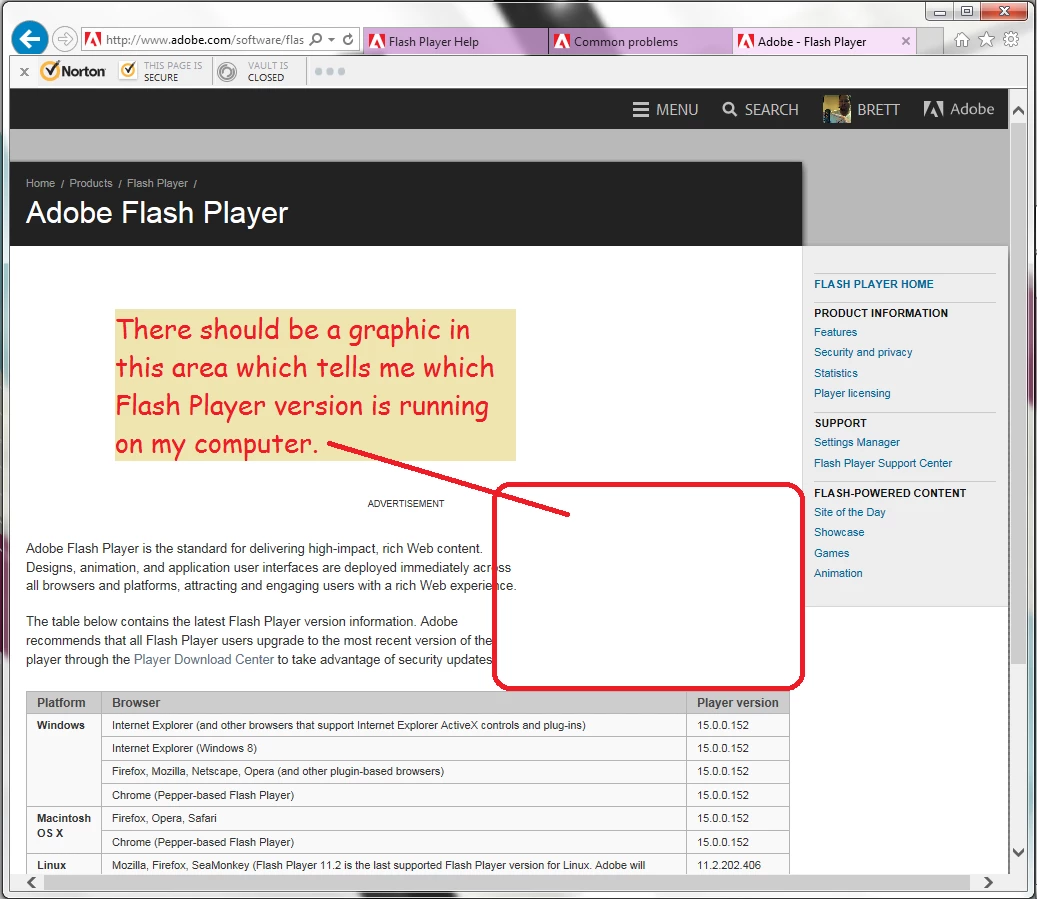
Step 2. "Check out the info on common... problems."
In the link: "Video and audio not playing," follow the first link at the top for Win7 (http://kb2.adobe.com/cps/837/cpsid_83715.html). The "Flash Player Information" pane does not indicate anything: neither the version number and operating system, nor the Flash error message--and one or the other is supposed to be run. [Attachment #6]/servlet/JiveServlet/downloadImage/2-6730251-671627/6.+Common+Problems.png
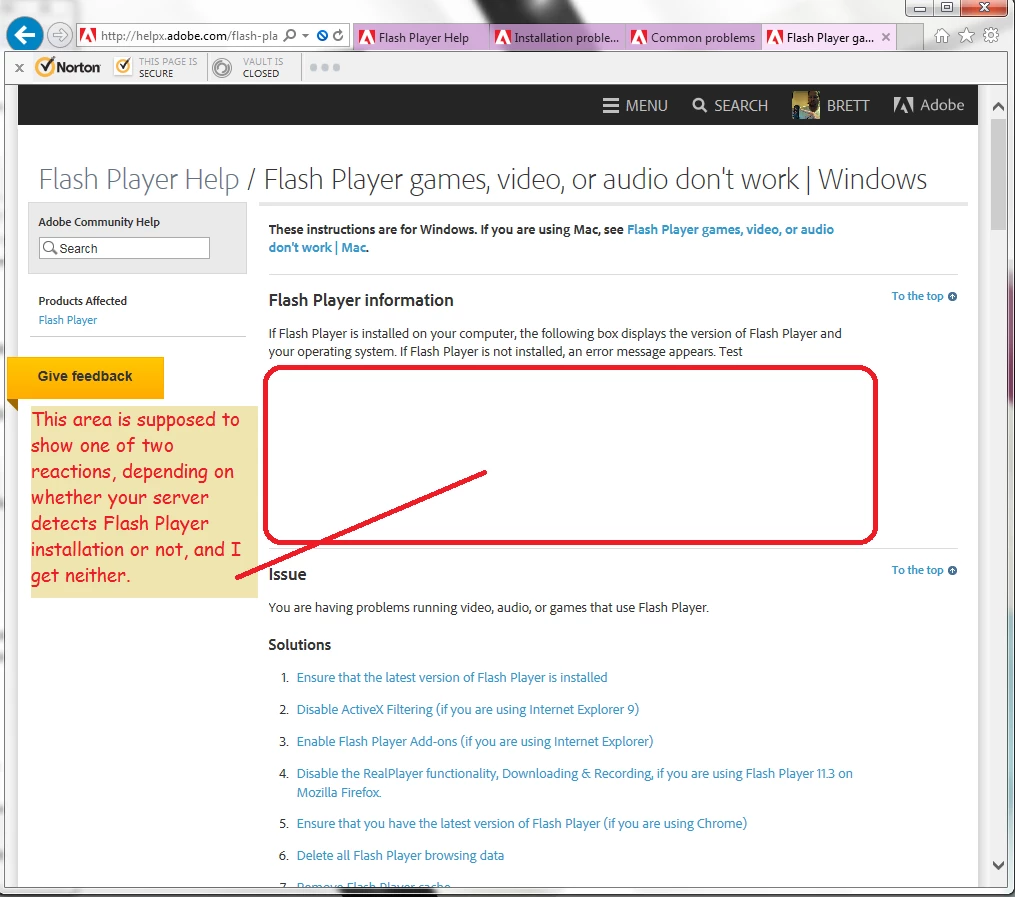
Delete Flash Player browsing data
Remove Flash Player cache
Delete Flash Player AppData
Deselect Harware Acceleration (had to go to a YouTube video to open the settings pane).
**The last item on this list is "If you still have issues, report it to the Flash Player Forum.** Back to previous page.
Step 2. Follow link "Flash Player on 64-bit operating systems"
(http://kb2.adobe.com/cps/000/6b3af6c9.html) On this page, in the section "Install Flash Player," the "direct link" link is pointing to a page that is not a download page, and needs to be fixed.
Step 2. Windows 7 Problems (http://kb2.adobe.com/cps/837/cpsid_83715.html)
Another redundant link.
Step 7. "Latest version of Flash Player doesn't display video."
(http://kb2.adobe.com/cps/909/cpsid_90990.html) Links to a redundant page which I have already troubleshooted [Can I say "troubleshooted?"] in step 2. This link should be removed from this step.
-----------------------------------------------------
Back to page (http://helpx.adobe.com/flash-player/kb/installation-problems-flash-player-windows.html)
The last step, "Still having problems?"
Under the sub-heading, "Also see:" is a link labeled "Installation problems for Windows 7 and older." (http://helpx.adobe.com/flash-player/kb/installation-problems-flash-player-windows.html)
This is a link back to the same page, and should be deleted or redirected.
-----------------------------------------------------
Back to the bottom of the original page (http://helpx.adobe.com/flash-player.html), the last link is "Ask an expert in the forum."
=====================================================================
As an aside, the Internet Explorer previews in the taskbar are all blank. [Attachment #7]
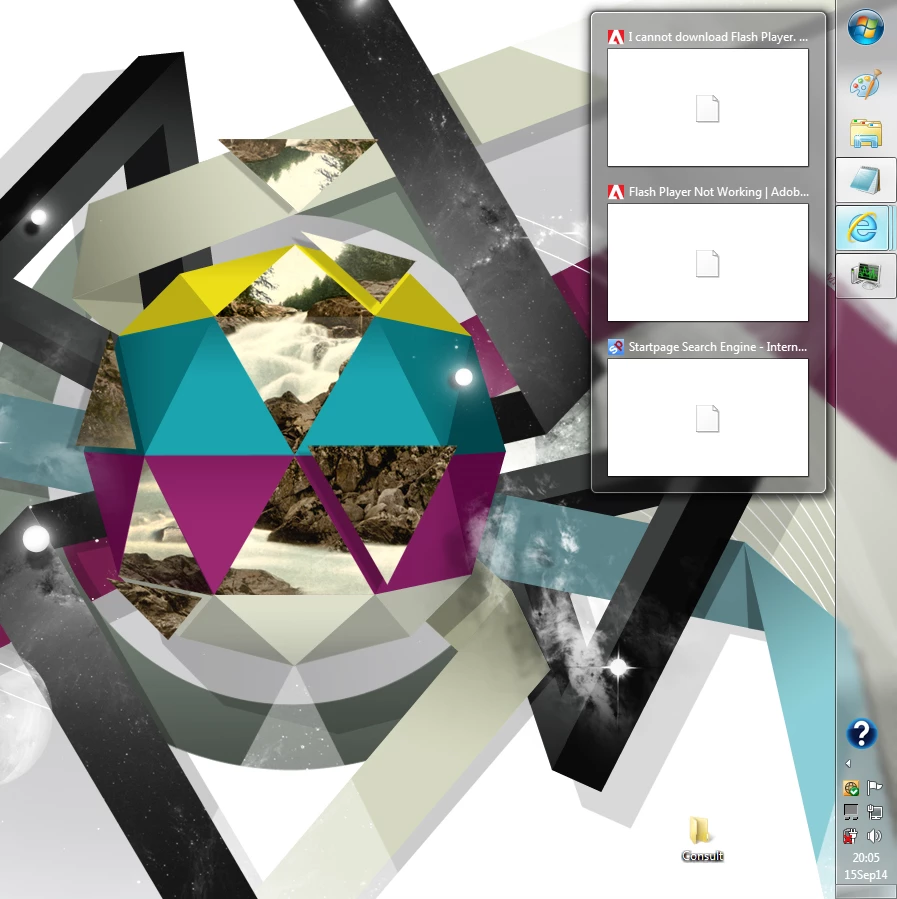
If I have multiple web pages open, only the page that is showing on top is reflected in the task bar preview. All other open pages are shown as blank white with the Internet Explorer logo in the middle. Are these generated with Flash Player? If I have multiple documents or folders open, they all preview correctly when I hover over the program icon. Only the Internet Explorer previews are affected.
I hope that there are sufficient clues in the information I have provided to point to a solution. Most notably, the test programs that run on your self-help pages. Attachments number 1 and 4 show Flash tests that return positive results, while Attachments number 2, 5, and 6 all show Flash tests that return negative or no results. Whoever knows what is different between these two sets of Adobe tests will be able to point us in the right direction.
 AdChoices