

VoltaM
Participant
February 22, 2017
Question

Flash player plugin blocked - OS X 10.11.6 and Chrome 56

  • February 22, 2017
  • 3 replies
  • 3198 views

Since the latest update, I'm having problems with the flash player plugin being blocked. I've gone through all the steps to "always allow" and "enable" on every website and preference possible - chrome and mac preferences. I can't get it to remember the site visited as "always allow." Please help!

As seen below - I get the red X and the message plugins were blocked. I have enabled on chrome and in mac preferences and yet every time I go to this site it won't remember my settings. Is there anything else I can do to get rid of this message?

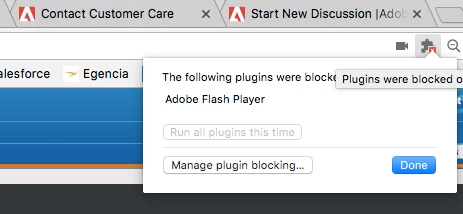
[moderator: edited topic title to better describe the issue and included os/browser]

    This topic has been closed for replies.

    3 replies

    February 24, 2017

    1.Choose Firefox > Tools > Add-ons.

    2.Select Plugins.

    3.In the list of Add-ons, look for Shockwave Flash (another name for Flash Player) and check the status that appears to the right of the plug-in name.

    4.Select Always Activate.

    5.Finish

    _maria_
    Community Manager
    Community Manager
    February 24, 2017

    @harrism5968

    The OP is using Chrome, not Firefox, and has attempted to 'always activate' the plugin.

    VoltaM
    VoltaMAuthor
    Participant
    February 22, 2017

    Well, I'm on a mac and it's not exactly identical. So you're saying it's a Chrome issue not Adobe?

    _maria_
    Community Manager
    Community Manager
    February 22, 2017

    Correct.  Adobe has nothing to do with the browser's algorithm to display/block a plugin.

    _maria_
    Community Manager
    Community Manager
    February 22, 2017

    What is the OS and browser version?

    VoltaM
    VoltaMAuthor
    Participant
    February 22, 2017

    OS Version X El Capitan 10.11.6

    Browser version Version 56.0.2924.87 (64-bit)

    Saying it's all up to date.

    _maria_
    Community Manager
    Community Manager
    February 22, 2017

    Sounds like you're encountering the same issue with Chrome that is reported here: Chrome/win7/ run the plugin choise stopped existing  Please review the discussion.  If it's the same, it's Chrome behaviour, not Flash Player.