Participating Frequently
July 21, 2011
Answered

Flash Player settings frozen

  • July 21, 2011
  • 3 replies
  • 34567 views

Hello

I can't use my webcam nor my microphone on webchats.

They work well on iChat, Skype, PhotoBooth, etc.

I can't click on Allow or Deny nor close the window.

I'm using the new MAC OS X LION and I tried on Safari, Firefox and Google Chrome.

Here is a screen picture (in French)
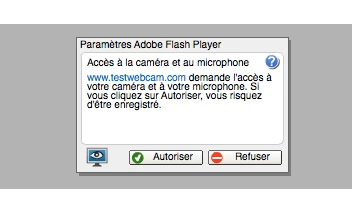
Please, HELP ME!!!!!!! I've been trying to solve this for 9 hours !!!!

    This topic has been closed for replies.
    Correct answer chris.campbell

    I put together a short video that walks you through the process of using Flash Player's native control panel and the camera and microphone settings.  Hopefully it helps out.

    http://forums.adobe.com/thread/880967

    Chris

    3 replies

    Participant
    July 28, 2011

    I'm having the same problem using the new MAC OS X Lion and have also tried in ton Safari & Firefox...Same thing...Can't close it, can't click Allow or Deny...

    chris.campbell
    Legend
    August 1, 2011

    scd199720 wrote:

    I'm having the same problem using the new MAC OS X Lion and have also tried in ton Safari & Firefox...Same thing...Can't close it, can't click Allow or Deny...

    Hi scd,

    Can you try going into Flash's native control panel (System Preferences->Flash Player), then selecting the Storage tab and clicking the Local Storage Settings by Site... button.  Look for the entry for assets.frontier.zgncdn.com and change the storage access popup to Allow?  In addition, you might want to verify that "Allow sites to save information on this computer" is also selected on the Storage tab.

    Thanks,

    Chris

    Adobe Employee
    July 21, 2011

    Yes, unfortunately this is a known issue with Flash Player on OSX Lion.

    Until a fix is released, you can use the Flash Player Local Settings Manager to modify your Camera and Microphone permissions as a workaround.

    The Local Settings Manager is included with Flash Player 10.3, and can be found in System Preferences.

    chris.campbell
    chris.campbellCorrect answer
    Legend
    July 22, 2011

    I put together a short video that walks you through the process of using Flash Player's native control panel and the camera and microphone settings.  Hopefully it helps out.

    http://forums.adobe.com/thread/880967

    Chris

    tiddles75Author
    Participating Frequently
    July 23, 2011

    Thanks but it still doesn't work when using Private Browsing.

    Participating Frequently
    July 21, 2011

    merci de vos nombreuses réponse. m est je parle ou lit que le français est pas l anglais merci encore pour les nombreuses réponse.

    Envoyé depuis un mobile Sa.msung

    tiddles75 <forums@adobe.com> a écrit :

    >

    >Hello

    >I can't use my webcam nor my microphone on webchats.

    >They work well on iChat, Skype, PhotoBooth, etc.

    >I can't click on Allow or Deny nor close the window.

    >Here is a screen picture (in French)

    >http://forums.adobe.com/servlet/JiveServlet/showImage/76559/Screen.png

    >Please, HELP ME!!!!!!! I've been trying to solve this for 9 hours !!!!

    >