Participant
November 13, 2020
Answered

Flash Player update blocked by Clean My Mac

  • November 13, 2020
  • 3 replies
  • 1467 views

Running El Capitan I've updated Flash regularly but now it's blocked. Here's a screenshot of the message I get:
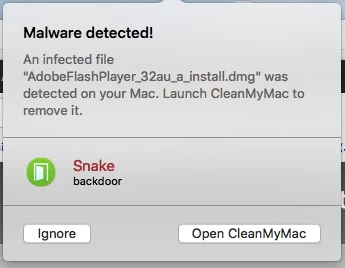
 So I haven't updated it. Anyone else seen this?

    This topic has been closed for replies.
    Correct answer _maria_

    CleanMyMac has been known to falsely flag Flash Player as malware.  You can test out the installer file on VirusTotal


    Based on the file name, it was downloaded from a Flash Player Update Notification dialog prompt.   If downloaded from adobe.com it's legit.  You can always download the installer file from https://get.adobe.com/flashplayer, but don't use Safari.  Apple dropped support for Flash Player in Safari 14 and going to https://get.adobe.com/flashplayer with Safari will redirect you to the end-of-life FAQ.


    If you don't need Flash Player, simply uninstall it as it is being end-of-lifed at the end of the year and all browser vendors will drop support for Flash Player around the same time.

    3 replies

    jeromiec83223024
    Inspiring
    November 16, 2020

    For your convenience, here are the links to the uninstaller. 


    Uninstall Flash Player - Windows:
    https://helpx.adobe.com/flash-player/kb/uninstall-flash-player-windows.html


    Uninstall Flash Player - Mac:
    https://helpx.adobe.com/flash-player/kb/uninstall-flash-player-mac-os.html


    _maria_
    Community Manager
    _maria_Community ManagerCorrect answer
    Community Manager
    November 13, 2020

    CleanMyMac has been known to falsely flag Flash Player as malware.  You can test out the installer file on VirusTotal


    Based on the file name, it was downloaded from a Flash Player Update Notification dialog prompt.   If downloaded from adobe.com it's legit.  You can always download the installer file from https://get.adobe.com/flashplayer, but don't use Safari.  Apple dropped support for Flash Player in Safari 14 and going to https://get.adobe.com/flashplayer with Safari will redirect you to the end-of-life FAQ.


    If you don't need Flash Player, simply uninstall it as it is being end-of-lifed at the end of the year and all browser vendors will drop support for Flash Player around the same time.

    Legend
    November 13, 2020

    Flash is closing down forever in 6 weeks, so you might as well just uninstall it now. Otherwise (1) verify you are downloading from http://get.adobe.com/flash - nowhere else whatever (2) if so report a false positive to CleanMyMac.