
April 3, 2015
Answered

Flash Player Update won't run properly on my Windows Vista / IE 9

  • April 3, 2015
  • 1 reply
  • 667 views

I am having problems with updating the Adobe Flash Player. The player is installed and recognizes that an update is available. I select to download and install the update and an internet explorer window opens and I am given the opportunity to click the "Download Now" button. However once i do the screen changes for a while to a progress bar titled "Step 1 of 3" and "Initializing" which then changes to "Step 2 of 3" that shows "If you encounter any issues downloading Adobe Flash Player, Click here." but never does anything else. When I take advantage of the 'click here' option or the "Need Help?" prompt in the upper right corner I get another screen overlay showing the following. The problem is I am not getting any of the prompts shown below. It is as if the download never started. And no the prompts shown below are not really apearing and just hiding behind another open window on my screen. It seems to me that the update and download functions are broken. The same thing happens if i go directly to the ADOBE site and try to initiate the install or updates directly from there. Can someone help with this?

1.

When File Download dialog box appears, click Run.  Security scan will run automatically.

2.

When User Account Control dialog box appears, click Yes.
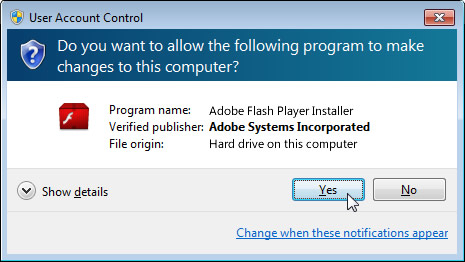
Note : If you are still unable to download Adobe Flash Player, click the Back button on your browser. Then click Install/Download now and select the option to  Save and Run.

This topic has been closed for replies.
Correct answer andys75622553

John,

I am not sure Maria will reply before Monday.

You say you try going to the Adobe site and it still does not download.

Have you tried:

1. Restart your computer to stop any Adobe process that may be running.

2. Go to the following Adobe site. Go down to the bottom where it says, 'Still having problems?'. Click on the link for Internet Explorer.

Installation problems | Flash Player | Windows

If this does not work, perhaps someone else has a suggestion.

1 reply

_maria_
Community Manager
Community Manager
April 3, 2015

Hi jwklingon,

Thanks for a very clear problem description and including the screenshots.

Sometimes the steps on the browser get ahead of the actual installer dialog launching.


After you click YES in the User Account Control dialog the installer should launch.  Is this not happening?  Could it be launching behind the browser?

--

Maria

April 4, 2015

Thanks Maria,

You seem to be following my narrative up to the point where we get to the screen shots. The screens shown are from the help window and, no, I never get a save or run type prompt or a user account dialogue box to click yes in. I have waited for over 45 minutes on several attempts and never get any king of prompt while the screen hangs and waits at step 2 of 3. I even turned on the network monitoring to watch the activity on the network card handling my internet connection and out side of a small blip when I first click to "download" there is no traffic in or out.

John

andys75622553Correct answer
Inspiring
April 4, 2015

John,

I am not sure Maria will reply before Monday.

You say you try going to the Adobe site and it still does not download.

Have you tried:

1. Restart your computer to stop any Adobe process that may be running.

2. Go to the following Adobe site. Go down to the bottom where it says, 'Still having problems?'. Click on the link for Internet Explorer.

Installation problems | Flash Player | Windows

If this does not work, perhaps someone else has a suggestion.
