johnbarrett
Inspiring
May 16, 2016
Question

Flash Player won't load until permission is granted

  • May 16, 2016
  • 2 replies
  • 408 views

Hi There,

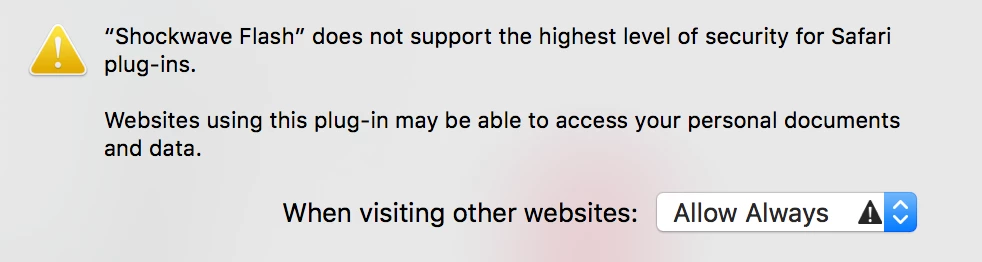
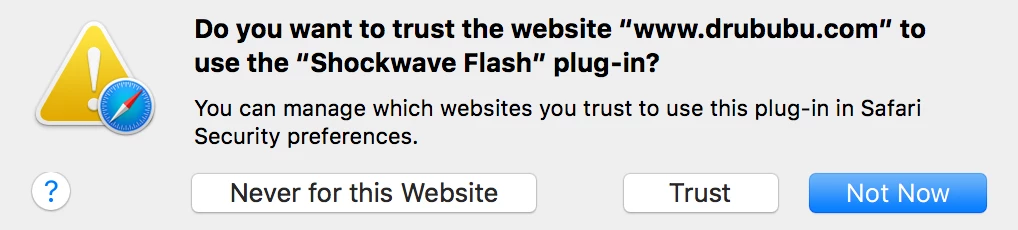
I am having an issue using Flash Player with seeing a pop-up asking me if I want to trust the player. I have set the correct options in the preferences in Safari, well I think so anyway. See attached screen shots of what is happening. Basically I just want to know how to have flash load by default.

Here are my details:

  1. Mac OS X, version - 10.11.4
  2. Safari, Version 9.1
  3. Flash Player version Version 21.0.0.242
  4. java version 1.8_91 (not sure if this matters)

Thank you so much!

Johnny

This topic has been closed for replies.

2 replies

jeromiec83223024
Inspiring
May 17, 2016

Here are the generic instructions for enabling Flash Player in Safari:

Enable Flash Player for Safari

In practice, I've found that Safari's Flash preferences can be flaky.  We don't have a close relationship with the Safari team, and I'm not familiar with the relevant internals, but uninstalling and reinstalling Flash will frequently fix this class of problems. 

FWIW, I'm running 10.11.4, but I have a strong preference for Chrome, unless I'm doing specific testing or work that requires Safari.  I definitely haven't run into this, and haven't seen anything similar from the QA team or recent forum reports.

Uninstall Flash Player - Mac:

https://helpx.adobe.com/flash-player/kb/uninstall-flash-player-mac-os.html

Download Flash Player:

http://get.adobe.com/flashplayer

vakhtangi
Inspiring
May 17, 2016

maybe you have installed debug version of flash player