


Participating Frequently
September 27, 2017
Question

Flash preventing fitbit.com from working properly

  • September 27, 2017
  • 2 replies
  • 981 views

Using

Google Chrome is up to date

Version 61.0.3163.100 (Official Build) (64-bit)

OS X El Capitan Version 10.11.6

MacBook Air

When I go to https://www.fitbit.com/foods/log I get the attached report.
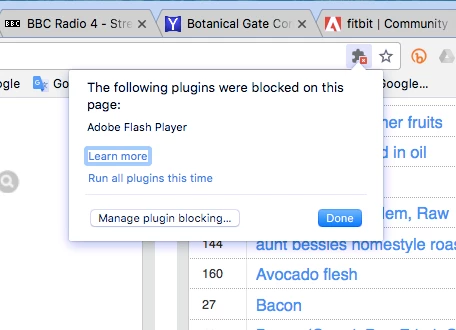
I am using the latest Flash and have enabled https://www.fitbit.com/foods/log  in Chrome. Any answers to what I should do ? This doesn't happen in Firefox.

    This topic has been closed for replies.

    2 replies

    jeromiec83223024
    Inspiring
    September 27, 2017

    For what it's worth, this works fine on my machine.  (MacOS 10.12.16 and Chrome Version 61.0.3163.100 (Official Build) (64-bit).

    I did notice that the blocked plugin icon consistently gets displayed on this page.  I think that even when authorized, it's still blocking some of the analytic and tracking stuff on FitBit's page that uses Flash.  This is by design (see Google's Plug-In Power Saver and PPS Tiny features for details).

    That said, the graph loads and populates for me.  I'm not sure why you're getting a different experience.  Do you have a third-party plug-in that might be causing problems?  (Ad-blocker, anti-tracking utility, etc?)  If you just installed Chrome for the first time, it takes several minutes to download the Flash plug-in on first launch.  I don't have a good theory as to why we're having different experiences.  I reset my Chrome installation to default to rule out any magic flags that I might have enabled.

    Also, just to be clear, this isn't Flash Player breaking anything.  This is Chrome intentionally preventing Flash Player from launching normally.  This in turn invalidates assumptions that some content makes about Flash Player being either readily available or not installed.

    As the major browsers move Flash Player to exclusively click-to-play status, they all have a different implementation, and they all have imperfections.  Experimenting with the available browsers is probably going to be something that you'll have to do more and more.  While we can refer this information over to the folks at Chrome, we don't have any direct control over a situation where the browser prevents us from launching.

    The intent on the part of the browser vendors is to really force content providers to move to exclusively HTML and JavaScript.  By increasing friction for consumers using Flash, the goal is to generate complaints sufficient to encourage content providers like FitBit to make that migration.

    Participating Frequently
    September 28, 2017

    Thanks jeromiec and m_vargas. I have unticked adblock for the site and have moved the slider to Ask first. Unfortunately there seems to be some problem with the site itself at the moment so can't check if the suggested changes have worked but will try later and let you know. I have also been getting a warning saying the adobe flash isn't installed, which obviously is.

    jeromiec83223024
    Inspiring
    September 28, 2017

    Yeah, the vast majority of websites are going to be written under the assumption that Flash Player is either available, or it's not installed.

    That situation has changed in the context of all of these recent browser changes, but every single website on the planet would need to update their content to handle this uncertainty in a more nuanced way.  That's simply not going to happen for a large subset of content currently on the web.

    For what it's worth, I have Always Ask disabled.  I think it was your ad blocker in play, but we won't know until you can retry against a working site. 

    I'm also curious if simple Flash content works for you, like http://www.homestarrunner.com/

    _maria_
    Legend
    September 27, 2017

    Hi,

    I logged onto https://www.fitibit.com/foods/log and do not see the puzzle piece in the address field:

    Please go to chrome://settings/content/flash and post a screenshot of the Flash settings.

    Google's https://support.google.com/chrome/answer/6258784 support page may also be of assistance.

    Participating Frequently
    September 27, 2017

    Participating Frequently
    September 27, 2017