Flash Uninstall & left over files in XP!
Adobe FLASH Player: install and Uninstall problems especially with left over files.
I have a PC running Windows XP Pro + SP2 + IE7 + ZoneAlarm ISS all up to date and running fine.
This machine is on a home Windows Peer to Peer Workgroup network of other Windows XP and 98 machines.
I wanted to completely remove all traces of FLASH Player 9 (in this case version 9b also listed by Adobe as version 9 release 28).
When I used the built in uninstaller it only partly worked as it left three files behind located in:
C:\WINDOWS\SYSTEM32\MACROMED\FLASH.
I could NOT delete these files. No matter what I tried and I even tried booting with Ultimate Boot CD for Windows V3.22 http://www.ubcd4win.com/index.htm .
This has driven me crazy!!
THE ANSWER.
I realised I was using a Windows XP feature called SIMPLE FILE SHARING, therefore I did NOT have necessary Permissions to delete these left over files.
HOW TO DO IT (in Windows XP Pro)
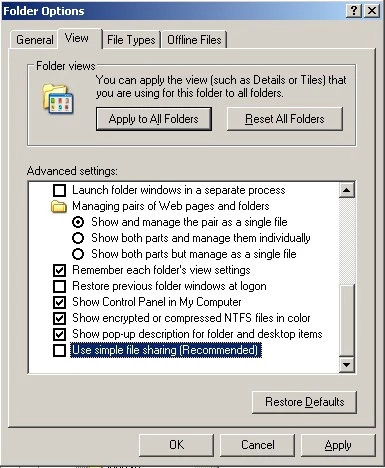
1. Launch Windows Explorer and open the TOOLS menu and choose FOLDER OPTIONS and then click the VIEW Tab.
2. Scroll down to the bottom of the list and ensure Use Simple File Sharing is unticked (turned off). See Screen Shot 1
3. Click APPLY and then click OK
Now still using Windows Explorer navigate your way to the following folder
C:\WINDOWS\SYSTEM32\MACROMED\FLASH.
In here you will see the OCX file and corresponding EXE file that refuse to delete.
You need to do this…
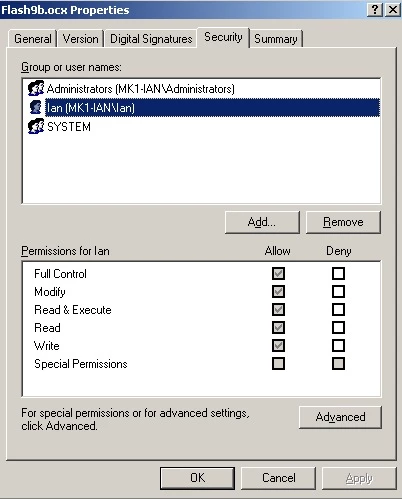
4 Right click on the Flash9b.ocx file, go to Properties and then to the Security Tab.
5 You should see that no NAME is associated with control of this file so you need to ADD your own user name and then click to ALLOW FULL CONTROL of the permissions.
Click APPLY and then click OK.
Now back at your Windows Explorer page you will be able to delete the offending file.
Repeat these steps for the other files in the folder.
Job complete.
You now need to consider whether you want to go back to using SIMPLE FILE SHARING. I can’t help you there.
Good luck.
If you want to print these instructions I have attached a pdf version.
I will not be logging in here too often so please do not expect any detailed replies from me, sorry but I hope this helps some of you.
 AdChoices