


Flash update settings
Hello everyone.
I'm having a bit of a problem regarding the way Flash handles the update process and I was hoping you can help me.
So i'm working for a company which deploys Flash updates through Microsoft SCUP.
And, because of this, we want to disable flash update notifications for the end-user. I've managed to do this via GPO (as you can see in the next screenshot).
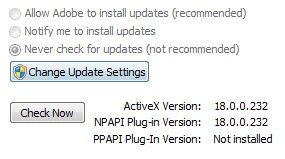
BUT, my problem is how can I disable\remove\gray-out the Change Update Settings button. I am searching online for this for a time now and I don't seem to find a solution.
I know it has something to do with Windows UAC, because in the Adobe Flash version 18 administrator guide I found the next statement:
If you want to enforce standardized update settings for all users, you can use the mms.cfg options discussed in this section. Also, ensure that those users who should not be allowed to change these settings are configured as standard users and do not have admin rights.
Do you have any informations on how to do this?
Thanks a lot.
 AdChoices