Participant
August 27, 2012
Answered

Flashplayer 11.4 and Safari

  • August 27, 2012
  • 1 reply
  • 13774 views

Flashplayer 11.4 won't work from my Safari Browser. It works from my Firefox browser .

When I try to play a video from any website that I go to on Safari I get the same error

message that says " Blocked Plug in"  and instructs me to dowload the current version of

flashplayer. I have tried downloading and installing and reboting Flashplayer 11.4 about a dozen times but no luck.  I have an Apple Imac with 4 g of memory with

Mac OSX version 10.7.4  Lion operating system.  What do I have to do to fix this problem so I can watch my sports and other  videos.
    This topic has been closed for replies.
    Correct answer Sunil_Bhaskaran

    Dell,

    After downloading Flash Player, you need to install the same.

    Could you please see the following document: http://helpx.adobe.com/content/help/en/flash-player/kb/installation-problems-flash-player-mac.html#main-pars_heading_6

    It has step-by-step instructions on installing Flash Player on Mac.

    I was asking you to check in the Library folder.

    In Finder, click Go and select Computer.

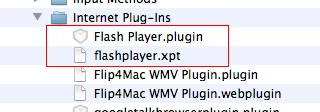
    In the right side, you will see Library folder. Go to the Library folder and then go to Internet Plug-ins folder. If Flash Player is installed, you will see Flash Player.plugin there.

    Thanks,

    Sunil

    1 reply

    Sunil_Bhaskaran
    Inspiring
    August 27, 2012

    You need to update Flash Player. After downloading did you install Flash Player?

    Could you please go to the following folder: Library/Internet Plug-ins

    Do you see Flash Player.plugin there?

    Thanks,

    Sunil

    Participant
    August 27, 2012

    Sunil.

    Thanks for your reply. Not sure what you mean by the library.... I dowloaded and intalled flashplayer 11.4 over and over again and tried everything I know. It always says installation completed but when I try to

    open the

    flash player application it just brings me back to installation and does not open. I am totally confused.

    Dell

    Sunil_Bhaskaran
    Sunil_BhaskaranCorrect answer
    Inspiring
    August 27, 2012

    Dell,

    After downloading Flash Player, you need to install the same.

    Could you please see the following document: http://helpx.adobe.com/content/help/en/flash-player/kb/installation-problems-flash-player-mac.html#main-pars_heading_6

    It has step-by-step instructions on installing Flash Player on Mac.

    I was asking you to check in the Library folder.

    In Finder, click Go and select Computer.

    In the right side, you will see Library folder. Go to the Library folder and then go to Internet Plug-ins folder. If Flash Player is installed, you will see Flash Player.plugin there.

    Thanks,

    Sunil