mfakanemo
Participant
June 19, 2015
Resuelto

Flashplayer Installation auf Win XP

  • June 19, 2015
  • 2 respuestas
  • 1168 visualizaciones
  • Operating system version : Win XP SP3
  • Web browser and version : Mozilla Firefox v38
  • Flash Player version  : momentan: 17
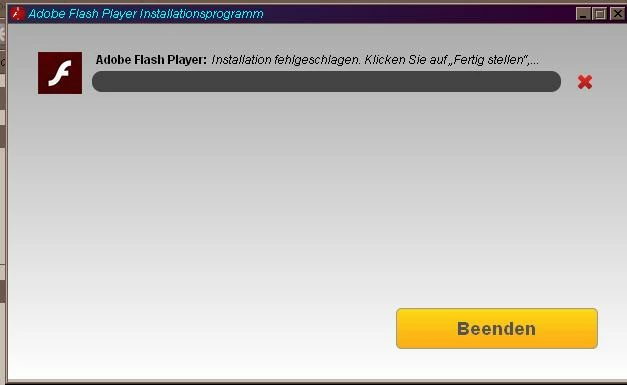
  • Problem: nach dem Download des Installers bricht die Installation bei 40% ab- ich erhalte keine Gründe dafür genannt.
  • siehe Screenshot:

Shockwave Flash ist in den Addons unter Firefox aktiv, Browser wurde für die Installation geschlossen.

Este tema ha sido cerrado para respuestas.
Mejor respuesta de _maria_

Hi mf141179,

I have seen several reports of WinXP users having problems with the online installer, which you are using.  I'd like to get some log files from you, to forward to the online installer folks.  Please provide the following log files:

  • Adobe_ADM.log and Adobe_GDE.log located at C:\Documents and Settings\YourUserID\Local Settings\Temp\Adobe_ADMLogs
    • If you do not see the Local Settings folder it is hidden.  In the Tools menu, select Folder Options > View and select the 'Show hidden files and folders' item.  Click OK
  • FlashInstall.log file located at C:\Windows\System32\Macromed\Flash
    • If this is a 64-bit OS, there's another FlashInstall.log file at C:\Windows\SysWow64\Macromed\Flash.  Both files are required on a 64-bit OS
  • Upload all 3 files using the instructions posted here: How to share a document

In the mean time, the offline installer, posted at the bottom of the Installation problems | Flash Player | Windows page in the 'Still having problems' section should work.

--

Maria

2 respuestas

piyush2508
Adobe Employee
Adobe Employee
June 23, 2015

Hi mf141179,

Thank You for sharing the logs, we are forwarding this case to the concerned team and waiting for their reply.

Please try downloading latest version of Flash Player for Mozilla from location - Installation problems | Flash Player | Windows‌, Please let us know if this helps.

Thanks

Piyush

mfakanemo
Participant
June 23, 2015

it seems like that the offline installer worked. now i have FP v18. nevertheless, information from my log files could be important for the future,

piyush2508
Adobe Employee
Adobe Employee
June 24, 2015

Hi mf141179,

Great to hear the offline installer is working for you.

Yes, The case has been forwarded to the concerned Team and we are investigating the cause for this error. Thank you for providing us with the necessary information .

Thanks

Piyush

_maria_
Legend
June 22, 2015

Hi mf141179,


Please hover your mouse over the error message.  A Tool Tip icon will display.  Please click on the Tool Tip to view the entire message.  Post the entire message in your reply.

Thank you.

--

Maria

mfakanemo
Participant
June 22, 2015

there is no tooltip icon. when i hover the mouse over the message, i have this, which means translated: "installation failed, please click on 'finish" to receive more informations"

when i do so,  a new browser tab opens , with the following message:

once there, i hover the mouse over the yellow triangle icon with the exclamation point -> nothing happens, no further informations.

_maria_
_maria_Respuesta
Legend
June 22, 2015

Hi mf141179,

I have seen several reports of WinXP users having problems with the online installer, which you are using.  I'd like to get some log files from you, to forward to the online installer folks.  Please provide the following log files:

  • Adobe_ADM.log and Adobe_GDE.log located at C:\Documents and Settings\YourUserID\Local Settings\Temp\Adobe_ADMLogs
    • If you do not see the Local Settings folder it is hidden.  In the Tools menu, select Folder Options > View and select the 'Show hidden files and folders' item.  Click OK
  • FlashInstall.log file located at C:\Windows\System32\Macromed\Flash
    • If this is a 64-bit OS, there's another FlashInstall.log file at C:\Windows\SysWow64\Macromed\Flash.  Both files are required on a 64-bit OS
  • Upload all 3 files using the instructions posted here: How to share a document

In the mean time, the offline installer, posted at the bottom of the Installation problems | Flash Player | Windows page in the 'Still having problems' section should work.

--

Maria