


Participant
June 14, 2018
Question

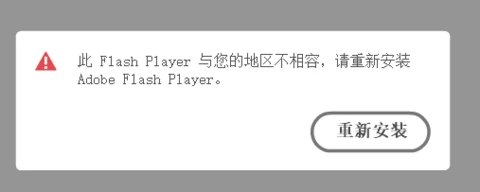
Flashplayer Is Incompatible With Your Area

  • June 14, 2018
  • 1 reply
  • 3426 views

Operating system version : "Windows 7  64bit"

Web browser and version : "Chrome 68.0.3423.2 64bit"

Flash Player version: latest 30.0.0.113

my issue is when i run flashplayer,it Prompt “This flashplayer is incompatible with your area,please reinstall it.

and then i uninstall it, and reinstall it from Flash Player官方下载-Flash中国官网  , but invalid,also Prompt the same content.

More and more Our users Appeared this questions。
This topic has been closed for replies.

1 reply

ridhij4208356012135538
Adobe Employee
Adobe Employee
June 14, 2018

Hi,

Are you located in China region? When you see this error are you connected to any VPN?

For Chrome, you do not need to install latest version of Flash Player. Latest version of Flash Player is pushed by Google as part of Chrome updates. If you have uninstalled Flash Player, you can go to chrome://components/ , look for Adobe Flash Player and update Flash Player from the updates available.

Thanks!

Participant
June 14, 2018

Can I think it's a kind of discrimination against the Chinese?

In addition, how flash player knows location of user ? You checked user's ip ?

jeromiec83223024
Inspiring
June 14, 2018

While Flash Player is free to use, it is not free to develop, distribute or maintain.  Adobe is a for-profit company, and as such, Flash Player has to generate revenue in order to continue to exist.

In order for Flash Player to generate revenue, Adobe partners with other companies through various distribution engagements.

In China, which is a large and complex market, it makes more sense to engage with a partner with regional expertise.  To that end, inside China, 2144 is our official distribution partner.

We enforce the requirement that Flash Player is distributed from an authorized source (i.e. 2144).  In this instance, that authorization check is failing, but it's unclear why.  It had been the case that a number of products and companies were distributing their own copies of Flash Player in violation of the terms of use.  These checks were unfortunately necessary to ensure that Flash Player is distributed through authorized channels.

If you're continuing to get this prompt, is it possible that you have an antivirus program or other utility that's killing the Flash Helper service or preventing it from being installed?