Participating Frequently
December 8, 2016
Answered

Frequently told my flash player is out of date

  • December 8, 2016
  • 1 reply
  • 5268 views

I am running a Mac computer with El Capitan (version 10.11.6), using the Safari browser (version 10.0.1) and have flash player version 23.0.0.207.

About two or three times a week I visit a new website that tells me my current flash player is out of date, and gives me the option of updating immediately.  Having done this once, I learned that they are trying to sell me various programs for my computer, and ultimately sending me a download that will allow me to upgrade . . . but it was a version I already had!  So whenever I get the message that I need an update, I always go to the Adobe website to do that.

But always the version Adobe wants to provide, is the same version I already have! 

I am therefore never allowed to view the website I wanted to see, because they require a download of the new version that THEY say I need . . . presumably to view their web site!  Am I missing something here?  Why am I frequently being told that I need to update my flash player, when I already have the latest version (I think)  Is there any way to confirm that I truly have the latest version?

I can't tell you how much time this issue has cost me!

Thanks.

Brad Crouch

    This topic has been closed for replies.
    Correct answer _maria_

    Maria,

    Thank you for your timely and knowledgeable response!

    As you suggested, I checked to make sure my Adobe Flash Player was enabled . . . and it was.  I then went to the website you listed to make sure I have the latest version, which I do!

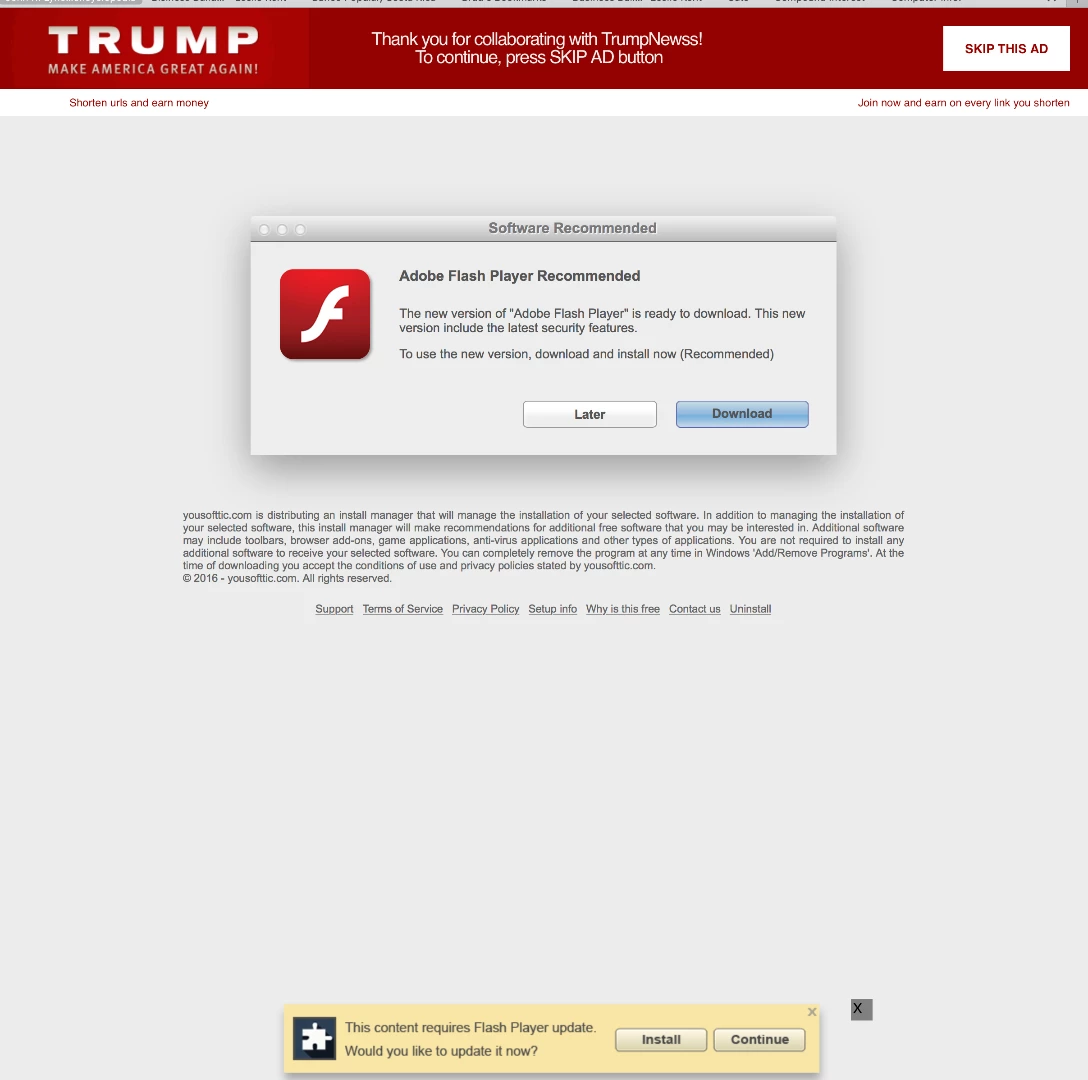
    Then I went back to the website in question to try again.  This is what I got:

    They STILL wanted to upgrade my Flash Player!

    Can you think of any other reason why I sometimes get this?  I get this not only from this web site, which is why I think there might be something wrong with my set up . . . I get the same thing from several different web sites.

    If you can think of anything else, I would certainly appreciate you sharing these ideas with me!  One more thing . . . I am running the operating system "El Capitan" (version 10.11.6 - Mac computer) and I have several experiences where some software products that I have enjoyed for years, no longer would work with my new operating system (when it wan brand new).  I had to wait for the software companies to modify their software to be compatible with "El Capitan"

    Thanks for your help!,

    Brad Crouch


    Hi Brad,

    Flash Player is most definitely supported on OS X 10.11.6 and has been since day one of the OS release.  Your latest screenshot showing the text he text "yousofttic.com is distributing an install manager that will manage the installation of your selected software..." further proves my previous comment.  Your original screenshot also proved this (it had nowup.setting4upgradefreshandforyou.download at the bottom of the page).  This is NOT an official Flash Player from Adobe because we do not use yousofttic.com (or nowup.setting4upgradefreshandforyou.download) to distribute authentic software.  Adobe only distributes Flash Player from our servers (adobe.com, macromedia.com) and no where else.  You are essentially visiting a malicious website that is trying to get you to install some version of Flash Player which is most likely not authentic, and will most likely install other software you do not want.  Don't install anything from this page, or any other questionable site.  Personally, I'd run from it and never visit it again.  Since this site is attempting to trick users into downloading unofficial versions of Flash Player I have forwarded it to our fraud team to follow-up on.

    <edit>

    Adobe encourages customers to report malicious/questionable sites directly to Adobe.  See Notifying Adobe of Security Issues for more information.  In your case, you'd want to report the malicious websites to phishing@adobe.com

    --

    Maria

    1 reply

    Participating Frequently
    December 8, 2016

    Here is an example of what I'm talking about:

    http://usa.trumpnewss.com/qeRJTG

    _maria_
    Legend
    December 8, 2016

    Hi,

    Normally, I'd ask if you've enabled Flash Player in the browser, and I'd still check that (see Enable Adobe Flash Player for Safari ), but it sounds like this is a malicious site, especially if they want you to install Flash Player from their site, and are trying to sell you various computer programs.  Adobe doesn't host Flash Player on any other site but ours (domain is either adobe.com or macromedia.com).  If this is the only site doing this, then the issue is with this site and their Flash Player detection scripts.  You'd need to contact them for that.

    You can always check the version of Flash Player installed by going to https://helpx.adobe.com/flash-player.html and clicking the 'Check Now' button.  The results will display your OS, browser, and Flash Player version installed, if any.  If it returns Flash Player version 23.0.0.207 you do indeed have the latest version installed.

    --

    Maria

    Participating Frequently
    December 9, 2016

    Maria,

    Thank you for your timely and knowledgeable response!

    As you suggested, I checked to make sure my Adobe Flash Player was enabled . . . and it was.  I then went to the website you listed to make sure I have the latest version, which I do!

    Then I went back to the website in question to try again.  This is what I got:

    They STILL wanted to upgrade my Flash Player!

    Can you think of any other reason why I sometimes get this?  I get this not only from this web site, which is why I think there might be something wrong with my set up . . . I get the same thing from several different web sites.

    If you can think of anything else, I would certainly appreciate you sharing these ideas with me!  One more thing . . . I am running the operating system "El Capitan" (version 10.11.6 - Mac computer) and I have several experiences where some software products that I have enjoyed for years, no longer would work with my new operating system (when it wan brand new).  I had to wait for the software companies to modify their software to be compatible with "El Capitan"

    Thanks for your help!,

    Brad Crouch